Journal · Buying guide · 4 min read
Can a power bank charge a MacBook? What to check
Two numbers decide it: output watts for speed, watt-hours for how much you get
A 14-inch MacBook Pro holds 72.4 Wh. A typical 20,000 mAh power bank holds about 72 to 74 Wh. On paper that is a full charge, so why did one such bank stop at 78 per cent in Macworld's test?
Short answerYes, if the power bank has a USB-C Power Delivery port. Apple says a 13-inch MacBook Air needs at least 30 W to charge and a 15-inch at least 35 W. A MacBook Pro fast-charges from 96 W, or 140 W for a 16-inch. A 20,000 mAh bank adds roughly 80 per cent to a 14-inch Pro.
MacBook battery sizes and charging watts
Apple's current MacBook Air specifications list a 53.8 Wh battery in the 13-inch model and 66.5 Wh in the 15-inch. Apple states the minimum to charge is 30 W for the 13-inch and 35 W for the 15-inch, and that fast charging needs a USB PD source of 70 W or more.
The 14-inch MacBook Pro with M5, M5 Pro or M5 Max carries a 72.4 Wh battery, and Apple lists fast charging from a 96 W or higher source. The 16-inch carries a battery Apple rates at 100 Wh, 99.6 Wh in its footnote, and its fast-charge page says only the 140 W adapter fast-charges it. Fast charging, in Apple's words, means up to 50 per cent in around 30 minutes.
Macworld's tests, updated in November 2026, show what real power banks deliver to a drained 14-inch MacBook Pro. A 20,000 mAh bank rated 72 Wh added 78 per cent, and a 20,000 mAh, 65 Wh bank added 87 per cent, which shows that efficiency matters as much as the label. Banks of 90 to 99.9 Wh all delivered a full charge with some left over, the best of them about 28 per cent extra.
| Model | Battery | Minimum to charge | Fast charge from |
|---|---|---|---|
| MacBook Air 13-inch | 53.8 Wh | 30 W | 70 W |
| MacBook Air 15-inch | 66.5 Wh | 35 W | 70 W |
| MacBook Pro 14-inch | 72.4 Wh | Not listed | 96 W |
| MacBook Pro 16-inch | 100 Wh | Not listed | 140 W |
Source: Apple MacBook Air and MacBook Pro specifications; Apple Support
Per cent added
Source: Macworld, Nov 2026
How a power bank charges a laptop
A MacBook charges at a higher voltage than a phone, usually 15 or 20 V over USB-C Power Delivery. The power bank must lift its cells from about 3.7 V up to 20 V, and the MacBook then converts that energy again to charge its own battery. Each step loses some energy as heat, which is why a 74 Wh bank does not fully fill a 72 Wh laptop.
Think of it like carrying water uphill to a rooftop tank. The higher the tank, the more effort each bucket costs, and some always spills on the way. A phone is a ground-floor tank. A laptop is the roof.
Watts and watt-hours do different jobs. Output watts decide how fast the laptop charges, or whether it can charge at all while you work. Watt-hours decide how much charge you get in total. A bank with 100 W output but only 37 Wh will charge a MacBook quickly, but not for long.
What happens below the minimum
Below Apple's minimum wattage, a MacBook may charge very slowly, hold its level only while asleep, or lose charge while in use. A 20 W phone port on a power bank can keep a sleeping MacBook Air ticking, but it will not keep up with a busy one.
Between the minimum and the fast-charge figure, the laptop charges normally, just not at Apple's 50 per cent in 30 minutes. For most people working on a train or in an airport, 45 to 65 W is a comfortable middle.
What to check before you buy
Find the USB-C output in watts. At least 30 W for a 13-inch MacBook Air and 35 W for a 15-inch just to charge, 70 W for fast charging an Air, 96 W for fast charging a 14-inch Pro, and 140 W for fast charging a 16-inch.
Read the watt-hours. For most of a MacBook charge, look for 70 Wh or more. Remember IATA guidance keeps carry-on power banks without airline approval at 100 Wh or less.
Check the single-port figure. A bank with 100 W total across three ports may give far less to one port when a phone is connected too.
Use a USB-C cable rated for the wattage. A cable rated 60 W will cap a 100 W bank; for 100 W and above, the cable needs to be marked 100 W or 240 W.
If you fly often, keep the Wh printed clearly on the bank, because airlines may ask to see it.
One practical trick helps on a long day. Close the lid while the power bank is connected. A sleeping MacBook draws very little, so nearly all of the bank's output goes into the battery instead of running the screen and processor, and you get more charge from the same watt-hours.
Myth corner
Myth: any USB-C power bank charges a MacBook. It will connect, but a low-watt port may not charge it while you work. Apple sets a 30 W minimum for the 13-inch Air and 35 W for the 15-inch, and higher still for fast charging, so the output watts on the label are what decide it.
The right one for you
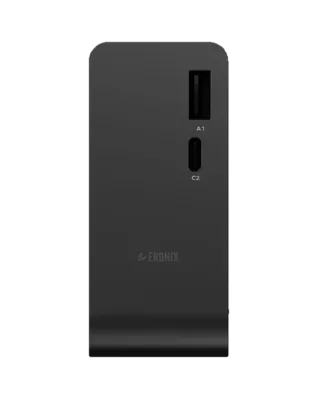
For a MacBook, the two numbers this guide asks for are output watts and watt-hours, and the Battery Pack for MacBook 140W carries both: up to 140 W, well above the 96 W a 14-inch MacBook Pro needs to fast-charge, and 20,000 mAh rated at 74 Wh, inside the 100 Wh cabin line.
Pair it with the Power Cable 240 W, a 2 m braided USB-C cable with an e-marker, so the cable never caps the output. Close the lid while it charges, and more of those 74 Wh reach the battery.

Step by step
- Look up your MacBook's battery Wh and minimum charging wattage on Apple's spec page.
- Choose a power bank whose single USB-C port meets or beats that wattage.
- Pick at least 70 Wh for most of a full charge, and 100 Wh or less for flights.
- Use a USB-C cable rated for the bank's output.
- Charge with the laptop asleep for the most charge per Wh.
Questions people ask
Can I charge a MacBook Air with a 20 W power bank?
It will charge very slowly when the laptop is asleep or lightly used, but Apple lists 30 W as the minimum to charge a 13-inch MacBook Air and 35 W for the 15-inch. For normal charging while you work, choose a power bank with at least that output on one USB-C port.
Can I take a MacBook power bank on a flight?
Yes, in cabin baggage, if it is 100 Wh or less, which IATA guidance allows without airline approval. Banks between 100 and 160 Wh need approval. In Macworld's tests, banks of 90 to 99.9 Wh fully charged a 14-inch MacBook Pro, and all of them sit just under that line.
Will a power bank damage my MacBook's battery?
No, if it uses USB-C Power Delivery. The MacBook negotiates the voltage and current it accepts, as it does with Apple's own adapters. Use a well-made cable and avoid unmarked power banks that do not list their output.
Can I use MagSafe with a power bank?
Yes, if you carry Apple's USB-C to MagSafe 3 cable. Apple lists both that cable and a USB-C charge cable for MacBook Air and MacBook Pro charging, so a power bank's USB-C PD port can feed either.
How long does a power bank take to charge a MacBook Pro?
It depends on output watts. Apple says fast charging reaches up to 50 per cent in around 30 minutes, but only with 96 W or more for a 14-inch Pro and 140 W for a 16-inch. A 65 W bank will take noticeably longer.
Sources
- Apple: MacBook Air technical specifications · accessed 22 Nov 2026
- Apple: MacBook Pro technical specifications · accessed 22 Nov 2026
- Apple Support: Fast charge your MacBook Air or MacBook Pro · 5 Nov 2026
- Macworld: Best laptop power banks for Apple MacBook (tests) · 4 Nov 2026
- IATA: Passenger lithium battery guidance (Revision 3) · Feb 2019
USB-C Power Delivery
One connector, a negotiated contract.
Read →Buying guide · 4 min readWhich charger does the iPhone 18 Pro Max need?
The biggest iPhone battery yet, filled to half in the time it takes to drink a chai.
Read →Explainer · 6 min readNew 14-inch MacBook Pro with M6: charger and cable guide
No charger in the box in India. Here is the wattage and the cable that unlock fast charge.
Read →Buying guide · 5 min readWhat size power bank do you need for a full phone charge?
Why a 10,000 mAh power bank never gives two full charges, and how to size one honestly
Read →Buying guide · 5 min readWhich charger does the iPhone 15 Pro Max need?
A 140 W laptop brick and a 30 W charger fill it in almost the same time. Here is why.
Read →Explainer · 5 min readCan a 100 W charger damage your phone?
The watts on the brick are a ceiling, not a push. Heat is what your battery remembers.
Read →