Journal · Buying guide · 5 min read
Which charger does your Windows thin-and-light laptop need?
One number covers most ultrabooks. Here is how to check yours in two minutes
Microsoft's Surface Laptop and Samsung's Galaxy Book6 come from different companies, but their fast-charge footnotes say almost the same thing: a USB-C PD charger of 60 W or 65 W. That shared number is the most useful fact a Windows laptop owner can know.
Short answerMost Windows thin-and-light laptops that charge over USB-C work fully with a 65 W USB Power Delivery adapter and a 5 A USB-C cable. A 45 W adapter will charge many of them slowly. Check which port accepts power, and keep the original adapter for laptops with dedicated graphics.
What the laptop makers specify
Microsoft's Surface Laptop (7th Edition) page says the charger in the box is either a 45 W USB-C wall charger or a 65 W Surface Power Supply, depending on market and configuration. Its footnotes say fast charging requires a USB-C PD charger rated at 60 W or higher, sold separately. The 13.8-inch and 15-inch models have two USB-C ports with USB4 plus Surface Connect; the 13-inch has two USB-C ports with USB 3.2.
Samsung's Galaxy Book6 pages run their fast-charge tests with a 65 W charger. The Galaxy Book6 Pro lists 78.07 Wh for the 16-inch and 67.18 Wh for the 14-inch, with about 33 and 38 per cent charge in 30 minutes respectively. The Galaxy Book6 Ultra claims up to 65 per cent in 30 minutes, also with a 65 W charger.
The standard sets the ceiling. The USB-IF says USB PD was limited to 100 W, using 20 V and a 5 A cable, until Revision 3.1 in 2021 added 28 V, 36 V and 48 V for up to 140 W, 180 W and 240 W. Plugable notes those higher levels are aimed at gaming and all-in-one laptops. A thin-and-light laptop sits well inside the older 100 W range.
Google's ChromeOS hardware guide states a rule worth knowing: power adapters rated above 15 W must support USB Power Delivery. Without PD, a USB-C port tops out at 5 V and 3 A, which is 15 W, so a laptop adapter without PD on its label is a warning sign.
| Power | USB PD line | Cable |
|---|---|---|
| 15 W, no PD | 5 V 3 A | Any USB-C |
| 60 W | 20 V 3 A | 3 A |
| 65 W | 20 V 3.25 A | 5 A |
| 100 W | 20 V 5 A | 5 A |
| 140 W to 240 W | 28 V to 48 V, PD 3.1 | Marked for up to 240 W |
Source: USB-IF, USB Power Delivery; Plugable; ChromiumOS developer library
%
Source: Samsung US product pages, Galaxy Book6 series
How a laptop agrees on power
When you plug in, the adapter offers a list of voltages, normally 5, 9, 15 and 20 V for USB PD. The laptop asks for 20 V and the current it wants, and the adapter supplies it. At 20 V, 60 W needs 3 A and 65 W needs 3.25 A. Ordinary USB-C cables carry 3 A; for 65 W, the cable should be rated 5 A.
Think of the adapter as a power-backup inverter and the laptop as your home. A 650 VA inverter runs fans and lights; a 1 kVA one runs the fridge too. If you plug the fridge into the small inverter, it struggles or refuses. A laptop on a 20 W phone adapter is that fridge: it may charge while asleep but drain while working.
Laptops also run themselves from the adapter before charging the battery. That is why makers test fast charging with the screen off, and why a bigger adapter helps most when you work while charging.
Find your number in two minutes
Look at the adapter that came with the laptop. Its output line, such as 20 V 3.25 A, is the target. Multiply to get watts.
Check the manual or the port icon to find which USB-C port accepts charging. On some laptops only one does.
Look up the spec page for a fast-charge footnote. Microsoft and Samsung both name the wattage they tested with.
If the laptop has a separate barrel or proprietary connector and high-power graphics, USB-C may be for top-ups only. Keep the original adapter for heavy work.
Do you need a 140 W or 240 W adapter?
Not for a thin-and-light laptop. The higher levels of USB PD 3.1, 140 W at 28 V up to 240 W at 48 V, are aimed at gaming and all-in-one laptops, as Plugable notes. Plugable adds that cables for these levels must carry a visible marking showing they support up to 240 W.
A bigger adapter is still safe on a smaller laptop, so it can make sense if you share it with a larger machine. For one ultrabook and a phone, a 65 W to 100 W adapter is the practical range.
What to check before you buy
Check for USB PD and a 20 V line that matches your target: 3 A for 60 W, 3.25 A for 65 W, 5 A for 100 W.
Buy a 5 A cable for anything above 60 W. USB-IF ties the 100 W limit of the older standard to 5 A cables.
On a multi-port adapter, check the laptop port alone gives your target with a phone also plugged in. Total wattage is often shared.
Check the plug and the brick for an Indian socket. A laptop adapter carries load for hours and should sit firmly.
Look for the BIS mark and R-number on the adapter, and verify it on crsbis.in.
Myth corner
Myth: a 100 W charger will push too much power into a 65 W laptop. It cannot. Under USB PD the laptop asks for what it accepts and the adapter supplies only that. A larger adapter is safe and useful if you also charge a more power-hungry device.
The right one for you
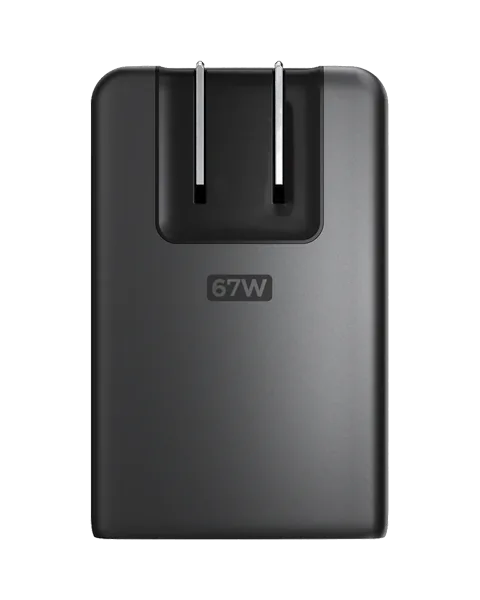
Most thin-and-light laptops ask for 20 V at 3 A to 3.25 A. The Entropy67 supplies 20 V at 3.35 A, 67 W, from one port; share it with a phone and the split is 45 + 20 W or 35 + 30 W. At 14 mm thin, it lies flat beside the laptop in the bag.
Above 60 W, pair it with the Power Cable 240 W, e-marked and rated 240 W EPR over 2 m.

Step by step
- Read the output line on your laptop's original adapter and multiply volts by amps.
- Find which USB-C port accepts charging.
- Choose a USB PD adapter with a 20 V line that meets that wattage.
- Use a 5 A USB-C cable for anything above 60 W.
- On a multi-port adapter, confirm the laptop port's output with other devices connected.
Questions people ask
Can I charge my Windows laptop with a phone charger?
If the laptop charges over USB-C and the phone charger supports USB Power Delivery, yes, slowly. A 20 W or 25 W adapter may top up the battery while the laptop sleeps but often cannot keep up while you work. Makers such as Microsoft and Samsung quote fast charging with 60 W or 65 W adapters.
Is a 65 W charger enough for my laptop?
For most thin-and-light Windows laptops, yes. Microsoft says the Surface Laptop fast charges with a USB-C PD charger of 60 W or more, and Samsung tests its Galaxy Book6 range with 65 W. Laptops with dedicated graphics may ship with a larger adapter for heavy use.
Do I need a special cable for a 65 W laptop charger?
Yes, ideally. At 20 V, 65 W needs 3.25 A, more than the 3 A that ordinary USB-C cables carry. Use a cable rated 5 A, often marked 100 W, which contains an e-marker chip. With a 3 A cable the adapter will usually limit itself to 60 W.
Why does my laptop say it is charging slowly?
Windows laptops often warn when the adapter supplies less than they want, for example a phone charger or a shared port on a multi-port adapter. Check the adapter's 20 V rating, use a 5 A cable, plug into the correct charging port, and avoid charging through a hub or dock that keeps part of the power for itself.
Sources
- Microsoft: Surface Laptop (7th Edition) · accessed 22 Nov 2026
- Samsung US: Galaxy Book6 Pro · accessed 22 Nov 2026
- Samsung US: Galaxy Book6 Ultra · accessed 22 Nov 2026
- USB-IF: USB Charger (USB Power Delivery) · accessed 22 Nov 2026
- Plugable: What is 240W USB Extended Power Range (EPR)? · accessed 22 Nov 2026
- ChromiumOS developer library: Cable and adapter tips and tricks · accessed 22 Nov 2026
USB-C Power Delivery
One connector, a negotiated contract.
Read →Buying guide · 5 min readWhich charger for students: one brick for everything
One bag, one socket, one brick. Here is how many watts that brick really needs.
Read →Buying guide · 4 min readWhich charger does your Galaxy Book laptop need?
Three laptops, one test charger in Samsung's footnotes, and the number to look for
Read →Buying guide · 5 min readWhich charger does your MacBook Pro 14-inch (M6 or M5 Pro/Max) need?
Three adapters, one laptop size. Here is the wattage the machine actually asks for.
Read →Buying guide · 4 min readWhich charger does your MacBook Pro 16-inch (M5 Pro or M5 Max) need?
The one MacBook where a 100 W charger works but never fast-charges.
Read →Buying guide · 4 min readOne charger for phone, tablet and laptop: how many watts?
Add up what each device takes, then decide how patient you are. That is the calculation.
Read →