Journal · Explainer · 4 min read
Can you charge a phone with a wet port?
Monsoon, a splash, a liquid warning on screen. Here is why waiting beats the override.
It is July in Mumbai or Kolkata, your phone has been through a downpour, and the battery is at 9%. You plug in and the screen says liquid has been detected. Is it safe to charge anyway?
Short answerNo, not through the wet port. Water plus charging voltage can corrode the pins and damage the port for good. Unplug, tap the phone gently port-down, leave it in moving air and wait at least 30 minutes before trying again. Full drying can take up to a day. A wireless charger, once the back is dry, is the safer stopgap.
What the phone makers' numbers say
Apple's support page on liquid alerts covers iPhone XS and later. It says to wait at least 30 minutes after unplugging and shaking out the water before you try charging or connecting accessories. If the alert returns, Apple says leave the phone somewhere dry with airflow for up to 24 hours, because complete drying can take that long.
Apple includes an emergency override, so when you reconnect you can charge despite the warning. It still advises against it, because corrosion on the connector pins can cause permanent damage.
Water resistance does not change this. Google's Pixel hardware page notes that IP68 does not make a phone waterproof, that resistance diminishes over time, and that liquid damage voids the warranty. Under the IP code, the second digit 8 means immersion beyond 1 metre under conditions the maker sets, and IP tests use fresh water. Salt water, sweat and drinks are not part of the test.
| Situation | What Apple advises |
|---|---|
| Alert appears | Unplug, tap out water, wait at least 30 min |
| Alert returns | Leave in dry, moving air for up to 24 h |
| Drying aids | No heat, compressed air, rice or swabs |
| Emergency override | Possible, but risks pin corrosion |
| Wireless charging | Usable once the back is dry |
Source: Apple Support: liquid-detected alert on iPhone
Why water and voltage do not mix in a port
A USB-C port packs two rows of tiny contacts into a slot only millimetres wide. When it is dry, each contact touches only its partner in the plug. A drop of water bridges neighbouring pins. When a charger then puts voltage across them, current flows through the water itself. That drives electrolysis: metal ions leave the pin and redeposit as corrosion, which raises resistance and can stop the port from working.
Picture a tiny battery terminal left out in the rain. Leave it wet without a load, and it dries clean. Connect it to a circuit while wet, and you see the green crust within days. The voltage is what turns harmless water into corrosion.
That is why phones check for moisture before charging. The phone senses unusual conductivity between pins and refuses power until the port reads dry.
What to do in the first five minutes
Unplug the cable from the phone and from the adapter. Keep both apart until both are dry.
Hold the phone with the port facing down and tap it gently against your palm to shake out water.
Leave it on a table in a room with moving air, such as under a ceiling fan. Do not use a hair dryer or other heat, and do not use compressed air. Apple names both as things to avoid.
Do not push a cotton bud, tissue or SIM tool into the port. Do not bury the phone in rice; Apple lists rice among the things to avoid.
Sweat, sea water and drinks
Not all liquids behave like rain. The IP code's water tests use fresh water, and the standard says nothing about salt water, oils or other fluids, which need separate testing. Sweat and sea water carry dissolved salts that conduct electricity far better than rainwater and leave residue behind when they dry.
If the port met anything other than clean water, a dry port may still hold salt or sugar. Rinsing is a job for the maker's instructions or a service centre, not a guess. Until then, treat the port as wet even after it looks dry, and charge wirelessly if you can.
What to check before you buy
Read the phone's water rating in its specification, and remember the test uses fresh water under set conditions. It is not a promise against rain plus a charger.
If you carry a power bank or charger in the monsoon, choose one with a cable you can keep dry, and store both in a zipped pouch.
Consider a wireless charger as a monsoon backup. Apple says a wet-port iPhone can still use a Qi wireless charger, once the back of the phone is dry.
Check that your cable's plug is intact. A cable with a corroded or bent tip can trigger repeated liquid alerts even when the phone is dry; Apple notes that if the alert appears only with one cable or accessory, that item may be damaged.
Myth corner
Myth: rice pulls water out of a phone. Rice does not dry a port faster than open air, and Apple lists rice among the things not to use, alongside heat, compressed air and swabs. Small grains and dust can lodge in a slot only millimetres wide. Airflow and time do the work.
The one habit that matters
Treat every liquid warning as a 30-minute pause, not a nuisance to override. Half an hour of patience costs far less than a new charging port.
The right one for you
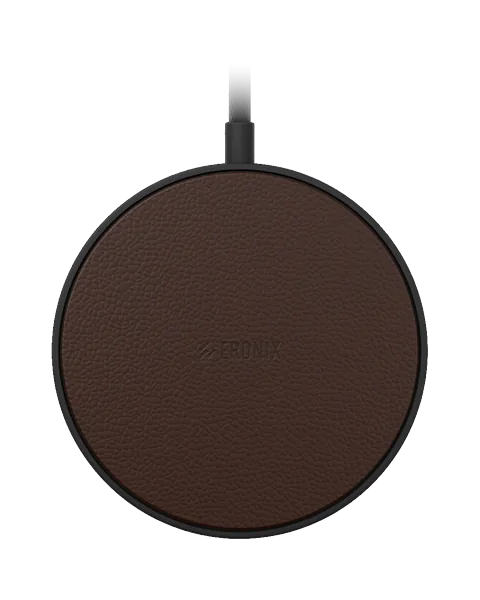
Once the back of the phone is dry, wireless charging takes the port out of the job entirely. The ERONIX Magnetic Charger snaps onto iPhone 12 and later and charges at up to 25 W on iPhone 17 and later, through an aluminium ring on a 1.5 m braided cable. It comes without an adapter, so pair it with a USB-C charger you already trust.
Step by step
- Unplug the cable from the phone and the adapter.
- Tap the phone gently with the port facing down to shake out water.
- Leave it in open, moving air for at least 30 minutes; no heat, no rice, no swabs.
- Try charging again; if the alert returns, wait up to 24 hours.
- In the meantime, use a wireless charger once the back is dry.
Questions people ask
How long should I wait to charge my phone after it gets wet?
Apple advises waiting at least 30 minutes after unplugging and tapping out the water. If the liquid alert comes back, leave the phone in a dry place with airflow for up to 24 hours. Try charging again during that time; the alert clears once the port is dry.
Can I wirelessly charge a phone with a wet port?
Usually yes. Apple says a wet-port iPhone can still use a Qi wireless charger, as long as the back of the phone is dry first. Wireless charging does not pass current through the connector pins, so it avoids port corrosion.
Is it safe to use the emergency override?
Only in a real emergency. Apple provides an override but advises against charging while wet, because corrosion on the pins can cause permanent damage. If you must, use it briefly and dry the phone properly afterwards.
Does IP68 mean I can charge my phone right after swimming?
No. IP68 describes resistance to immersion in fresh water under maker-set test conditions. It says nothing about passing current through a wet port. Google also notes that water resistance diminishes over time. Dry the port before charging, every time.
What if the liquid warning will not go away?
Try a different cable and adapter. If the alert appears with only one cable, that cable may be damaged. If it appears with every cable after a full day of drying, the phone may need service at an authorised centre.
Sources
- Apple Support: If you see a liquid-detected alert on your iPhone · accessed 22 Nov 2026
- Google Pixel Help: Pixel phone hardware tech specs (water resistance notes) · accessed 22 Nov 2026
- IP code: summary of IEC 60529 test conditions (Wikipedia) · accessed 22 Nov 2026
Battery Management
Capacity is chemistry; longevity is software.
Read →Explainer · 4 min readDoes fast charging kill the battery?
The watts on the charger matter less than the temperature of the phone
Read →Explainer · 5 min readCan a 100 W charger damage your phone?
The watts on the brick are a ceiling, not a push. Heat is what your battery remembers.
Read →Explainer · 4 min readIs it safe to charge your phone overnight?
Your phone does not overcharge. It sits full for hours, and that is what to fix.
Read →Explainer · 5 min readShould you let the battery drain to 0%?
The monthly full drain is a habit from older batteries. Here is what the chemistry says.
Read →Explainer · 5 min readPower banks on flights: the rules in India
Carrying one is fine. Using one at 35,000 feet is not. What changed and why.
Read →