Journal · Explainer · 4 min read
Charging in the car on long drives
Navigation, sunlight and fast charging all make heat. On a highway they arrive together.
Six hours on the Mumbai-Pune Expressway or the Golden Quadrilateral, maps open, music streaming, the phone clamped to the dashboard in full sun. Somewhere past the toll plaza it flashes a temperature warning and the charging icon goes grey. What went wrong, and how do you keep a phone alive on a long drive?
Short answerHeat, not the charger, is the main problem. Navigation, a bright screen, sunlight and charging all add heat at once. Mount the phone in the air-conditioning flow or out of direct sun, use a wired USB PD car charger rather than wireless, and let the phone charge in bursts rather than fight heat all day.
The temperatures and watts on a road trip
Apple's battery guidance gives an ideal comfort zone of 16 to 22 °C and an operating range for iPhone of 0 to 35 °C. It warns that temperatures above 35 °C can permanently reduce battery capacity, and that charging in high ambient heat can damage it further. Apple's support page on hot devices lists wireless charging, processor-heavy apps and high-quality video streaming among the tasks that warm an iPhone. It notes that when the phone gets too hot, charging, including wireless charging, slows or stops, the display dims, and the mobile signal may weaken as the radios drop to a low-power state. It also gives a storage range of -20 to 45 °C and warns that a parked car can exceed it.
Battery University shows what sustained heat costs. Its estimates for a lithium-ion cell kept for a year put remaining capacity at about 96% at 25 °C and 40% charge, but about 65% at 40 °C when fully charged.
Lab charging tests already run warm in a cool room. Android Authority recorded a peak of 39.6 °C on the Galaxy S26 Ultra while fast charging on a desk, and ChargerLAB recorded 44.2 °C on the back of an iPhone 16e. A dashboard in sun adds to that.
| Measure | Temperature | Source |
|---|---|---|
| iPhone comfort zone | 16 to 22 °C | Apple |
| iPhone operating range | 0 to 35 °C | Apple |
| iPhone storage range | -20 to 45 °C | Apple |
| Galaxy S26 Ultra peak, fast charging on a desk | 39.6 °C | Android Authority |
| iPhone 16e back, charging | 44.2 °C | ChargerLAB |
Source: Apple; Android Authority; ChargerLAB
% of capacity
Source: Battery University, BU-808
How heat builds up in a car
Three sources stack. The phone itself makes heat from the processor running maps, the bright screen and the mobile radio constantly handing over between towers. Charging adds more, and wireless charging adds the most because some energy is lost between the coils. And the car adds its own: sun through the windscreen and the hot dashboard surface below.
Think of a steel tiffin left on a car seat at noon. The food inside was warm to begin with; by the time you open it at a dhaba, it is hotter than when you packed it, because the box gained heat from the sun faster than it could lose it. A phone in a windscreen mount is that tiffin, with its own stove inside.
When the phone protects itself, it dims the screen, slows charging or pauses it. During navigation, Apple's guide says the phone may show a Temperature: iPhone needs to cool down alert and turn the display off, while spoken directions continue and the screen lights up again as you approach a turn.
A long-drive charging plan
Mount it in the cool. An AC vent mount keeps cold air across the phone. If you use a windscreen or dashboard mount, angle it out of direct sun or use a sunshade.
Prefer wired over wireless. A wired USB PD car charger turns less of its power into heat at the phone than a wireless pad.
Charge in bursts. Top up to 70 or 80% early, unplug, and plug in again later. The phone spends less time hot and full, which Battery University identifies as the worst case.
Dim and simplify. Lower screen brightness, download offline maps before the trip and close apps you are not using.
Never leave the phone in a parked car. At a lunch stop, take it with you.
Share the load. If two people are in the car, let the passenger's phone navigate for part of the journey while the driver's phone rests and cools in a shaded door pocket, out of the sun.
What to check before you buy
Check the car charger's port protocol. For iPhones, USB-C PD at 20 to 30 W; for Samsung phones, PD with PPS. The total wattage on the front matters less than the per-port figure.
Check the input range. A 12-24 V rating covers cars and larger vehicles.
Check the fit in the socket. A loose plug interrupts charging on bumpy roads.
For mounts, check ventilation. A cradle that wraps the whole phone traps heat; an open clamp or a vent mount lets it breathe.
Carry a power bank as backup for stretches where the car's socket is busy or the phone needs a break from the mount.
Myth corner
Myth: a more powerful car charger keeps the phone fuller on a long drive. Fact: when the phone is hot, it slows or pauses charging whatever the charger can supply. Apple's support guidance makes this clear. Cooling the phone does more for the battery percentage than any extra watts.
The right one for you
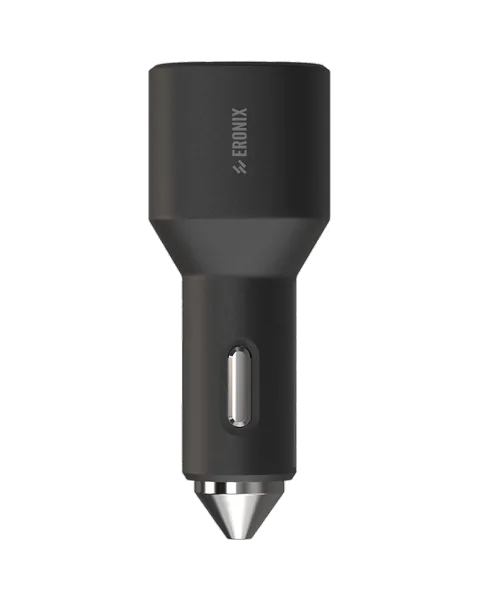
For the long drive, the Car Charger keeps it wired: two USB-C ports at 65 W and 30 W, with Power Delivery and PPS, so an iPhone or a Samsung phone gets its own fast-charge protocol while a laptop takes the other port.
It runs on 12 or 24 V, and its aluminium body sits flush in the socket.
Step by step
- Mount the phone in an AC vent or out of direct sun.
- Use a wired USB PD car charger matched to your phone.
- Charge to 70 or 80%, then unplug and top up later.
- Lower screen brightness and download offline maps before leaving.
- Take the phone with you whenever you park.
Questions people ask
Why does my phone stop charging in the car on sunny days?
It is protecting itself from heat. Apple explains that when an iPhone gets too hot, charging, including wireless charging, can slow or stop, and resumes once it cools. Sun on a dashboard mount, navigation and charging together are a common cause. Move the phone into the AC flow and out of the sun.
Is wireless charging in the car bad for the phone?
It is not harmful by design, but it adds heat, because some energy is lost between the coils. In a hot car, that extra heat can push the phone into slowing or pausing charging. On long, sunny drives, a wired USB PD charger keeps the phone cooler.
Can a car charger drain the car battery?
In many cars the socket switches off with the ignition. Where it stays live, a plugged-in charger draws a small standby current that can slowly drain the battery over days. On a road trip with the engine running, this is not a concern; unplug when parking for long periods.
Is it safe to leave my phone in a parked car?
Not in the heat. Apple advises against leaving devices in a hot car and gives a storage range up to 45 °C and an operating range up to 35 °C. A closed car in Indian summer sun can exceed both quickly. Take the phone with you at stops.
Should I use offline maps to save battery?
It helps. Downloading maps before the trip reduces the data the phone must fetch over the mobile network, especially in areas with weak coverage, where Apple's battery page lists Low Signal and No Cell Coverage as causes of drain. Navigation itself still uses GPS and the screen, so keep brightness moderate.
Sources
- Batteries - Maximizing Performance (Apple) · accessed 22 Nov 2026
- If your iPhone or iPad gets too hot or too cold (Apple Support India) · accessed 22 Nov 2026
- BU-808: How to Prolong Lithium-based Batteries (Battery University) · accessed 22 Nov 2026
- I tested the Galaxy S26 Ultra's 60W charging (Android Authority) · accessed 22 Nov 2026
- 4005mAh+27W | Charging Review of iPhone 16e (ChargerLAB) · 27 Mar 2025
Thermal Management
The quiet discipline inside every serious power product.
Read →Explainer · 4 min readRoad-trip power planning
Maps, music, two phones and a dashcam. How to arrive with more charge than you left with.
Read →Explainer · 5 min readCan a 100 W charger damage your phone?
The watts on the brick are a ceiling, not a push. Heat is what your battery remembers.
Read →Explainer · 6 min readNew 14-inch MacBook Pro with M6: charger and cable guide
No charger in the box in India. Here is the wattage and the cable that unlock fast charge.
Read →Explainer · 5 min readWhat to pack for a work trip: the charging and carry kit
One charger, two cables, one power bank: a kit built for the day, not the brochure.
Read →Explainer · 4 min readIs it safe to charge your phone overnight?
Your phone does not overcharge. It sits full for hours, and that is what to fix.
Read →