Journal · Explainer · 5 min read
Does a case slow down wireless charging?
The case is rarely the problem. What you tuck inside it often is.
Many people pull the case off before setting the phone on a wireless charger, the way some take off their shoes at the door: out of habit, without being sure it matters. Yet Apple's own MagSafe guidance lets cases stay on. So which habit is right?
Short answerA thin case made for magnetic charging makes little practical difference. What slows charging is extra distance and poor coil alignment: thick rugged cases, cards or metal plates in the case, grip rings and stands on the back. These cut efficiency and add heat, and heat makes the phone slow itself down. Keep the back clear.
What the makers and tests say
MacRumors' MagSafe guide notes that cases can stay on while charging. It also warns that the charger can leave a circular imprint on leather MagSafe cases, and that you should not charge with the MagSafe Wallet attached.
Apple's MagSafe Charger page asks you not to place credit cards, security badges, passports or key fobs between the phone and charger, because they can damage magnetic strips and RFID chips, and to remove them from a case that holds them before charging. It also asks for the charger to sit on a flat surface clear of metal objects or other foreign material. It gives no case thickness limit.
Misalignment costs energy. TechSpot's report on Eric Ravenscraft's test found a flat wireless pad used about 47% more energy than a cable for a full charge on a Pixel 4, while a stand that held the phone in position used about 39% more, and misaligned placement used more still.
| On the back | Effect | What to do |
|---|---|---|
| Thin magnetic case | Little practical difference | Keep it on |
| Thick rugged case | Adds distance and traps heat | Choose a thinner magnetic case |
| Cards in a case pocket | Risk to magnetic strips and RFID chips | Remove before charging |
| Metal plate for a car mount | Absorbs energy and heats up | Remove, or use a magnetic case |
| Grip ring or stand | Pushes the coils out of line | Remove before charging |
Source: Apple Support; MacRumors; Macworld, accessed Nov 2026
Relative energy
Source: TechSpot, reporting Eric Ravenscraft's test
How the gap and alignment matter
Wireless charging passes energy between two coils, one in the charger and one in the phone, through a magnetic field. The field is strongest close to the coil and centred on it. Every millimetre of extra gap and every millimetre off-centre means less of the field reaches the phone's coil, and more energy is lost as heat.
Magnets fix the alignment. Macworld explains that MagSafe iPhones have a ring of magnets around the coil that holds accessories in place, while plain Qi chargers have a weaker hold, so misplacement and wasted energy are more common. A magnet-ready case carries its own ring of magnets, so the charger still snaps into the right place.
Picture talking to a friend through a closed window. Stand close to the glass, right opposite them, and you are heard. Step back a pace, or move to one side, and your words fade. A thin case is a window pane. A thick rugged case, a card or a metal plate is a second window, and a grip ring is you stepping to the side.
Heat: the hidden slowdown
Lost energy turns into heat between the phone and the charger. Apple notes that when the battery is too warm, software may limit charging above 80%. So a case that adds a little gap may not slow the first half of the charge much, but it can stretch the second half considerably on a warm day.
Macworld also reports that Qi2 25W chargers work to stricter surface temperature limits of about 40 °C. Thick cases trap more heat against the phone's back.
Android phones without magnets
Many Android phones have no built-in magnets. 9to5Google reported that the Galaxy S26 series lacks Qi2 magnets, and that the S26 Ultra likely needs a magnetic case to reach 25 W wireless, since 25 W chargers rely on magnetic alignment. Belkin's guide says the same for current Samsung models. On these phones the right case does not slow charging; it is what enables the fastest speed.
Car mounts, plates and wallets
Many car mounts work with a thin metal plate stuck to the phone or slipped inside the case. That plate sits right in the charging path. Apple asks for MagSafe charging to happen clear of metal objects and foreign material, and the same physics applies to any Qi charger: metal in the field absorbs energy and heats up.
Wallets are similar. A card in a case pocket adds thickness and risks its own magnetic strip. If you need both a wallet and wireless charging, choose one that attaches magnetically and lift it off when the phone goes on the charger.
What to check before you buy
Choose a case labelled for MagSafe, Qi2 or magnetic charging. Its magnet ring keeps the coils aligned.
Feel the back. A case with a thick, raised panel or an air-pocket design over the coil adds distance.
Remove cards, metal plates for car mounts, and grip rings before charging, or choose accessories that attach magnetically and come off easily.
For leather cases, accept that a ring imprint may form over time, as MacRumors' MagSafe guide warns. It is cosmetic, not a charging problem.
Test it. Place the phone on the charger and check the charging indicator, and feel for unusual warmth after twenty minutes.
Myth corner
Myth: any case blocks wireless charging. Fact: MacRumors' MagSafe guide says cases can stay on, and Belkin's Qi2 guide says no special case is needed for its Qi2 25W chargers, Samsung phones aside. The real blockers are cards, metal and misalignment.
The right one for you
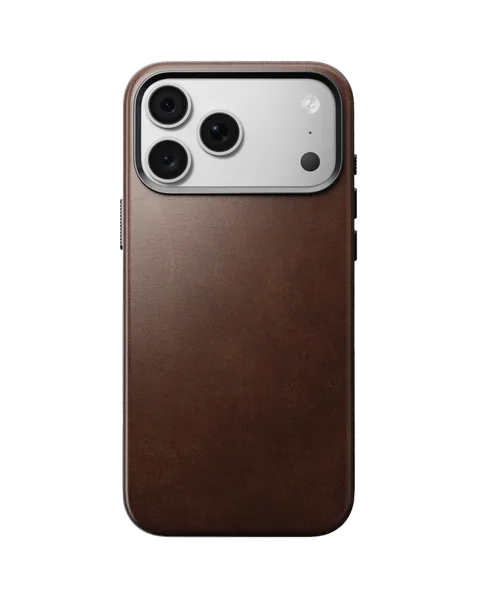
A thin case with its own magnet ring is the one that keeps the coils in line. The Leather Case for iPhone 18 Pro is full-grain leather with a magnet ring compatible with MagSafe, so a magnetic charger still snaps into place through it.
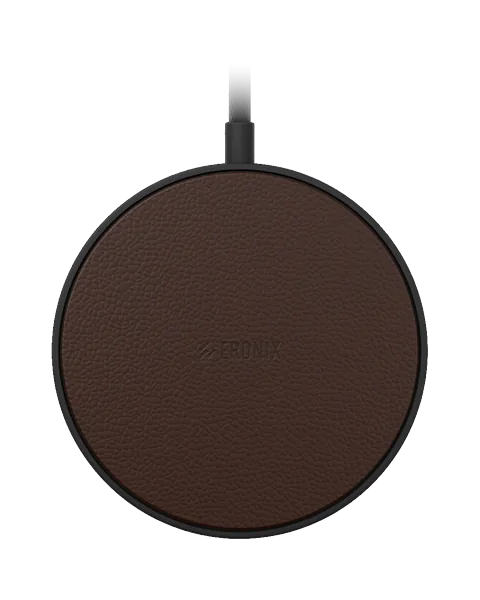
The Magnetic Charger is the match: Qi2.2 25 W on iPhone 17 and later, on an aluminium ring with a 1.5 m braided cable.
Like any leather, the case will mark gently where the charger sits, and take on your hand over the years.
Step by step
- Use a thin case labelled for MagSafe, Qi2 or magnetic charging.
- Remove cards, metal plates and grip rings before charging.
- Centre the phone on the charger, or use a magnetic charger.
- Check for unusual heat after twenty minutes.
- Keep the charger on a clean surface with no metal underneath.
Questions people ask
Can I wireless charge with a leather case?
Yes, if it is thin and designed for magnetic charging. MacRumors' MagSafe guide warns that the charger can leave a circular imprint on leather MagSafe cases over time. That is a cosmetic mark; it does not affect charging speed or safety, and many owners see it as part of the leather's character.
Does a PopSocket or ring holder stop wireless charging?
Often, yes. A grip or ring stuck over the coil area pushes the phone away from the charger and can block magnetic alignment. Metal rings are worse. Choose a removable magnetic grip, or take it off before charging.
Why does my phone get hot on a wireless charger with a case?
Extra gap and misalignment mean more energy turns into heat between the coils, and a thick case traps that heat. Apple says that if the battery gets too warm, software might limit charging above 80%. Try a thinner, magnet-ready case and keep the charger out of direct sun.
Do Samsung phones need a magnetic case for Qi2?
For magnetic accessories and the fastest Qi2 speeds, generally yes. 9to5Google reported that the Galaxy S26 series has no built-in Qi2 magnets, and Belkin's guide states Samsung models need a magnetic case for Qi2 alignment.
Sources
- Apple Support: How to use your MagSafe Charger · accessed 22 Nov 2026
- MacRumors: MagSafe guide · accessed 22 Nov 2026
- TechSpot: Wireless charging has an efficiency issue · accessed 22 Nov 2026
- Macworld: Qi2 vs MagSafe, which wireless charger is best for your iPhone · 21 Oct 2026
- 9to5Google: Samsung Galaxy S26 charging speeds and Qi2 · 25 Feb 2026
- Belkin India: Everything you need to know about Qi2 25W wireless charging · accessed 22 Nov 2026
Magnetic Alignment
Position, made physical.
Read →Explainer · 4 min readQi2 and Qi2.2: the wireless standards in plain words
Same magnets, same snap. The difference is ten watts and a stricter test.
Read →Explainer · 4 min readWhy wireless charging is slower than wired
Power has to jump a gap of air and glass. Some of it never lands.
Read →Buying guide · 6 min readWhich charger does your 25 W magnetic (Qi2.2) puck need?
The puck can only give what the adapter feeds it, and heat takes its share first.
Read →Buying guide · 5 min readWhich charger does a 15 W MagSafe puck need?
The puck is only as fast as the plug behind it. Here is the adapter that unlocks 15W.
Read →Explainer · 4 min readMagSafe vs Qi2: same magnets, different rules
They feel identical when they click on. The difference is in who sets the rules.
Read →