Journal · Explainer · 4 min read
Earbuds for Indian languages calls: mic placement matters
Hindi, Bengali or Tamil, the listener needs your consonants, or the word is lost.
You switch between Hindi, English and your mother tongue on the same call, often standing on a busy road. The other person keeps saying, sorry, say that again. Your earbuds play music beautifully. Why do they make you sound so unclear?
Short answerCall clarity depends on where the microphones sit, how far they are from your mouth and how well the earbuds separate your voice from noise. Language does not change the physics, but every language relies on crisp consonants, the first sounds noise hides. Look for beamforming microphones, voice sensors and mics aimed at your mouth.
The numbers behind a clear voice
Distance costs level quickly. Under the inverse-square law, each doubling of distance from a sound source cuts its intensity to a quarter, about 6 dB. An earbud microphone sits several centimetres from your mouth, while background noise arrives from everywhere at once, so the voice-to-noise ratio starts out modest.
Close microphones are the classic fix. Wikipedia's article on noise-cancelling microphones notes that such mics are typically tuned for sources very close to the front, about 1 to 3 cm away, and that two-microphone designs subtract the noise picked up by a second microphone from the main one.
The sounds that carry meaning are high and soft. Wikipedia's summary of presbycusis notes that sibilants and fricatives, sounds like s, sh and f, are the first to suffer when high-frequency hearing fades, and that consonants become hard to follow once the 2 to 4 kHz range is affected. Street noise, fans and crowds overlap that range, so they mask consonants first.
Brands describe their solutions in these terms. Apple lists dual beamforming microphones, an inward-facing microphone and a speech-detecting accelerometer on AirPods Pro. Samsung says the Galaxy Buds3 FE uses three microphones angled towards the user's mouth and a machine learning model to isolate the voice.
| Technique | What it does | Described by |
|---|---|---|
| Close-talking mic | Tuned for a source about 1 to 3 cm away | Wikipedia, noise-cancelling microphone |
| Two-mic subtraction | Removes noise heard by a second mic | Wikipedia, noise-cancelling microphone |
| Beamforming pair | Favours sound from the mouth's direction | Apple, AirPods Pro specifications |
| Speech accelerometer | Senses jaw vibration when you speak | Apple, AirPods Pro specifications |
| Mic side choice | Uses the bud facing away from noise | Apple, AirPods user guide |
Source: Wikipedia; Apple; accessed 22 Nov 2026
How earbuds pick your voice out of a street
Beamforming uses two microphones a short distance apart. Your voice reaches them in a predictable order from a predictable direction, the mouth. Noise arrives from all directions. By combining the two signals with small delays, the chip boosts sound from the mouth's direction and reduces the rest.
A vibration sensor adds a second opinion. When you speak, your jaw and skull vibrate; an accelerometer feels that, and the earbud knows when the sound is you rather than the person beside you.
Software finishes the job. Noise suppression trained on many voices removes steady hum and traffic. On iPhone, Apple's Mic Modes let you choose Voice Isolation for phone calls, which, in Apple's words, prioritises your voice and blocks ambient noise.
Picture a telephone operator wearing a headset with a boom mic that sits just at the corner of the mouth. Earbuds have no boom, so they rebuild one in software: two microphones aimed like a torch beam at your mouth, plus a sensor that feels you speak.
Some earbuds also choose which bud listens. Qualcomm's true wireless white paper describes designs that can swap the two buds' roles when the second earbud's microphone quality is significantly better than the first, as can happen when one side faces traffic or wind. You never notice the switch; the listener simply hears you more clearly.
Habits that make you clearer
Seat both earbuds properly. Many designs aim the beam assuming the stem or body sits at a set angle; a twisted bud points its microphones away from your mouth.
Choose the microphone side if your earbuds allow it. Apple's settings let you set the microphone to the left or right AirPod, or let either act as the mic. If wind or traffic comes from one side, use the other.
Turn your back to the loudest noise. It shelters the outward microphones and improves the voice-to-noise ratio.
Use voice isolation or noise reduction modes where your phone offers them.
Speak at a normal level and pace. Shouting into earbuds distorts, and rapid code-switched speech loses consonants first when the line is noisy.
Mind the network too. A weak mobile signal compresses your voice heavily and drops syllables, which sounds exactly like a poor microphone. If calls are clear on Wi-Fi calling but not on a weak mobile signal, the earbuds are not the problem.
What to check before you buy
Read the microphone list: count, beamforming and any voice or bone sensor.
Make a test call at the counter, ideally near the shop entrance or a fan, in the languages you actually use, and ask the listener how clear you are.
Check whether the earbuds let you choose the mic side or use either bud for calls.
Check for wind handling if you take calls outdoors.
For office use, check multipoint and the call controls, such as mute, on the earbud itself.
Myth corner
Myth: earbuds tuned in one country struggle with Indian languages. Call processing works on the acoustics of speech, not on vocabulary. What hurts clarity is noise, distance and microphone direction. Test in your languages and in your usual noise, and judge by the listener's experience.
The right one for you
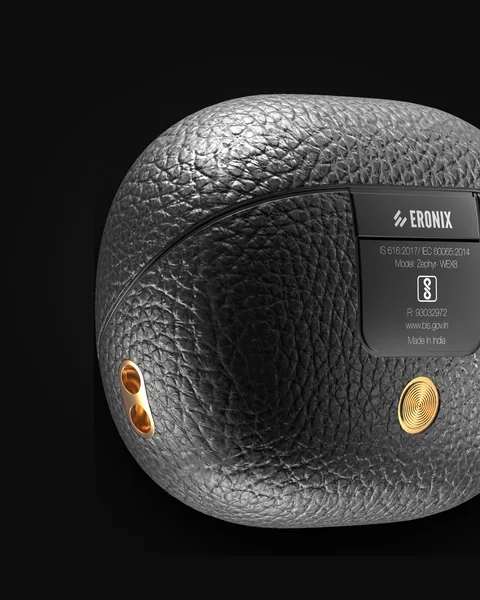
A clear call starts with microphones that hear your mouth before they hear the street. The Zephyr carries four microphones with quad-microphone ENC up to 35 dB for calls, on Bluetooth 5.4 with the HFP 1.7 hands-free profile, and suits iPhone, Galaxy A and S FE, and OnePlus phones. It closes into a NeoLeatherette case, quiet in the hand and in the pocket.
Step by step
- Seat both earbuds at the angle the maker shows.
- Turn on voice isolation or noise reduction for calls.
- Choose the mic side away from wind or traffic if your earbuds allow it.
- Turn your back to the loudest noise source.
- Make a test call in the languages and places you use most.
Questions people ask
Why do people say I sound muffled on my earbuds?
Earbud microphones sit several centimetres from your mouth, and noise masks the high, soft consonants that make speech clear. A twisted bud, wind or traffic on the mic side, or an older design with fewer microphones makes it worse. Reseat the buds, turn from the noise and use voice isolation.
How many microphones do earbuds need for clear calls?
There is no fixed number, but beamforming needs at least two per bud, and many designs add a third or a vibration sensor. Apple lists dual beamforming mics, an inward mic and a speech-detecting accelerometer on AirPods Pro; Samsung lists three mics on Galaxy Buds3 FE. Design matters as much as count.
What is Voice Isolation on iPhone?
Voice Isolation is an iPhone Mic Mode that, according to Apple, prioritises your voice and blocks ambient noise. It works on regular phone calls from iOS 16.4, and on FaceTime and some third-party apps. Choose it from Control Center while the call is in progress.
Are wired earphones better for calls than wireless earbuds?
Wired earphones with an inline mic often sit closer to the mouth, which helps. Wireless earbuds compensate with beamforming and processing. In quiet rooms both are fine; in noisy streets, a well-designed wireless pair with several microphones can match or beat a basic wired mic.
Sources
- Wikipedia: Inverse-square law · accessed 22 Nov 2026
- Wikipedia: Noise-canceling microphone · accessed 22 Nov 2026
- Wikipedia: Presbycusis · accessed 22 Nov 2026
- Apple: AirPods Pro technical specifications · accessed 22 Nov 2026
- Samsung Newsroom US: Samsung introduces Galaxy Buds3 FE · accessed 22 Nov 2026
- Apple Support: Use Mic Modes on iPhone and iPad · accessed 22 Nov 2026
- Apple AirPods User Guide: Change settings for AirPods or AirPods Pro · accessed 22 Nov 2026
- Qualcomm: The Evolution of True Wireless Technology (white paper) · 2020
Acoustics
What a driver actually does.
Read →Explainer · 4 min readCall quality: how earbud microphones handle noise
Your mouth is a hand's width from the mic. Everything else makes up for that.
Read →Explainer · 5 min readWhat ANC can and cannot block
Why the bus engine fades but the conductor's voice does not, and what to check.
Read →Explainer · 4 min readTransparency mode: how earbuds let the world back in
Your earbuds can hear the platform announcement for you. Here is how, and where it stops.
Read →Explainer · 4 min readENC vs ANC: two different jobs
One protects your ears. The other protects the person on the other end of the call.
Read →Explainer · 4 min readEarbuds for small ears
If your earbuds keep falling out, the problem is rarely your ears. It is the fit.
Read →