Journal · Explainer · 5 min read
Laptop sleeves: what protection really means
A sleeve is a raincoat, not a helmet. Buy it for the dangers it actually stops.
Your laptop rides in a backpack beside a water bottle, a charger, keys and a lunch box. One sudden auto-rickshaw brake later, the lid has a new scuff. Would a sleeve have saved it, and would it save the screen if the bag hit the floor?
Short answerA good laptop sleeve protects against scratches, scuffs, grit, pressure points from other items, light knocks and splashes. It does not make a laptop drop-proof. Choose one that fits snugly, has a soft lining, and keeps hard objects away from the lid, and carry it inside a bag with structure when you commute.
The numbers that define laptop protection
Real drop protection has a formal definition. RuggedPCReview, which tracks rugged computers, describes the military test MIL-STD-810 transit drop: 26 drops from 122 cm, covering every face, edge and corner, onto a hard surface. Under the 810H revision, that surface is steel plate over concrete, and the 26 drops may be spread across up to five test units. Laptops sold as rugged are built to pass this. A slim sleeve is not designed for it, and no honest sleeve should claim it.
The lid itself is the weak point. Apple's support page on camera covers says the gap between display and keyboard on its laptops is designed to very tight tolerances, and that a cover thicker than an average sheet of printer paper, 0.1 mm, can damage the display when the lid closes. Anything that presses on a closed lid, inside or out, uses the same small margin.
Climate matters too. Apple's handling guide for MacBook Air gives an operating range of 10 to 35 °C and relative humidity of 0 to 90% non-condensing. Indian summers and monsoons press on both ends of that range.
| Material | Strength | Watch out for |
|---|---|---|
| Leather | Resists abrasion, stiffer walls spread pressure | Needs a soft inner lining |
| Felt and wool | Soft and light, good against scratches | Absorbs moisture in the monsoon |
| Neoprene | Flexible, light padding, sheds splashes | Can trap heat |
| Hard shell | Clips on, guards against scratches | Adds weight, can trap grit |
Source: ERONIX Lab Desk summary; Apple handling guide
How a sleeve protects, and where it stops
A sleeve works in three ways. A soft lining stops abrasion, the tiny scratches that grit and zips cause over months. A padded or structured wall spreads a point load, such as a bottle cap pressing on the lid, across a wider area so the display is not pushed into the keyboard. An outer layer sheds dust and light rain.
Think of a raincoat versus a helmet. A raincoat keeps you dry and clean all day; it does nothing if you fall off a scooter. A sleeve is the raincoat. A rugged case with corner bumpers, or a bag with a suspended laptop compartment that keeps the laptop off the floor of the bag, is closer to the helmet.
Drops hurt laptops at the corners. When a bag lands on a corner, a thin sleeve compresses almost at once and passes most of the shock through. Thick foam or a raised false bottom in a bag helps more than any sleeve alone.
Materials, in plain terms
Leather: abrasion-resistant, ages well, stiffer walls spread pressure. Needs a soft inner lining so the leather's back does not rub the metal.
Felt and wool: soft and light, good against scratches, absorbs moisture, so it is less suited to monsoon commutes.
Neoprene: flexible and lightly padded, good against bumps and splashes, can trap heat.
Hard shells: clip onto the laptop rather than hold it, guard against scratches, add weight and can trap grit underneath if not cleaned.
What to check before you buy
Check the fit by model, not by screen size alone. A 14-inch laptop from one brand can be several millimetres wider than another's. The laptop should slide in with light resistance and not move when shaken.
Feel the lining. It should be soft and seamless where it touches the lid. Rough stitching or exposed glue on the inside does the scratching a sleeve is meant to stop.
Look at the closure. Zips should not touch the laptop's metal edges. Magnetic flaps should stay shut when the sleeve is upside down. Keep strong magnets away from the screen edge.
Check pockets. A pocket for the charger is useful only if it sits on the sleeve's outside, away from the lid. A charger brick pressing on a closed lid breaks Apple's 0.1 mm rule many times over.
Think about your bag. For a structured backpack with its own compartment, a slim sleeve is enough. For a tote or a crowded bag, choose thicker walls.
Habits that matter more than the sleeve
Make sure nothing is on the keyboard before you close the lid: a pen, an earbud or a folded receipt. Apple's handling guide also warns against loose metal items such as coins and paper clips in the bag, which can enter the vents or lodge in the USB-C ports.
Let the laptop sleep and cool before you slide it in. A sleeve insulates, and a warm laptop sealed in fabric inside a bag cools slowly.
Myth corner
Myth: a padded sleeve makes a laptop safe to drop. Fact: true drop resistance is defined by tests such as 26 drops from 122 cm onto steel-backed concrete, as RuggedPCReview describes. A sleeve can soften a knock against a table edge; a fall onto a station floor needs the laptop's own build and a well-designed bag.
The right one for you
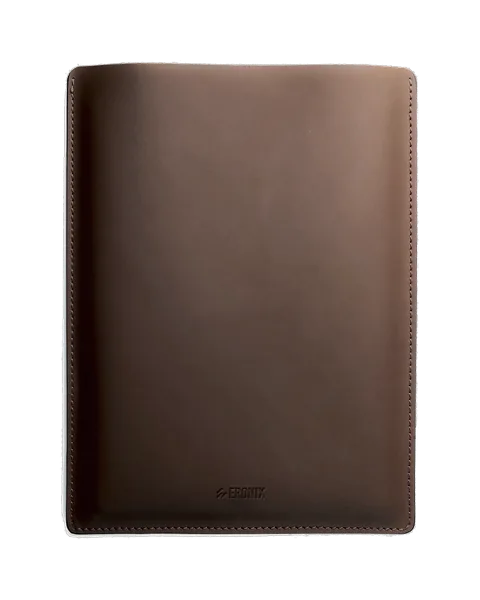
For a MacBook that travels inside a bag, the job is scratches, grit and pressure, and that is what the Leather Sleeve for MacBook is built around. Full-grain leather gives the wall stiffness to spread a point load, and a microfibre lining keeps the leather's back off the aluminium.
It comes in 13/14 inch and 15/16 inch sizes for MacBook Air and Pro, in Black, and closes with a magnetic flap. There is no pocket against the lid, so nothing presses on a closed screen.
Step by step
- Measure or look up your laptop's exact width, depth and thickness.
- Choose a sleeve made for that model, with a soft, seamless lining.
- Clear the keyboard before closing the lid.
- Let the laptop sleep and cool before sliding it in.
- Carry the sleeve inside a structured bag on commutes.
Questions people ask
Should I use a sleeve inside a laptop bag?
If the bag's laptop compartment is padded and you carry little else, a sleeve adds mainly scratch protection. If the bag is a tote or holds chargers, bottles and keys, a sleeve adds a useful barrier against pressure and grit. Either way, keep hard objects away from the lid.
Can I carry a laptop in a sleeve without a bag?
For short trips, such as between meeting rooms, yes. For commuting, a sleeve alone leaves the laptop exposed to drops and rain, and it is easier to set down on a wet or dirty surface. A sleeve with a handle or strap helps, but it is still not drop protection.
Is a leather laptop sleeve good for the Indian monsoon?
Leather sheds light rain if wiped promptly, but soaked leather can stain and stiffen, and water can seep through seams. In heavy rain, carry the sleeve inside a water-resistant bag. Dry a damp sleeve at room temperature, away from direct heat, before putting the laptop back.
Does a sleeve cause a laptop to overheat?
Not when the laptop is asleep or shut down. Running a laptop inside a sleeve, or putting it away hot, traps heat. Apple gives an operating range of 10 to 35 °C for MacBook Air. Let the laptop sleep and cool for a minute before sliding it in.
How do I clean a laptop sleeve?
Shake out grit from the inside often, because trapped grit scratches the lid. Wipe leather with a dry or slightly damp cloth and let it air-dry. Felt and fabric linings can be cleaned with a lint roller. Follow the maker's label for washing.
Sources
- How the rugged PC drop spec just became different (RuggedPCReview) · accessed 22 Nov 2026
- Don't close your MacBook, MacBook Air or MacBook Pro with a cover over the camera (Apple Support) · accessed 22 Nov 2026
- Important handling information for your Mac (MacBook Air User Guide, Apple Support) · accessed 22 Nov 2026
Thermal Management
The quiet discipline inside every serious power product.
Read →Explainer · 4 min readDoes fast charging kill the battery?
The watts on the charger matter less than the temperature of the phone
Read →Explainer · 5 min readCan a 100 W charger damage your phone?
The watts on the brick are a ceiling, not a push. Heat is what your battery remembers.
Read →Explainer · 4 min readIs it safe to charge your phone overnight?
Your phone does not overcharge. It sits full for hours, and that is what to fix.
Read →Explainer · 5 min readShould you let the battery drain to 0%?
The monthly full drain is a habit from older batteries. Here is what the chemistry says.
Read →Explainer · 4 min readHotel room charging: making one socket work
One socket behind the bed, three devices, a 7 am meeting. Here is the plan.
Read →