Journal · Explainer · 4 min read
USB-C ports: data speed vs charging power
Two cables, identical plugs. One copies a film in seconds, the other in half an hour.
You plug a new phone into a laptop to copy a few hundred photos and videos. It takes far longer than you expected, even though the same cable fast charges the phone perfectly. Is the phone slow, or the laptop? Very often, it is the cable, and the reason is in what USB-C does and does not promise.
Short answerUSB-C is only the shape of the plug. Data speed and charging power are separate ratings. Many charging cables, even 60 W or 240 W ones, carry data at only USB 2 speed. For fast data, the cable and both devices must support 10, 20, 40 or 80 Gbps. Check both ratings, not the plug.
The two ratings, in numbers
The USB Implementers Forum's packaging guidelines say it plainly: USB Type-C is a type of connector, and it is not the same as USB 3.2 or USB4. For data, the guidelines recommend naming products by speed: USB 5Gbps, 10Gbps, 20Gbps, 40Gbps or 80Gbps.
For power, Tom's Hardware reported the USB-IF logo scheme introduced in 2021: USB-C cables that pass USB-IF compliance testing carry a logo showing 60 W or 240 W, a separate logo shows data rate, and a combined logo shows both. These logos appear only on packaging of products that passed that testing.
Apple's support page on the iPhone's USB-C connector shows how this plays out. The iPhone 15 Pro and later Pro models, and the iPhone Duo, support USB 3 transfers at up to 10 Gbps, but only with a USB 3 cable rated for that speed. The cable included with the iPhone supports charging and USB 2 speeds. ChargerLAB's cable guide adds that standard USB-C charging cables typically support USB 2 data.
| Job | Rating that matters | Figure to look for |
|---|---|---|
| Charging most phones | Power | 60 W, 3 A |
| Galaxy 45 W modes | Power | 100 W or 5 A |
| USB PD 3.1 laptops | Power | 240 W |
| Copying files, external SSD | Data | 10 Gbps or more |
| Connecting a display | Data | USB 3.1 or higher |
Source: Apple Support; USB-IF; ChargerLAB, accessed 22 Nov 2026
Gbps
Source: USB-IF packaging guidelines; USB 2.0 (Wikipedia), accessed 22 Nov 2026
How it works: different wires for different jobs
Inside a USB-C cable, charging and data use different wires. Power travels on a thicker pair for current. Basic USB 2 data uses one small twisted pair. High-speed USB 3 and USB4 data need several extra shielded pairs, precisely built, which add cost, thickness and stiffness.
A cable can therefore have thick power wires for 240 W and only the basic data pair, giving fast charging and slow data. Another can have all the high-speed pairs but only 3 A power wires, giving fast data and 60 W charging.
Think of a highway and a railway line built side by side. The highway is power; how many lanes it has decides how much traffic it carries. The railway is data; whether it is a single track or a high-speed line decides how quickly passengers arrive. A wide highway says nothing about the railway next to it.
What the difference means for a real copy
USB 2 runs at a nominal 480 Mbps, according to Wikipedia's USB 2.0 summary. A USB 3 link at 10 Gbps is roughly twenty times faster on paper. Real transfers are slower than both because of the drives and file systems involved, but the gap remains large.
For a 20 GB folder of 4K video, our arithmetic on nominal rates gives about six minutes at 480 Mbps and well under a minute at 10 Gbps, before real-world overheads, which slow both. If you shoot video on a Pro iPhone and move it to a laptop or SSD, the cable decides whether that is a coffee break or a lunch break.
Where each rating matters
Charging a phone: power rating only. A 60 W, 3 A cable covers most phones; 100 W or 5 A for Galaxy 45 W modes; 240 W for USB PD 3.1 laptops.
Copying files or using an external SSD: data rating first, at least 10 Gbps for Pro iPhones and fast drives.
Connecting a display: Apple notes that supported iPhones output up to 4K at 60 Hz over USB-C and recommends a USB 3.1 or higher cable for high-resolution displays.
Charging a small device from the phone: Apple says iPhone 15 and later can charge small USB PD devices such as earbuds and watches at up to 4.5 W.
What to check before you buy
Check both numbers on the packaging: a data speed, such as 10Gbps, and a power figure, such as 60 W or 240 W. If only one is shown, assume the other is basic.
Check for USB-IF logos on the box. They appear only on products that passed USB-IF compliance testing and state speed and power clearly.
Check the length. High-speed data cables are often shorter, because speed is harder to maintain over long thin wires.
Check your devices' ports. A 40 Gbps cable gives 480 Mbps if the phone's port is USB 2.
Myth corner
Myth: a more expensive or thicker USB-C cable is always faster for data. Thickness often comes from heavy power wires for 100 W or 240 W charging, which do nothing for data speed. The USB-IF's own guidance is to read the speed label, because the connector alone says nothing about it.
The right one for you
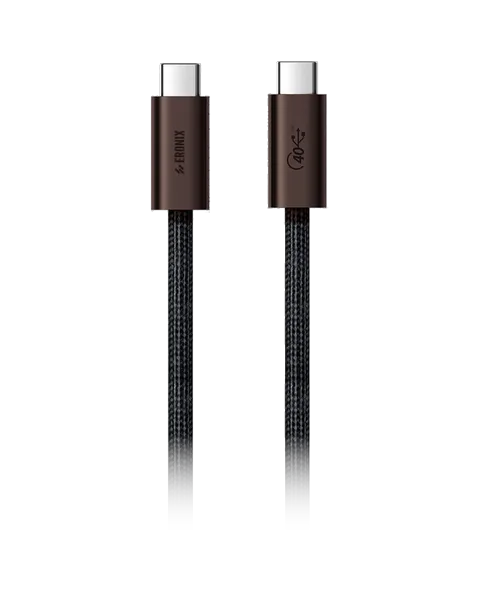
When the job is a display, an external SSD or a large video copy, the data rating decides. The Mac Cable USB4 carries 40 Gbps and 240 W over 1 m, so one cable handles the screen, the data and the power.
It suits a Mac, an iPad Pro and an external display.
Step by step
- Decide whether you need fast charging, fast data, or both.
- Read the power rating on the packaging: 60 W, 100 W or 240 W.
- Read the data rating: USB 2, 10Gbps, 20Gbps, 40Gbps or 80Gbps.
- Check that your phone or laptop port supports the data speed you need.
- Prefer packaging with USB-IF logos that state both ratings.
Questions people ask
Why does my USB-C cable charge fast but transfer data slowly?
Because charging power and data speed use different wires. Many charging cables carry high current but only USB 2 data, at a nominal 480 Mbps. ChargerLAB notes standard USB-C charging cables typically support USB 2 data. For fast transfers, use a cable rated for 10 Gbps or more.
Does the iPhone USB-C cable support fast data transfer?
No. Apple says the cable included with iPhone supports charging and USB 2 speeds. iPhone 15 Pro and later Pro models can transfer at up to 10 Gbps, but only with a USB 3 cable that supports 10 Gbps, sold separately.
Can one USB-C cable do fast charging and fast data?
Yes. Some cables combine full high-speed data wiring with 5 A power wires, such as USB4 cables rated 40 Gbps and 240 W. The USB-IF's combined logo shows both ratings on the packaging of tested products. These cables are usually thicker, costlier and shorter than basic charging cables.
What does a 240 W USB-C cable mean?
It means the cable supports up to 240 W charging under USB Power Delivery 3.1 Extended Power Range, using 5 A at up to 48 V. It says nothing about data speed. Check the packaging for a separate speed rating such as 10Gbps or 40Gbps.
Sources
- USB Type-C language, product and packaging guidelines (USB-IF) · 20 Mar 2023, accessed 22 Nov 2026
- New USB logos show charging capabilities up to 240W (Tom's Hardware) · 1 Oct 2021, accessed 22 Nov 2026
- Charge and connect with the USB-C connector on your iPhone (Apple Support) · accessed 22 Nov 2026
- ChargerLAB's Ultimate Cable Selection Guide for Everyone (ChargerLAB) · accessed 22 Nov 2026
- What is 240W USB Extended Power Range (EPR)? (Plugable) · accessed 22 Nov 2026
- USB 2.0 (Wikipedia) · accessed 22 Nov 2026
USB-C Power Delivery
One connector, a negotiated contract.
Read →Explainer · 5 min readCan a 100 W charger damage your phone?
The watts on the brick are a ceiling, not a push. Heat is what your battery remembers.
Read →Explainer · 6 min readNew 14-inch MacBook Pro with M6: charger and cable guide
No charger in the box in India. Here is the wattage and the cable that unlock fast charge.
Read →Explainer · 5 min readUSB Power Delivery explained in one page
How a charger and a phone agree on power before it flows, and how to read the label.
Read →Explainer · 5 min readWhat to pack for a work trip: the charging and carry kit
One charger, two cables, one power bank: a kit built for the day, not the brochure.
Read →Explainer · 5 min readPPS: why Samsung phones care about it
Three letters on a charger label decide whether a Galaxy charges at full speed or half.
Read →