Journal · Buying guide · 5 min read
Which charger for a phone with a thick case on a wireless pad?
Wireless charging is a short-distance handshake. A chunky case makes the reach longer.
You bought a rugged case after the last drop, the kind with corner bumpers and a raised back. Now the phone sits on the wireless pad, the charging icon flickers on and off, and in the morning it is at 60%. Is the pad the problem, or the case?
Short answerUsually the case. Standard Qi wireless charging is designed around a coil gap of about 5 mm, and a thick case widens it, which lowers efficiency, adds heat and can stop charging altogether. The fix is a magnetic case, MagSafe or Qi2 compatible, paired with a magnetic charger, which holds the coils aligned through a slim, designed layer.
How much a few millimetres cost
Battery University's explainer on wireless charging gives the baseline. It lists the Qi coil distance at 5 mm and puts inductive transfer efficiency at roughly 75 to 80%, before adapter losses. That design distance is the budget the phone's back glass, any case and any air gap all share.
Real-world losses grow when that budget is overrun or the coils slide apart. In a test reported by TechSpot, writer Eric Ravenscraft of OneZero measured energy from the wall while charging a Pixel 4 from empty to full. A cable used 14.26 Wh on average. One flat wireless pad used 21.01 Wh, more than 47% more, and a stand-type charger used 19.8 Wh, nearly 39% more. He found consumption rose further when the phone was not centred. A thick case does both things at once: it adds distance and makes centring harder.
Magnetic alignment is the counter. MacRumors' MagSafe guide explains that iPhones from the 12 onward have a ring of magnets around the charging coil that pull the charger into the right spot. Belkin's charging guide adds that a MagSafe, Qi2 or Qi2 25W-aligned case helps with alignment and efficiency, and notes that Galaxy S25 and S26 phones need a magnetic case to use magnetic alignment with Qi2 chargers.
| Method | Energy used | vs cable |
|---|---|---|
| Cable | 14.26 Wh | Baseline |
| Stand-type wireless charger | 19.8 Wh | Nearly 39% more |
| Flat wireless pad | 21.01 Wh | More than 47% more |
Source: Eric Ravenscraft (OneZero), reported by TechSpot
Wh
Source: Eric Ravenscraft (OneZero), reported by TechSpot
Why distance matters so much
A wireless charger has a flat copper coil carrying an alternating current. That creates a magnetic field, and a matching coil in the phone picks it up and turns it back into current. Battery University gives the Qi operating frequency as 100 to 205 kHz. The field weakens quickly with distance, so every extra millimetre means less of it reaches the phone, and more is lost as heat in the pad and the phone.
Think of talking to someone through a closed window. Pressed to the glass, you are heard clearly. Step back half a metre and you have to shout, and much of your effort goes into the room instead of the listener. A thick case makes the charger shout.
Heat is the hidden cost
Lost energy does not disappear; it becomes heat. Apple's battery guidance advises removing certain cases before charging because they can trap heat and affect battery capacity. MacRumors notes that warm iPhones have charging throttled, with Apple limiting charging above 80% if the phone gets too warm. So a thick case can slow charging twice: once through distance, and again when the phone protects itself from the heat that distance creates.
Rugged cases, wallets and car mounts
Three accessories cause most problems. Rugged cases add thickness exactly where the coil sits, often with a raised back or a stand. Card wallets add plastic, leather and the cards themselves; MacRumors notes Apple's own MagSafe wallet must come off before charging. Metal plates stuck inside cases for magnetic car mounts sit directly in the magnetic field and can block it completely, and absorb energy as heat.
If you need a rugged case, look for one built with a magnet ring for MagSafe or Qi2. It keeps the coils aligned through the case, which recovers much of what thickness costs. If you rely on a metal mount plate, plan on cable charging.
What to check before you buy
Look for MagSafe or Qi2 compatibility on the case itself. A case built with a magnet ring keeps the charger centred, which matters more than a fraction of a millimetre of thickness.
Check the phone's own wireless limit. Apple's fast-charge page lists the adapter watts each iPhone needs for MagSafe fast charging, and Belkin's guide lists Qi2 levels of 15 W and 25 W by phone. A charger stronger than the phone's limit will not push more through a thick case.
Pick a charger with the right adapter. Apple's page says MagSafe fast charging on recent iPhones needs a 30 W or higher USB-C adapter, and 35 W or higher on the newest Pro models. An underpowered brick is a common cause of slow wireless charging that people blame on the case.
Take off anything between phone and pad. Card wallets, metal plates for car mounts and pop-out grips add distance or block the field. MacRumors notes that Apple's own magnetic wallet must come off before charging.
If the case has no magnets and is thicker than a standard slim cover, plan to use a cable. It will be faster and cooler.
Myth corner
Myth: a more powerful wireless charger can push through any case. Fact: wattage cannot fix distance. The field weakens with the gap, and more input mostly turns into heat, which makes the phone throttle. Alignment and a designed, thin layer between the coils make the difference.
The right one for you
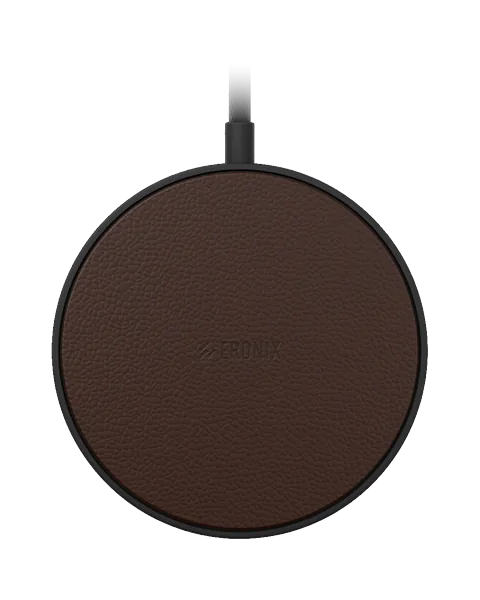
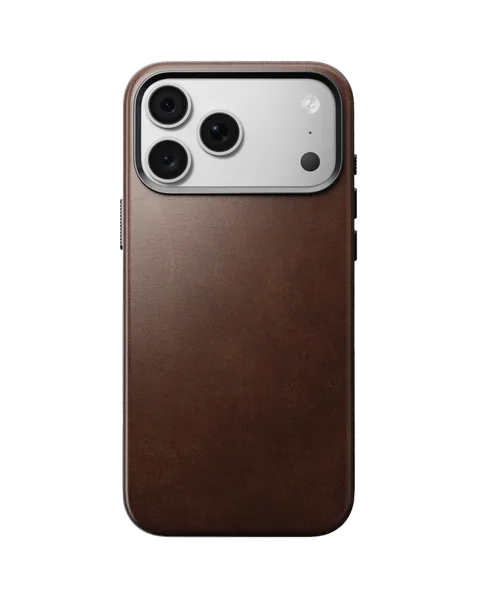
The fix for a thick case is alignment through a thin, designed layer, so choose the charger and the case as a pair. The ERONIX Magnetic Charger is a Qi2.2 25 W puck with an aluminium ring and a 1.5 m braided cable; it fits iPhone 12 and later and reaches 25 W on iPhone 17 and later. On the iPhone 18 Pro, the ERONIX Leather Case carries its own magnet ring, compatible with MagSafe, so the puck snaps into place through full-grain leather. The adapter is not included; use the USB-C rating Apple lists for your iPhone.
Step by step
- Test charging with the case off to see if the case is the cause.
- Choose a case marked MagSafe or Qi2 compatible.
- Use the adapter wattage your phone maker lists for wireless fast charging.
- Remove wallets, grips and metal plates before charging.
- Use a cable instead if the case is thick and has no magnets.
Questions people ask
How thick can a case be for wireless charging?
There is no single published limit for every phone, but standard Qi is designed around a coil distance of about 5 mm, which the phone's back and the case share. Slim cases usually work. Rugged cases, wallets and metal plates often reduce speed or stop charging. A magnetic MagSafe or Qi2 case keeps coils aligned and works most reliably.
Why does my phone keep stopping and starting on the wireless charger?
Usually the coils are not aligned, or the gap is too wide, so the link keeps dropping. Heat can also pause charging. Remove the case or wallet to test, centre the phone, and check that the charger's adapter has enough watts. If it works without the case, the case is the cause.
Is wireless charging through a case bad for the battery?
It can be if the case traps heat. Lost energy turns into heat, and Apple advises removing certain cases that trap heat while charging. Heat is what ages lithium-ion batteries. A slim magnetic case on an aligned charger produces far less waste heat than a thick, misaligned one.
Do I need a MagSafe case for a Qi2 charger?
On iPhones with MagSafe, a MagSafe-compatible case keeps the magnet ring working through the case. On Android phones without built-in magnets, Belkin notes a magnetic case is needed to use Qi2's magnetic alignment. Without magnets, a Qi2 charger still works as a flat charger, but alignment is up to you.
Sources
- BU-412: Charging without Wires (Battery University) · accessed 22 Nov 2026
- Wireless charging has an efficiency issue (TechSpot) · accessed 22 Nov 2026
- MagSafe: Everything About Apple's iPhone Charging Technology (MacRumors) · accessed 22 Nov 2026
- Everything You Need to Know About Qi2 25W Wireless Charging (Belkin India) · accessed 22 Nov 2026
- Fast charge your iPhone (Apple Support) · accessed 22 Nov 2026
- Batteries: Maximizing Performance (Apple) · accessed 22 Nov 2026
Qi2
Wireless charging, aligned by magnets.
Read →Explainer · 5 min readDoes a case slow down wireless charging?
The case is rarely the problem. What you tuck inside it often is.
Read →Buying guide · 6 min readWhich charger does your 25 W magnetic (Qi2.2) puck need?
The puck can only give what the adapter feeds it, and heat takes its share first.
Read →Buying guide · 5 min readWhich charger does a 15 W MagSafe puck need?
The puck is only as fast as the plug behind it. Here is the adapter that unlocks 15W.
Read →Explainer · 4 min readQi2 and Qi2.2: the wireless standards in plain words
Same magnets, same snap. The difference is ten watts and a stricter test.
Read →Explainer · 4 min readWhy wireless charging is slower than wired
Power has to jump a gap of air and glass. Some of it never lands.
Read →