Journal · Comparison · 5 min read
Desk stand vs pad vs puck: which wireless charger?
Three shapes, one physics problem: getting two coils to line up and stay there.
Walk past a wireless charging shelf and you see three shapes: a flat pad, an upright stand, and a small magnetic disc on a cable, usually called a puck. They may all print the same wattage on the box. Yet in one test, a flat pad drew 47% more energy than a cable. Do the three shapes really charge the same?
Short answerNo, because alignment decides how much energy reaches the phone. A magnetic puck or stand holds the coils in line every time, so it charges at its rated speed with less waste. A flat pad depends on where you drop the phone. Choose a puck for travel, a stand for a desk, and a pad only if it is magnetic.
The one number that decides it: energy lost to misalignment
TechSpot reported on a test by Eric Ravenscraft, who measured the energy drawn from the wall to fully charge a Google Pixel 4. By cable it took 14.26 Wh. A flat pad took 21.01 Wh, about 47% more. A cradle-style stand took 19.8 Wh, about 39% more, because its shape stopped the phone sliding out of line vertically. Misaligned placement used more energy still.
Magnets close more of that gap. Macworld explains that MagSafe and Qi2 chargers use a ring of magnets around the coil to hold accessories in place, while plain Qi chargers have weaker alignment, so misplacement and wasted energy are more common. It reports that Qi2 25W chargers also work to stricter surface temperature limits of about 40 °C.
Speed follows alignment. Macworld timed an iPhone 15 Pro at about 45 minutes to 50% on 15 W MagSafe or Qi2, while chargers marked only MagSafe Compatible, typically 7.5 W, took about 90 minutes. The Wireless Power Consortium says Qi2 25W delivers nearly 70% more power than the original 15 W Qi2.
| Shape | Alignment | Suits |
|---|---|---|
| Magnetic puck | Fixed by magnets, even in the hand | Travel and car |
| Magnetic stand | Fixed by magnets, screen visible | Bedside and desk |
| Flat pad | Depends on placement, unless magnetic | Shared phones without magnets |
Source: Macworld; TechSpot, accessed Nov 2026
Wh from the wall
Source: TechSpot, reporting Eric Ravenscraft's test
How each shape works
Wireless charging passes energy between a coil in the charger and a coil in the phone. The field is strongest when the coils are centred and close. Any shift sideways or extra gap means more energy is lost as heat, and a warm phone slows its own charging.
A puck is a single coil with a magnet ring on a cable. It snaps onto the phone's back, so alignment is fixed even if you pick the phone up. A magnetic stand holds that same coil upright. A flat pad usually has no magnets; you rely on placing the phone in the right spot, though magnetic Qi2 pads now exist.
Think of hanging a picture on a wall. A nail driven exactly where the hook is holds it straight every time. A shelf you rest the picture on works too, but it can be nudged off-centre. The magnetic puck and stand are the nail; the flat pad is the shelf.
Which one for which place
Bedside: a magnetic stand or puck. Placing the phone in the dark is easy, and alignment is automatic. A stand also keeps the screen visible for alarms.
Desk: a stand. You can read notifications, use video calls and unlock with your face while the phone charges at full speed.
Travel and car: a puck. It is small, works at any angle and keeps charging if you hold the phone. Apple's MagSafe page says to plug the charger into power before placing the iPhone on it; if you placed it first, lift the phone off, wait three seconds and put it back to restore full power.
Shared family use: a flat pad suits phones without magnets, but check placement each time.
Two-in-one and three-in-one stations
Stations that charge a phone, earbuds and a watch together are popular on bedsides. They combine the shapes: often a magnetic stand or puck for the phone and a flat pad for the earbuds.
They share one power adapter, so check the phone's stated speed when every spot is in use, and use the adapter wattage the maker specifies. A station that reaches 25 W for the phone alone may give less when all three devices are charging at once.
What to check before you buy
Check the standard: Qi2 25W for phones that take 25 W, Qi2 for 15 W. A charger marked only MagSafe Compatible is typically limited to 7.5 W, Macworld notes.
Check the power adapter it needs. Apple specifies a 30 W or greater adapter rated at 15 V and 2 A for 25 W MagSafe charging. A weaker adapter caps the charger.
For stands, check the coil height suits your phone's size, and whether it charges in both portrait and landscape.
For pads, prefer a magnetic Qi2 pad, or one with a clear centre mark.
Keep metal away. Apple asks for the charger to sit on a flat surface clear of metal objects or other foreign material.
Myth corner
Myth: a 15 W pad and a 15 W stand charge exactly the same. Fact: in the test TechSpot reported, a flat pad used about 47% more energy than a cable, a stand about 39% more. Holding the coils in line, by shape or by magnets, changes the result.
The right one for you
For the bedside, the 3-in-1 Desk Stand holds an iPhone at StandBy angle on Qi2.2 25 W, with a Watch charging module, an AirPods pad and a 45 W adapter in the box, so the adapter question is answered for you. Its weighted aluminium base, about 600 g, stays put when you reach for the phone in the dark.
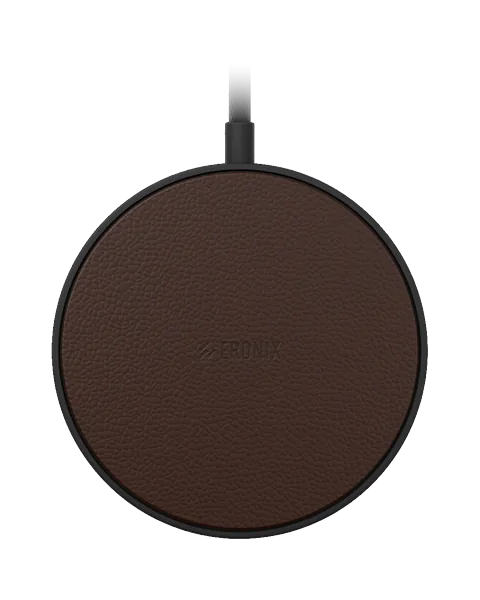
For the bag and the car, the Magnetic Charger is the puck: Qi2.2 25 W on iPhone 17 and later, on an aluminium ring. Pair it with an adapter of 30 W or more at 15 V and 2 A.
Step by step
- Decide where you charge most: bedside, desk or on the go.
- Choose a magnetic stand for desk and bedside, a puck for travel.
- Match the standard to your phone: Qi2 25W or Qi2.
- Pair the charger with the adapter it specifies.
- Keep metal and cards away from the charging area.
Questions people ask
Is a wireless charging stand better than a pad?
For alignment, usually yes. In Eric Ravenscraft's test reported by TechSpot, a cradle-style stand used about 39% more energy than a cable, against about 47% for a flat pad, because the stand kept the phone in line. Magnetic stands and pads align better still.
What is a MagSafe puck?
It is the small round magnetic charger on a cable, like Apple's MagSafe Charger. It snaps to the magnet ring on iPhone 12 and later, holding the coils in line. Apple's 25 W-tier MagSafe Charger needs a 30 W or higher adapter rated at 15 V and 2 A for full speed.
Why is my phone charging slowly on a wireless pad?
Most often the phone is off-centre, a case is thick, or something sits between phone and charger. Apple also notes that placing an iPhone on a MagSafe Charger before plugging the charger in can limit power; lift the phone, wait three seconds and replace it. Heat can slow charging too.
Do wireless chargers use power when no phone is on them?
Some do. TechSpot reported that both wireless chargers in Ravenscraft's test drew about 6 Wh over 24 hours with no phone present, while a cable charger showed no measurable standby draw. Unplug chargers you rarely use.
Sources
- TechSpot: Wireless charging has an efficiency issue · accessed 22 Nov 2026
- Macworld: Qi2 vs MagSafe, which wireless charger is best for your iPhone · 21 Oct 2026
- Wireless Power Consortium: Qi2 25W news release · 23 Jul 2025
- Apple Support: How to use your MagSafe Charger · accessed 22 Nov 2026
Qi2
Wireless charging, aligned by magnets.
Read →Explainer · 4 min readQi2 and Qi2.2: the wireless standards in plain words
Same magnets, same snap. The difference is ten watts and a stricter test.
Read →Explainer · 4 min readWhy wireless charging is slower than wired
Power has to jump a gap of air and glass. Some of it never lands.
Read →Comparison · 4 min readMagnetic vs wired power banks: side by side
The magnet costs you energy and minutes. Whether that matters depends on your day.
Read →Explainer · 5 min readDoes a case slow down wireless charging?
The case is rarely the problem. What you tuck inside it often is.
Read →Buying guide · 6 min readWhich charger does your 25 W magnetic (Qi2.2) puck need?
The puck can only give what the adapter feeds it, and heat takes its share first.
Read →