Journal · Explainer · 4 min read
How to charge earbuds that won't charge
Before you book a repair, try these steps in this order. Most cases come back to life
One bud at 0 per cent, the other at 100, and the case light blinking at you. Or no light at all. Is the battery gone, or is something smaller in the way?
Short answerUsually something smaller. Clean the metal contacts in the case and on the earbuds, seat the buds firmly, and charge the case with a known good cable and adapter for at least 15 minutes. If a bud still will not charge, reset the earbuds. Only if that fails is it likely a battery or hardware fault.
What the manufacturers' numbers tell you
The status light is your first instrument. Apple's charging guide, updated in October 2026, says a green light means fully charged and amber means less than one full charge remains. On recent AirPods models, a pulsing amber light means the AirPods or case are below 95 per cent, and a flashing amber light means the AirPods are below 95 and the case is below 25 per cent. No light at all, Apple says, means you may need to charge before use. Other brands use different colours, so check your manual.
On a wireless pad, Apple says to place the closed case with the status light facing up; the light shows the charge level for 8 seconds. Some newer cases must sit flat and centred on the charger to work at all.
Deep discharge is the other common cause. Battery University explains that a lithium-ion pack can enter a protective sleep mode if the cell falls below 2.50 V. Tiny earbud cells drain faster than phone batteries, especially if left in a drawer for months. A sleeping cell often needs a longer, patient charge before it shows any life.
Phone makers say the same about their own devices. Google warns that a completely drained Pixel may show no response for up to 25 minutes after it is plugged in. Earbuds are not phones, but the lesson carries over: a flat cell needs time before it shows signs of life.
| Light | Meaning |
|---|---|
| Green | Fully charged |
| Amber | Less than one full charge left |
| Pulsing amber (recent models) | AirPods or case below 95% |
| Flashing amber (recent models) | AirPods below 95%, case below 25% |
| No light | Charge before use |
Source: Apple Support, Charge your AirPods and learn about battery life, October 2026, accessed 22 Nov 2026
How earbuds actually charge
Earbuds charge in two hops. The wall adapter charges the case's battery, and the case passes power to each earbud through two or more small metal contacts, often spring-loaded pins. The earbud sits on them because a magnet pulls it into place.
Think of a train coupling. If a little dirt or grease sits between the couplers, the carriages look connected but do not pull. Ear wax, skin oil and pocket lint on those contacts do exactly that, and because it often affects only one side, you get the classic one bud charging, one not.
Five-minute fix, in order
Step 1. Clean the contacts. Wipe the metal points on each earbud with a soft, dry, lint-free cloth. For the case, Apple advises a clean, dry, soft-bristled brush for debris and says not to insert anything into the charging ports. Keep liquid out of every port.
Step 2. Check the case's own battery. Plug the case into a wall adapter with a cable you know works, for at least 15 minutes, with the lid closed. Apple notes AirPods charge fastest from an iPhone or iPad USB charger or a Mac. If the case light still does not respond, try another cable and socket.
Step 3. Reseat each bud. Drop it in, then press gently so the magnet pulls it fully down. A bud tilted by a large foam or silicone tip, or by an aftermarket cover, can miss the contacts.
Step 4. Wake a sleeping bud. If one bud has sat unused for weeks, leave both buds in the charging case on power for 30 minutes or more before judging it.
Step 5. Reset. Follow your brand's reset steps, usually holding the case button or touching both buds for several seconds with the lid open, then pair again. A reset clears battery reporting errors that can make a charged bud look empty.
What to check before you buy
Look inside the case at the counter. Contacts set in a shallow, open well are easier to wipe clean than ones hidden deep in a narrow slot.
Ask how the case shows charge. A clear light or a percentage in the app saves guesswork when something goes wrong.
Check the case's port. USB-C means you can use the same cable and adapter as your phone, so testing with a known good cable is easy.
Check whether wireless charging needs alignment. Some cases must sit flat and centred on a pad, so a magnetic or clearly marked pad avoids false no-charge moments.
Myth corner
Myth: earbuds that will not charge after months in a drawer are dead. Often they are only asleep. Battery University describes how lithium-ion packs shut down below about 2.50 V to protect themselves. A patient charge in the case can bring them back. If they stayed deeply flat for very long, the cell may be damaged and will not hold charge.
The right one for you
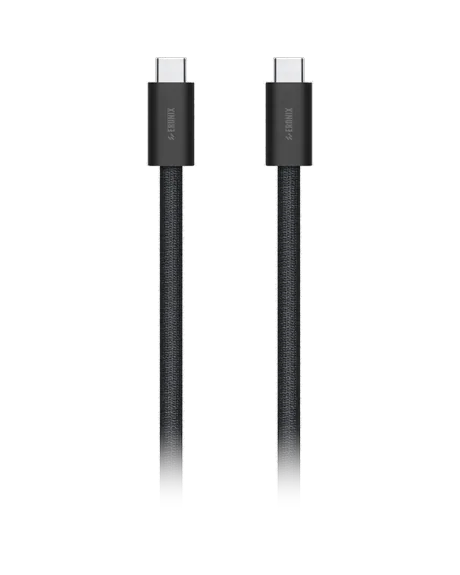
Step 2 depends on a cable you trust. The Everyday Cable is USB-C to USB-C, rated 60 W and tested to 10,000 bends, so it can be the known good cable you rule out first.
It fits every USB-C earbud case, phone and tablet. At 1 m, braided, with aluminium shells and a leather tie, it stays neat in a bag between tests.
Step by step
- Wipe the metal contacts on each earbud with a dry lint-free cloth.
- Brush debris from the case well and port with a soft dry brush.
- Charge the case on a known good adapter and cable for at least 15 minutes.
- Reseat each earbud firmly and leave both charging for 30 minutes.
- Reset and re-pair the earbuds if one still does not charge.
Questions people ask
Why is only one earbud charging?
The most common cause is a dirty contact or a bud not seated fully in the case. Ear wax and skin oil build up on one side more than the other. Wipe the bud's metal contacts with a dry lint-free cloth, gently brush out the case well, reseat the bud and leave it on power. If it still fails, reset the earbuds.
How long should I charge earbuds that seem dead?
Give them longer than you think. Charge the case with the buds inside for at least 30 minutes on a known good adapter before deciding. A deeply drained lithium-ion cell may be in a protective sleep mode, which Battery University describes below about 2.50 V, and can take time to recover.
Can I clean earbud contacts with alcohol?
Apple allows a cloth slightly dampened with isopropyl alcohol on the outside of the case, but says to keep liquid out of charging ports and never insert objects into them. For contacts, a dry lint-free cloth or a soft dry brush is the safest first step. Let anything damp dry fully before charging.
Why does my earbud case not charge on a wireless pad?
Alignment is the usual reason. Apple says to place the closed case with the status light facing up, and some cases must be centred flat on the pad. Thick covers on the case can also block charging. Try without the cover, check the case works on a cable, then retry the pad.
Sources
- Apple Support: Charge your AirPods and learn about battery life · published 13 Oct 2026, accessed 22 Nov 2026
- Apple Support: How to clean your AirPods · accessed 22 Nov 2026
- Battery University: BU-702 How to store batteries · accessed 22 Nov 2026
- Google Pixel Help: Fix a Pixel phone that won't charge or turn on · accessed 22 Nov 2026
Battery Management
Capacity is chemistry; longevity is software.
Read →Explainer · 4 min readHow long should earbud batteries last?
Two numbers matter: hours per charge today, and how many charges before they shrink.
Read →Explainer · 4 min readCaring for earbud batteries
You cannot swap an earbud battery. You can change how quickly it wears.
Read →Explainer · 4 min readWhy one earbud dies first
Your earbuds are twins, but one of them usually has the harder job.
Read →Explainer · 5 min readSecond-hand phones: battery checks before you buy
The screen and camera are easy to inspect. The battery needs five minutes and a plan.
Read →Explainer · 5 min readLDAC, aptX, AAC: which codec your phone really uses
The logo on the earbud box is a promise. Your phone decides whether it is kept.
Read →