Journal · Explainer · 4 min read
Why does my iPad charge slowly on an iPhone charger?
Same port, same cable, very different appetite. The iPad wants more than the cube gives.
An iPad Air battery holds about 29 Wh. On the 5 W cube that came with older iPhones, that is close to six hours of charging before any losses. So you plug the iPad in at 10%, and an hour later it has barely moved, and if you use it while charging, it may even drop. The charger is fine with the phone. Why is it hopeless with the tablet?
Short answerThe iPad has a much bigger battery and can draw far more power than an older iPhone charger gives. Apple's old iPhone cube supplies only 5 W. A 20 W USB-C adapter is the sensible minimum for most iPads; an iPad Air M3 draws about 30 W, and Apple says iPad Pro M5 needs 60 W or more to fast-charge.
The numbers behind the slow charge
Apple's support page on its USB power adapters says most iPhone models before iPhone 11 came with a 5 W adapter. It lists the 20 W USB-C adapter for many iPads, including iPad (8th to 10th generation), iPad Air (4th generation and M2) and iPad mini (6th generation).
The battery gap is large. ChargerLAB's compatibility test of the iPad Air with M3 lists its battery at 28.93 Wh. At 5 W, before any losses, that is nearly six hours of input for a full charge, and slower still if you use the iPad while it charges, because the screen and processor take part of the power.
With the right charger the iPad takes much more. In ChargerLAB's test, the iPad Air M3 drew a peak of about 18.5 W from Apple's 20 W charger and about 29.5 W from a 70 W Apple charger, with a highest reading near 30 W. ChargerLAB notes the box lists up to 45 W input, but about 30 W was the practical limit with Apple chargers.
The newest iPad Pro wants more. Apple's iPad fast-charge page says the iPad Pro (M5) can reach up to 50% in around 30 minutes with a USB-C adapter rated at 60 W or higher and the supplied USB-C cable.
Computer ports are no better. Wikipedia's summary of USB power lists a standard USB 2.0 port at 500 mA and 5 V, just 2.5 W, and a USB 3 port at 900 mA, or 4.5 W. An iPad plugged into an older computer may charge slowly or simply hold its level. A USB-C port on a recent laptop can do better if it supports Power Delivery, but a wall charger remains the reliable choice.
| iPad | Charger | What it takes |
|---|---|---|
| iPad (8th to 10th gen), iPad mini (6th gen), iPad Air (4th gen, M2) | 20 W USB-C | Apple's listed adapter |
| iPad Air (M3) | 30 W or higher USB-C PD | About 30 W peak |
| iPad Pro (M5) | 60 W or higher USB-C PD | 50% in about 30 min |
| Any iPad on an old iPhone cube | 5 W (5 V 1 A) | Nearly 6 h for a 29 Wh battery |
Source: Apple Support; ChargerLAB, accessed 22 Nov 2026
Watts
Source: ChargerLAB; Apple Support; Wikipedia: USB hardware, accessed 22 Nov 2026
How the iPad and charger agree on power
A modern USB-C charger and iPad negotiate over USB Power Delivery. The iPad asks for a higher voltage, such as 9 V or 15 V, and the charger supplies it if it can. An old 5 W USB-A cube has no such conversation: it offers 5 V at 1 A, and that is all the iPad can take from it.
Imagine filling a water tank on the roof through a garden hose that the kitchen tap uses. It will fill, eventually, but the tank was sized for the main supply line. The iPad's battery is the tank, and a phone charger is the garden hose.
This is safe. The iPad simply charges at whatever the charger can provide. Nothing is overloaded; it is just slow, and if the iPad is busy it may barely keep up.
Charging also slows near the top, as with any lithium-ion battery. Even on the right charger, the last 20% takes longer than the first 20%, so judge a charger by how quickly it gets the iPad from low to half, not by the time to reach 100%.
What to use instead
For a standard iPad, iPad mini or iPad Air, use at least a 20 W USB-C Power Delivery charger. A 30 W or higher charger lets an iPad Air reach its roughly 30 W limit.
For iPad Pro (M5), use a 60 W or higher USB-C PD charger to get Apple's fast-charge figure, with a USB-C cable rated for that power.
If you want one charger for iPhone and iPad, a 30 W to 40 W USB-C PD charger covers both well; above that, the extra mainly helps an iPad Pro or a laptop.
What to check before you buy
Read the watts printed on your current charger. If it says 5 W, or 5 V at 1 A, it is an old phone cube.
Look for USB-C Power Delivery on a new charger. iPads charge fastest over USB-C PD.
Match the cable. Use USB-C to USB-C, rated 60 W or more for iPad Pro.
On multi-port chargers, check the watts on the port the iPad will use when a phone is also plugged in.
Check the BIS registration number and verify it on the BIS CRS portal.
Myth corner
Myth: charging an iPad on an iPhone charger damages it. It does not. The iPad draws only what the charger can safely provide. The only cost is time, and with a 5 W cube that cost is several hours.
The right one for you
One charger for iPhone and iPad needs the watts on the right port. The Fermi45 gives 45 W from one port, or 30 W and 15 W across its two USB-C ports, so an iPad Air takes its roughly 30 W while an iPhone charges beside it.
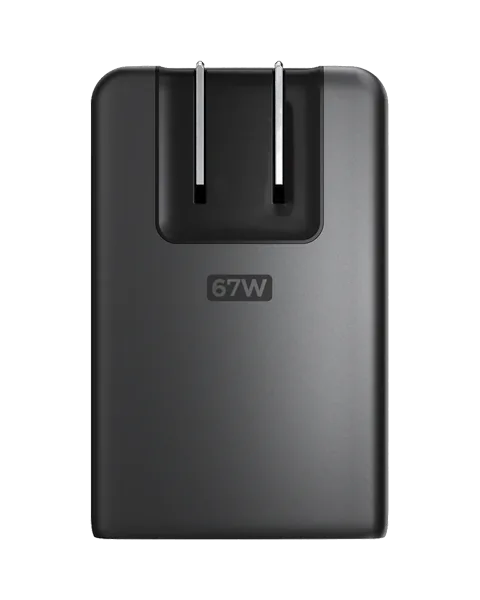
For an iPad Pro (M5), the Entropy67 gives 67 W from a single port, above the 60 W Apple names for its fast charge, in a body 14 mm thin.

Step by step
- Read the watt rating printed on your charger.
- Use a USB-C Power Delivery charger of at least 20 W.
- For iPad Pro (M5), use 60 W or higher.
- Use a USB-C to USB-C cable rated for that power.
- Lock the screen while charging for the fastest result.
Questions people ask
Can I charge my iPad with my iPhone charger?
Yes, safely. It will just be slower, especially with Apple's older 5 W adapter, which Apple lists for most iPhones before iPhone 11. A 20 W USB-C adapter, the one sold for recent iPhones, charges most iPads much faster, at about 18 W in ChargerLAB's test of the iPad Air M3.
What watt charger does my iPad need?
Apple lists 20 W USB-C for many recent iPad, iPad mini and iPad Air models. An iPad Air M3 can use about 30 W, according to ChargerLAB. For iPad Pro (M5), Apple specifies a 60 W or higher USB-C adapter to reach up to 50% in about 30 minutes.
Will a MacBook charger damage my iPad?
No. Under USB Power Delivery the iPad requests what it needs and the charger supplies no more than that. ChargerLAB found an iPad Air M3 drew about 29.5 W from a 70 W Apple charger, well below the charger's maximum, which is normal.
Why does my iPad say Not Charging?
Usually the charger cannot supply enough power while the iPad is in use, often with an old 5 W adapter or a computer USB port. Try a 20 W or higher USB-C PD adapter, lock the screen, and check the cable. Very hot or cold conditions can also pause charging.
Sources
- Apple Support: About Apple USB power adapters · accessed 22 Nov 2026
- Apple Support: Fast charge your iPad · accessed 22 Nov 2026
- ChargerLAB: Compatibility test of Apple iPad Air M3 · accessed 22 Nov 2026
- Wikipedia: USB hardware (power) · accessed 22 Nov 2026
USB-C Power Delivery
One connector, a negotiated contract.
Read →Explainer · 5 min readGaN chargers: what changed and what did not
A new material shrank the charger. Your phone's charging speed stayed where it was.
Read →Explainer · 5 min readMulti-port chargers and power sharing, explained
Why the laptop pauses when you plug in your phone, and the one table to read first.
Read →Explainer · 5 min readHow to charge two laptops from one charger
In one lab test, a 65 W charger gave the second laptop 0 W. Here is how to avoid it.
Read →Explainer · 5 min readHow to charge everything on one 65 W charger
Sixty-five watts is a budget. Spend it in the right order and it covers the whole bag.
Read →Explainer · 5 min readHow to choose the right charger in 30 seconds
Four questions, asked in order, cut a wall of chargers down to two or three.
Read →