Journal · Buying guide · 4 min read
Which charger does your iPad Pro need?
The box adapter is a third of what the tablet can take. Here is when that matters
The 13-inch iPad Pro holds a 38.99 Wh battery, and Apple puts a 20 W adapter in the box. Yet the tablet can fast charge on three times that. Which one should sit on your desk?
Short answerThe 20 W adapter in the box works, slowly. The iPad Pro (M5) fast charges to about 50 per cent in around 30 minutes with a USB-C adapter rated 60 W or more, such as Apple's 40 W Dynamic Power Adapter with 60W Max. Any USB PD adapter of 60 W or more, with a good USB-C cable, does it.
iPad Pro charging numbers, model by model
Apple's specification page lists the iPad Pro with the M5 chip in two sizes: the 11-inch with a 31.29 Wh battery and the 13-inch with 38.99 Wh. Both are rated for up to 10 hours of web browsing on Wi-Fi or video. The box includes a 20 W USB-C Power Adapter.
Apple's fast-charge support article, published in July 2026, names the iPad Pro (M5) as the iPad that fast charges, and asks for a USB-C compliant power adapter rated 60 W or higher. Apple's own tests used its 40 W Dynamic Power Adapter with 60W Max and its 70 W USB-C Power Adapter, timed from a drained battery to about 50 per cent in roughly 30 minutes.
The previous generation shows why the adapter matters. In ChargerLAB's compatibility test of the iPad Pro (M4), Apple's 20 W adapter delivered about 18.3 W. Apple's 61 W adapter delivered about 33.3 W, and the highest of the third-party chargers reached about 34.3 W, mostly at 15 V. In other words, the M4 model topped out in the mid-30s, and the 20 W adapter gave a little more than half of that.
The port is fast for data too. Apple lists Thunderbolt 3 and USB 4 at up to 40 Gb/s and USB 3 at up to 10 Gb/s, and the same port carries power and DisplayPort video.
| Adapter | Measured on iPad Pro (M4) | Fast charges iPad Pro (M5) |
|---|---|---|
| Apple 20 W (in the box) | about 18.3 W | No |
| Apple 61 W | about 33.3 W | Rated above 60 W |
| Apple 40 W Dynamic, 60 W Max | Not tested | Yes, in Apple's test |
| Apple 70 W | Not tested | Yes, in Apple's test |
Source: ChargerLAB iPad Pro M4 compatibility test; Apple Support, Fast charge your iPad, July 2026; accessed 22 Nov 2026
Measured power (W)
Source: ChargerLAB, compatibility test of Apple iPad Pro M4, accessed 22 Nov 2026
How an iPad Pro takes its charge
Over USB Power Delivery, the adapter lists the voltages and currents it can supply, and the iPad picks one. ChargerLAB's M4 results show that model mostly choosing 15 V at a little over 2 A. Raising the voltage is how a USB-C cable carries more power without needing more current.
Think of a goods train. You can add wagons, which is like adding current, or run at higher speed, which is like raising voltage. Both move more cargo per hour. USB PD mostly raises the voltage, because more current means thicker cables and more heat.
Charging is fastest when the battery is low and slows as it fills. That is why Apple quotes the 30-minute figure only to 50 per cent. The second half always takes longer, whatever adapter you use.
Which adapter suits which iPad Pro owner
Overnight charger: the 20 W adapter in the box is fine if the iPad charges while you sleep.
Daily laptop replacement: a 60 W or larger USB PD adapter is worth it. It unlocks fast charging on the M5 model and keeps up when you work and charge at once.
Already own a MacBook adapter: if it is USB-C and 60 W or more, it will charge an iPad Pro safely and at full speed. Apple's own test used a 70 W MacBook adapter.
Charging an iPad Pro from a power bank
Power banks follow the same rules as wall adapters. In ChargerLAB's test of the iPad Pro (M4), the power banks it tried delivered about 33 to 34 W, mostly at 15 V, matching the best wall chargers on that model.
For the M5 model, the bank's USB-C port needs to supply 60 W or more on its own to reach Apple's fast-charge figure. A bank that shares 60 W across two ports will charge more slowly when both are in use, so check the single-port rating before you travel.
What to check before you buy
Read the label for USB PD and a total of 60 W or more. On a 20 V line, 60 W means 3 A. Lower figures will still charge, just more slowly.
On multi-port adapters, check the single-port figure. A 65 W adapter shared between a phone and an iPad may give the iPad far less than 60 W.
Use a full-featured USB-C cable if you also move files. A charge-only cable carries power but runs data at USB 2 speed, far below the iPad's 40 Gb/s port.
Confirm which iPad Pro you have. Apple's fast-charge article covers the M5 models. Older iPad Pro models will charge on a 60 W adapter but at their own lower peak, as ChargerLAB's M4 test shows.
Myth corner
Myth: a MacBook charger will overload an iPad. It will not. Under USB PD the iPad only draws the power it requests, so a 70 W or 96 W USB-C adapter is safe. Apple itself used a 70 W adapter in its iPad Pro fast-charge testing.
The right one for you
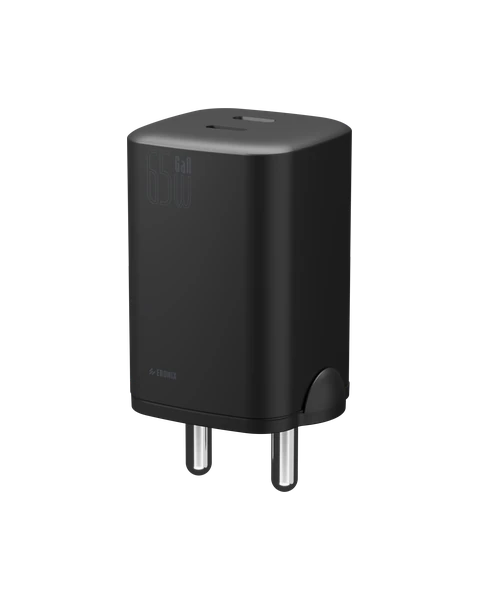
The iPad Pro (M5) fast charges from 60 W. Fermi65 is the ERONIX charger matched to it: 65 W, with two USB-C ports, so the tablet reaches Apple's half charge in about 30 minutes.
A phone on the second port shares the power, so give the iPad the adapter to itself when time is short.
Step by step
- Check your iPad Pro model in Settings, General, About.
- Pick a USB PD adapter rated 60 W or more for an M5 model.
- On a multi-port adapter, confirm one port gives 60 W on its own.
- Use a good USB-C cable, full-featured if you also transfer files.
- Charge from low battery and expect about half in 30 minutes on an M5 model.
Questions people ask
Can I use a 20 W charger for the iPad Pro?
Yes. Apple ships a 20 W adapter with the iPad Pro (M5). It charges safely but slowly. ChargerLAB measured about 18.3 W from that adapter on the previous M4 model. For Apple's fast charge to 50 per cent in about 30 minutes, you need 60 W or more.
How long does an iPad Pro take to charge fully?
Apple publishes only the fast-charge figure: about 50 per cent in around 30 minutes with a 60 W or higher adapter. A full charge takes considerably longer because charging slows as the battery fills. With the 20 W adapter in the box, expect several hours from empty, which is why it suits overnight charging.
Does the iPad Pro M4 fast charge too?
It charges faster on a bigger adapter, but Apple's fast-charge article lists only the M5 models. ChargerLAB's test of the M4 model found a peak of about 34 W, mostly at 15 V, so any USB PD adapter of 35 W or more gives it close to full speed.
Can I charge my iPhone from my iPad Pro?
Yes. The iPad Pro's USB-C port can supply power to a connected device such as an iPhone or AirPods with a USB-C cable. It charges slowly compared with a wall adapter and drains the iPad's battery, so it is best for emergencies.
Sources
- Apple: iPad Pro technical specifications · accessed 22 Nov 2026
- Apple Support: Fast charge your iPad · published 29 Jul 2026, accessed 22 Nov 2026
- ChargerLAB: Compatibility test of Apple iPad Pro M4 · accessed 22 Nov 2026
USB-C Power Delivery
One connector, a negotiated contract.
Read →Buying guide · 4 min readWhich charger for two phones at once?
Two phones, one socket, both fast. The answer is in the shared-port line of the label.
Read →Buying guide · 4 min readHow many watts does a 4-port desk charger really give each port?
The wattage on the box is a shared budget. Every extra cable takes a slice.
Read →Buying guide · 5 min readWhich charger for students: one brick for everything
One bag, one socket, one brick. Here is how many watts that brick really needs.
Read →Buying guide · 5 min readWhich charger for an iPhone and Apple Watch on one brick?
Two devices, one socket by the bed. Here is how much charger that really takes.
Read →Buying guide · 5 min readWhich charger does your MacBook Pro 14-inch (M6 or M5 Pro/Max) need?
Three adapters, one laptop size. Here is the wattage the machine actually asks for.
Read →