Journal · Buying guide · 4 min read
How many watts does a 4-port desk charger really give each port?
The wattage on the box is a shared budget. Every extra cable takes a slice.
A desk charger says 100 W on the front and has four ports. Plug in a laptop, a phone, earbuds and a watch, and it is tempting to imagine 25 W each, or 100 W for the laptop alone. In one lab test, a 65 W charger's laptop port fell to under 34 W once all its ports were busy. So what does each port really get?
Short answerA multi-port charger shares one total power budget and re-divides it every time you plug in or unplug a device. A single port usually gets close to the full rating. With several ports busy, each gets a share set by the maker's distribution table, and the main USB-C port often drops sharply. Read that table, not the front.
Real per-port numbers from lab tests
ChargerLAB's power distribution review of a 65 W, three-port charger from a major phone maker shows the pattern clearly. On its own, the main USB-C port delivered 63.4 W to a 16-inch laptop. With a laptop on that port and a phone on the second USB-C port, the laptop dropped to 38.76 W while the phone got 23.61 W. With all three ports busy, the split became 33.77 W, 23.39 W and 5.71 W.
The same review found one combination where the second USB-C port gave 0 W to a second laptop, because the charger chose to keep the first laptop running instead. It also recorded a brief cut: plugging a device into the second USB-C port made the first port drop to zero for a moment before it resumed.
Apple's support page for its 35 W dual USB-C adapter gives a simpler example of the same idea. Two devices such as a Mac and an iPhone get up to 17.5 W each. A Mac or iPhone paired with an Apple Watch or AirPods gets up to 27.5 W, with 7.5 W for the small device. Apple's advice when a device needs more is to unplug the other one.
| Devices connected | USB-C 1 | USB-C 2 | USB-A |
|---|---|---|---|
| Laptop alone | 63.4 W | — | — |
| Laptop and phone | 38.76 W | 23.61 W | — |
| All three ports | 33.77 W | 23.39 W | 5.71 W |
Source: ChargerLAB power distribution review (EP-T6530)
Watts on USB-C 1
Source: ChargerLAB power distribution review
How a charger shares its power
Inside, most multi-port chargers have one main power stage sized for the total rating, followed by a controller that hands out power to each port. When a new device connects, the controller recalculates the split and tells each device, through USB Power Delivery, what it may now draw. Nothing's support page explains that this reallocation can cause a short interruption before charging resumes, which is the drop to zero ChargerLAB recorded.
Heat adds a second limit. Tom's Hardware's June 2026 test of 20 wall chargers found all three 140 W models throttled after 30 minutes at full load, one falling to 88 W. None of the 45 to 68 W chargers throttled. A big charger running every port flat out may give less after half an hour than it does in the first minute.
Think of a family sharing one bowl of rice at dinner. If one person eats alone, they can take almost all of it. When four sit down, the bowl is the same size, and whoever serves decides the portions. The charger's controller is the person serving, and its distribution table is the rule they follow.
Working out what your devices need
Add up the realistic draw, not the maximums. A phone may take 20 to 40 W early in its charge and much less near full. Earbuds and watches need only a few watts. For a laptop, the wattage of the adapter that came in its box is the best guide to what it wants under load; it can usually charge more slowly on less.
Then check whether the charger's table gives the laptop port enough when the others are busy. If the laptop port falls to about 39 W with a phone attached, as in ChargerLAB's test, a laptop that shipped with a 65 W adapter will charge slowly or only hold its level during heavy work.
What to check before you buy
Ask for the power distribution table. A good maker prints the watts on each port for every combination. If there is no table, you are guessing.
Find the combination you will actually use, such as laptop plus phone, and read the laptop's share. That is the number that decides whether the charger suits you.
Check which port is the main one. Plug the laptop into the port labelled for the highest output, often marked C1.
Expect a brief pause when you plug in another device. If a laptop or phone stops for a second and restarts, it is the charger reallocating power, not a fault.
For heavy, all-day use, look for independent thermal tests. Sustained output after 30 minutes matters more than the first-minute peak.
Myth corner
Myth: a 100 W four-port charger gives 100 W from every port. Fact: the rating is the combined total. ChargerLAB's test of a 65 W three-port unit showed its main port falling from 63.4 W alone to 33.77 W with all three ports in use.
The right one for you
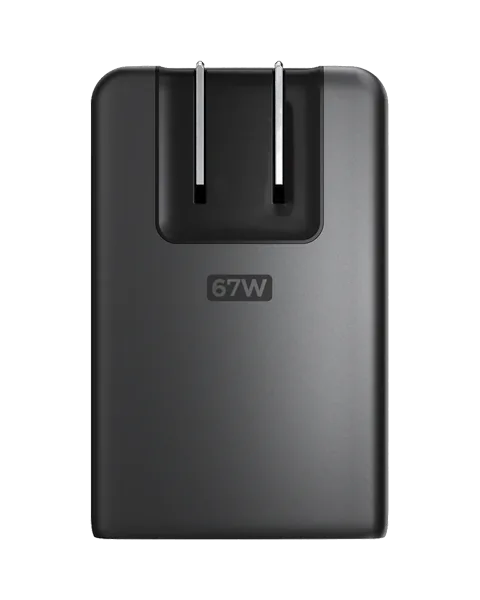
If your desk holds a MacBook Air and a phone, Entropy67 publishes the table this article asks for. One port alone gives 67 W; with two devices it splits 45 W and 20 W, or 35 W and 30 W, for 65 W in total.
It is made for the MacBook Air and the iPhone 18 Pro and Duo, in a body 14 mm thin.
Step by step
- List the devices you will charge together.
- Find the maker's power distribution table for that combination.
- Check the laptop port's share when the other ports are busy.
- Plug the laptop into the highest-output port.
- Keep the charger in open air during long, heavy use.
Questions people ask
Why does my laptop stop charging when I plug in my phone?
The charger is reallocating its power budget. ChargerLAB recorded the main port briefly dropping to zero when a second USB-C device was connected, and Nothing's support page describes the same short interruption. Charging should resume within moments at a new, lower share.
Is a multi-port charger slower than separate chargers?
It can be when several devices draw at once, because they share one total. Apple's 35 W dual adapter, for example, gives up to 17.5 W each to two phones or tablets. Separate chargers each give their full rating, at the cost of more plugs and more clutter.
Which port should I use for my laptop on a multi-port charger?
Use the port the maker lists with the highest output, often labelled C1. In ChargerLAB's test of a 65 W three-port charger, the main USB-C port delivered 63.4 W alone, while the second port delivered about 24 W to the same kind of phone.
Do multi-port chargers overheat?
Big ones can throttle. Tom's Hardware found all three 140 W chargers it tested reduced output after 30 minutes at full load, while none of the 45 to 68 W models did. Give the charger space to breathe and avoid covering it.
Sources
- ChargerLAB: Power distribution review of a 65W 2C1A charger (EP-T6530) · 14 Jul 2022
- Apple Support: How to use the 35W Dual USB-C Port Power Adapter · accessed 22 Nov 2026
- Nothing Support: Why does the charging port stop working and restart when I start using another port · accessed 22 Nov 2026
- Tom's Hardware: We tested 20 wall chargers from 15 W to 140 W · 11 Jun 2026
USB-C Power Delivery
One connector, a negotiated contract.
Read →Explainer · 5 min readGaN chargers: what changed and what did not
A new material shrank the charger. Your phone's charging speed stayed where it was.
Read →Explainer · 4 min readHotel room charging: making one socket work
One socket behind the bed, three devices, a 7 am meeting. Here is the plan.
Read →Comparison · 4 min readSingle-port vs multi-port chargers
The big number on the box is shared. The table on the back says what each device gets.
Read →Buying guide · 4 min readWhich charger for two phones at once?
Two phones, one socket, both fast. The answer is in the shared-port line of the label.
Read →Buying guide · 5 min readWhich charger does your MacBook Pro 14-inch (M6 or M5 Pro/Max) need?
Three adapters, one laptop size. Here is the wattage the machine actually asks for.
Read →