Journal · Comparison · 4 min read
Single-port vs multi-port chargers
The big number on the box is shared. The table on the back says what each device gets.
A 65 W charger with three ports sounds like three chargers in one. Then you plug in your phone and your laptop together, and the phone that was fast charging a minute ago slows down. Did you buy the wrong charger?
Short answerA multi-port charger shares one total wattage across its ports. A single-port charger gives all of it to one device. The number that decides which suits you is the per-port output with every device you plan to use plugged in at once. If that still meets each device's needs, multi-port saves space; if not, buy single-port.
What multi-port chargers actually deliver
Apple publishes a clear example. Its support page for the 35 W Dual USB-C Port adapter says the total is 35 W. With a Mac laptop and an iPhone or iPad, each gets up to 17.5 W. With a phone or Mac and an Apple Watch or AirPods, the larger device gets up to 27.5 W and the small one up to 7.5 W.
ChargerLAB's power distribution review of a 65 W charger with two USB-C ports and one USB-A port, published in July 2022, shows how far the split can go. Alone, the main USB-C port gave a 16-inch MacBook Pro 63.4 W and a Galaxy phone 37.42 W. With a laptop and a phone sharing the two USB-C ports, the laptop dropped to 38.76 W and the phone held 23.61 W. With all three ports in use, the laptop got 33.77 W, the phone 23.39 W and the USB-A port about 5.7 W. The two USB-C ports could not charge two laptops at once: with a laptop on the second port alongside another device, that port gave no output.
The same review recorded something many buyers notice. When a second device was plugged into the other USB-C port, the first port's output dropped to zero for a moment and then recovered. Plugging into the USB-A port only reduced it.
| Devices connected | Laptop | Phone | USB-A |
|---|---|---|---|
| Laptop alone, main port | 63.4 W | — | — |
| Phone alone, main port | — | 37.42 W | — |
| Laptop and phone | 38.76 W | 23.61 W | — |
| All three ports | 33.77 W | 23.39 W | About 5.7 W |
Source: ChargerLAB, Jul 2022
Laptop power (W)
Source: ChargerLAB, Jul 2022
How a charger shares power
Inside a multi-port charger is one power stage, the part that converts mains power, feeding several USB outputs. A small controller decides how to divide it. When a new device arrives, the controller recalculates the share, and each USB-C port must agree a new power level with its device. That fresh agreement is why charging can pause for a second. Nothing, a phone maker, describes the same behaviour on its support page: when several ports are in use, the adapter divides its power, and that redistribution can cause a short pause before charging continues.
Think of one water tank on a terrace feeding taps in the kitchen and the bathroom. Open both, and each tap runs weaker than when it was alone. A good plumber decides in advance how the flow splits; a good charger prints that split on its label.
Single-port: when it wins
Single-port chargers are smaller for the same peak watts, simpler and give the full rating every time. They suit a bedside, a laptop desk where the laptop is the only device, or anyone who wants the top speed from one device without thinking about ports.
They also never interrupt a charge. Nothing else can join and trigger a reallocation.
The trade-off is clutter. A phone, a watch and earbuds on single-port chargers need three sockets, which few Indian bedside boards have spare.
Multi-port: when it wins
Multi-port chargers win in travel bags, hotel rooms with one spare socket, and homes where the phone, earbuds and watch all charge overnight. Overnight, speed matters less than having everything full by morning, so a shared total is fine.
They also win when the main device is modest. Two phones that each need 20 to 25 W can share a 45 or 65 W charger with no loss of speed.
What to check before you buy
Find the distribution table. A good multi-port charger prints or publishes per-port outputs for each combination, such as 45 + 20 W. If you cannot find one, you cannot know what each device will get.
Add up your real needs. List the devices you will charge at the same time and their wattages. Compare that sum with the per-port figures, not the headline total.
Check which port is the main one. Laptops usually need the port labelled C1 or marked with the highest wattage. In ChargerLAB's test, a laptop on the secondary port got no power while another device was connected.
Check PPS on each USB-C port if you use a Samsung phone. In ChargerLAB's test, the USB-C ports kept PPS in multi-port mode, but this varies by charger.
Plan for the pause. If a laptop is mid-update or a phone is recording, plug the second device in before you start, not during.
Myth corner
Myth: a 65 W three-port charger gives 65 W to each port. Fact: 65 W is the total. In ChargerLAB's test of one such charger, three devices together drew roughly 33.8, 23.4 and 5.7 W, which adds up to about the 65 W rating.
The right one for you
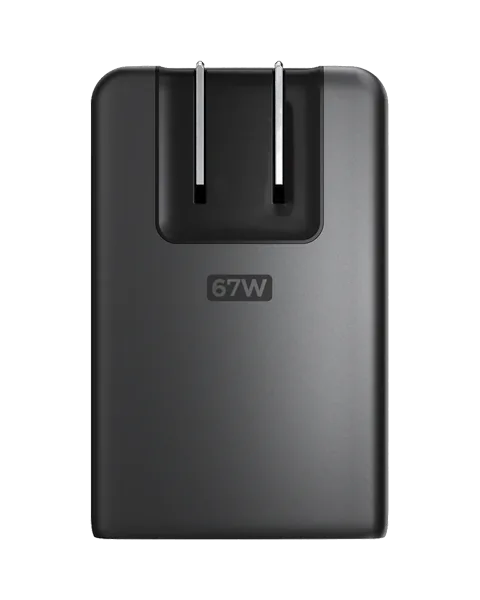
If one charger must serve a phone and a laptop, choose one that publishes its split. The Entropy67 gives 67 W from a single port, and with two devices it divides 45 + 20 W or 35 + 30 W, so you know in advance what each will get.
It is made for the iPhone 18 Pro and iPhone Duo alongside a MacBook Air, the kind of pair this article describes. At 14 mm thin, it lies flat in a briefcase pocket.
Step by step
- List the devices you charge at the same time and their wattages.
- Find the charger's per-port output table for that combination.
- Confirm each device still gets close to its rated wattage.
- Put the laptop or largest device on the main port.
- Plug in all devices before starting a long or critical charge.
Questions people ask
Why does my phone stop charging when I plug in another device?
The charger is reallocating its total power. Each USB-C port has to agree a new power level with its device, and some chargers cut the port briefly while they do. ChargerLAB recorded the first port dropping to zero and recovering when a second USB-C device was connected.
Can I charge a laptop and a phone from one 65 W charger?
Usually yes, but more slowly than on separate chargers. In ChargerLAB's test of a 65 W two-C, one-A charger, a laptop and a phone sharing the USB-C ports got about 38.8 W and 23.6 W. Use the port the maker marks for laptops, and check the distribution table first.
Is a dual-port charger safe for an iPhone and an Apple Watch together?
Yes, if it is a USB PD charger built for multiple devices. Apple's 35 W dual-port adapter, for example, gives up to 27.5 W to the iPhone and up to 7.5 W to the watch or AirPods, and allocates power automatically by each device's needs.
Are USB-A ports on multi-port chargers still useful?
For older cables and small devices, yes. But USB-A ports usually get the smallest share. In ChargerLAB's test, the USB-A port fell to about 5.7 W with all three ports in use. For phones and tablets, use a USB-C port where possible.
Should I leave unused cables plugged into a multi-port charger?
Apple suggests unplugging unused cables if a device charges slowly on its dual-port adapter. Some chargers count a connected cable when deciding the split. Unplugging cables you are not using keeps the most power available for the device that needs it.
Sources
- How to use the 35W Dual USB-C Port Power Adapter (Apple Support) · accessed 22 Nov 2026
- Power Distribution Review of Samsung 65W 2C1A Charger EP-T6530 (ChargerLAB) · 14 Jul 2022
- Why does the charging port stop working and restart when I start using another port (Nothing support) · accessed 22 Nov 2026
GaN — Gallium Nitride
The semiconductor that let chargers shrink.
Read →Buying guide · 1 min readChoosing a USB-C charger: a short, honest checklist
Five checks that outlast any marketing cycle.
Read →Buying guide · 4 min readWhich charger does the Galaxy S26 Ultra need?
Sixty watts on the box. Here is what it takes to get it.
Read →Comparison · 6 min read25 W vs 45 W for a Galaxy: what you actually gain
The extra 20 W looks big on the box. On the clock, it is a few minutes.
Read →Comparison · 5 min read65 W vs 100 W for a laptop: which one do you need?
A 100 W charger has 54 percent more power. Whether you feel it depends on one number.
Read →Explainer · 5 min readAVS and USB PD 3.2: what is new
A phone asked a power bank for 18 V. Here is the rule that made it possible.
Read →