Journal · Explainer · 5 min read
Why laptops charge at 20 V
Your phone sips at 9 V. Your laptop asks for 20 V. The reason is in the cable.
Turn over a USB-C laptop charger and read the small print. Among the 5 V and 9 V lines sits one that says 20 V, 3 A or 20 V, 5 A. Your phone never asks for it. Why does a laptop need four times the voltage of a USB port?
Short answerBecause power is volts multiplied by amps, and amps are what heat a cable. At 20 V, a USB-C cable can carry 60 W at 3 A or 100 W at 5 A. At 5 V, the same 60 W would need 12 A. A 20 V supply also sits above the laptop battery's voltage, as its charging circuit needs.
The numbers: USB power, step by step
USB began small. The Wikipedia summary of USB power history lists 5 V at 500 mA, or 2.5 W, for USB 2.0, and 900 mA, or 4.5 W, for USB 3.0. USB-C at plain 5 V reaches 3 A, or 15 W.
USB Power Delivery opened the higher steps. Its standard power range uses fixed voltages of 5, 9, 15 and 20 V. At 3 A, those give 15, 27, 45 and 60 W, and the 60 W level works with any compliant USB-C cable. At 20 V and 5 A, power reaches 100 W, but only with an electronically marked 5 A cable.
In May 2021, the USB Promoter Group announced USB PD 3.1, which added 28 V, 36 V and 48 V to reach 140, 180 and 240 W, and named larger notebook PCs among the products that could now move to USB-C. For most laptops, though, 20 V remains the workhorse level.
Apple's own adapter list shows where laptops sit. It recommends 30 W to 70 W adapters for MacBook Air models from 2022 onwards, 67 W to 96 W for the 14-inch MacBook Pro from 2021, and 140 W for the 16-inch MacBook Pro from 2021.
| Voltage | Current | Power |
|---|---|---|
| 5 V | 3 A | 15 W |
| 9 V | 3 A | 27 W |
| 15 V | 3 A | 45 W |
| 20 V | 3 A | 60 W |
| 20 V | 5 A, e-marked cable | 100 W |
| 48 V | 5 A, EPR cable | 240 W |
Source: USB hardware, Wikipedia; USB Promoter Group, May 2021
W lost
Source: Worked from the American wire gauge table, Wikipedia
How it works: why voltage beats current
Two things happen in a cable. First, the wire drops some voltage along the way. Second, it turns some power into heat. Both grow with current. The heat grows with the square of the current, so doubling the amps makes four times the heat.
Here is a worked example using Wikipedia's copper wire table. A 24 AWG copper conductor has about 0.084 ohms per metre. In a 1 metre cable, power flows out and back, so about 0.17 ohms in total. At 3 A, the cable wastes about 1.5 W and drops about 0.5 V. At 12 A, the current 5 V would need for 60 W, it would waste about 24 W and drop about 2 V, which is almost half the supply. That is why 60 W at 5 V is impractical, and why USB-C cables are rated in amps.
Think of it like water through a garden pipe. To deliver more water through the same pipe, you can push it harder, which is voltage, or force more volume through, which is current. Pushing harder works neatly; forcing more volume through a narrow pipe loses most of the effort to friction.
The battery side of the story
A laptop battery is made of several lithium cells connected in series, so their voltages add. Battery University gives about 4.20 V as the full-charge voltage of a common lithium-ion cell. Four cells in series therefore reach about 16.8 V when full.
A charging circuit inside the laptop has to turn the incoming supply into the exact voltage the battery needs at each moment. It is simplest and most efficient to step voltage down from a slightly higher supply. A 20 V input sits above a typical multi-cell pack across its whole charge range, while a 5 V or 9 V input would have to be boosted, which is less efficient and generates more heat at high power.
That is also why a phone charger can charge a laptop, but slowly. If the charger offers only 5 V and 9 V, or tops out at 20 W, the laptop may charge at a crawl, show a low-power warning, or only slow its battery drain while in use.
What to check before you buy
Find the 20 V line on the charger label. For a laptop, look for 20 V at 3 A, meaning 60 W, or 20 V at 5 A, meaning 100 W. If there is no 20 V line, the charger is meant for phones.
Match the wattage to the laptop maker's recommendation. Apple, for example, recommends at least the minimum wattage of the adapter it lists for each Mac.
Use a 5 A cable for anything above 60 W. Wikipedia's summary of the standard notes that 100 W at 20 V needs an electronically marked 5 A cable, and above 100 W an EPR cable.
On a multi-port charger, check what one port gives when others are in use. A 100 W charger may drop the laptop port to 45 W or 65 W when a phone is plugged in.
Myth corner
Myth: a 20 V charger will fry a phone. USB PD starts every connection at 5 V and only raises the voltage after a handshake in which the device asks for it, as Wikipedia's summary of the standard explains. A phone that asks for 9 V gets 9 V, even from a charger that can offer 20 V to a laptop.
The right one for you
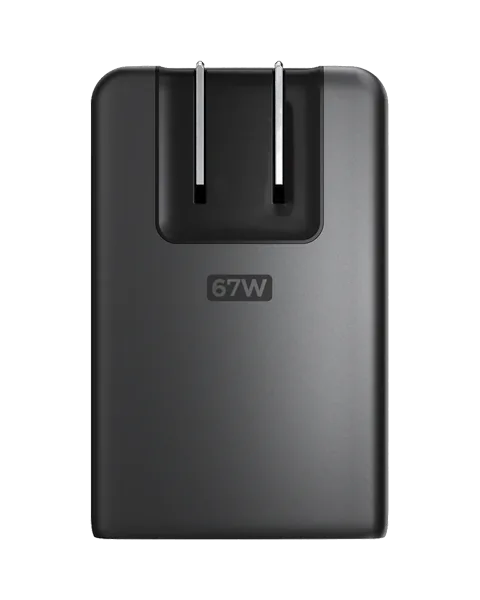
The line to look for was 20 V. The Entropy67 lists 20 V at 3.35 A from a single port, 67 W, inside the 30 to 70 W range Apple recommends for MacBook Air, in a body 14 mm thin.
Above 60 W the cable matters as much as the charger, so pair it with the Power Cable 240 W: USB-C at both ends, 240 W EPR with an e-marker, 2 m and braided.

Step by step
- Look up your laptop maker's recommended adapter wattage.
- Read the charger label and confirm a 20 V output line at the right current.
- Use a 5 A e-marked USB-C cable for chargers above 60 W.
- Plug the laptop into the highest-power port on a multi-port charger.
- Check the laptop's battery settings for a slow-charger warning.
Questions people ask
Can I charge my laptop with a 20 W phone charger?
Sometimes, but slowly. A 20 W charger usually offers 5 V and 9 V only, not the 20 V most laptops prefer. Some laptops will charge very slowly, some will only slow the battery drain, and some refuse with a low-power warning. Use a charger with a 20 V line and the wattage the maker recommends.
What does 20 V 3.25 A on a laptop charger mean?
It means the charger can supply 20 volts at up to 3.25 amps, which is 65 W, since power is volts multiplied by amps. The laptop draws only what it needs. Over USB-C, currents above 3 A need a cable rated for 5 A to be used fully.
Is it safe to use a 100 W charger on a 65 W laptop?
Yes. USB Power Delivery lets the laptop request only the power it supports, so a 100 W charger will deliver up to what the laptop asks for. Apple notes you can use a higher-wattage USB-C adapter with a Mac. The extra headroom can be shared with other devices on multi-port chargers.
Why do some laptops need 140 W or 240 W?
Large, powerful laptops draw more than 100 W under load. USB PD 3.1 added 28, 36 and 48 V levels to reach 140, 180 and 240 W while keeping current at 5 A. Apple recommends a 140 W adapter for the 16-inch MacBook Pro from 2021.
Sources
- USB Promoter Group: USB PD 3.1 announcement (240W) · 25 May 2021
- USB hardware, Wikipedia (power history) · accessed 22 Nov 2026
- American wire gauge, Wikipedia (resistance table) · accessed 22 Nov 2026
- Find the right power adapter and cable for your Mac, Apple Support · accessed 22 Nov 2026
- BU-808: How to prolong lithium-based batteries (Battery University) · accessed 22 Nov 2026
USB-C Power Delivery
One connector, a negotiated contract.
Read →Buying guide · 5 min readWhich charger for students: one brick for everything
One bag, one socket, one brick. Here is how many watts that brick really needs.
Read →Explainer · 4 min readHotel room charging: making one socket work
One socket behind the bed, three devices, a 7 am meeting. Here is the plan.
Read →Explainer · 5 min readGaN chargers: what changed and what did not
A new material shrank the charger. Your phone's charging speed stayed where it was.
Read →Explainer · 4 min readUSB PD 3.1 EPR and 240 W, explained
Same USB-C plug, more than twice the power. The trick is voltage, not a thicker wire.
Read →Explainer · 5 min readMulti-port chargers and power sharing, explained
Why the laptop pauses when you plug in your phone, and the one table to read first.
Read →