Journal · Buying guide · 4 min read
What to look for in a braided cable
The weave is the coat. The rating, the chip and the neck decide how long it lasts.
Most charging cables do not die in the middle. They die at the neck, a centimetre from the plug, where the wire bends every time you pick up the phone in bed. A braided sleeve promises to fix that. Sometimes it does. Sometimes it is a handsome coat on a weak body.
Short answerA braid protects the outer jacket from fraying and tangling, but it does not make a cable charge faster. Check the current rating (3A for up to 60W, 5A with an e-marker chip for 100W or 240W), the data speed if you move files, and firm strain relief at both plugs. Pick a length you will use.
What independent tests say about durability
Consumer Reports put six USB-C cables through a repeated bend-and-twist test, as reported by BGR in 2026. The longest survivor lasted more than 11,500 bends, which Consumer Reports estimated at about six years of use at five bends a day. Two braided cables lasted over 6,300 and 6,500 bends. The weakest failed at around 710.
The surprising part: the cable that lasted longest had a plain, non-braided sleeve. BGR noted that braided cables are often said to have better strain relief, yet in this test the sleeve alone did not decide lifespan. What happens inside, and at the joint between cable and plug, matters as much.
ChargerLAB's cable selection guide describes the main jacket types. Older PVC jackets yellow with age and are fragile where they meet the plug. TPE is now the common standard: flexible and safe. Braided jackets, often nylon and sometimes Kevlar fibre, resist wear and tend to last longer, but are thicker. Silicone jackets are soft, flexible and tangle less.
| Cable | Current | Maximum power | E-marker |
|---|---|---|---|
| Standard USB-C | 3 A | 60 W at 20 V | Not required |
| 5 A cable | 5 A | 100 W | Required |
| Extended Power Range | 5 A at 48 V | 240 W | Required |
Source: USB-C (Wikipedia); ChargerLAB cable selection guide
Bends
Source: Consumer Reports, as reported by BGR, 2026
The ratings inside the braid
Power first. The USB-C standard, as summarised on Wikipedia, requires every USB-C cable to carry at least 3A, which allows 60W at 20V. Cables that carry 5A, for 100W, must contain a small chip called an e-marker. The newer Extended Power Range raises that to 240W at 48V and 5A. ChargerLAB's guide confirms that under USB-IF rules, cables rated 3A or below do not need an e-marker, while anything above 3A does.
The e-marker tells the charger and the device what the cable can handle. A cable without one should be treated as a 3A, 60W cable, so a 100W charger and a laptop will stay at 60W or below, however thick the braid looks.
Data is separate. ChargerLAB notes that USB 2.0 cables are the type typically sold for charging, and Wikipedia's USB-C summary records that basic USB 2.0 Type-C cables top out at 480 Mbps. If you back up photos or connect an SSD, look for a speed marking such as 10Gbps or 40Gbps.
Think of a braided cable as a pressure hose. The woven outer layer stops it scuffing on the floor. The size of the bore and the fittings at each end decide how much water flows and whether it leaks.
Length and use
ChargerLAB suggests 1 metre for most daily use, 2 to 3 metres for charging from a bedside or desk socket while you lie in bed, and short cables for power banks and travel. For high-power laptop charging, what matters most is a cable rated for the full current the charger and laptop need.
Where a braid earns its place
A braid is most useful where a cable rubs against things. In a backpack, it shrugs off zips, keys and the corners of a laptop. On a car dashboard or a bedside table, it resists the slow scuffing that splits a soft jacket. It also coils loosely rather than kinking, which helps on travel days.
It earns less on a desk where the cable stays put. There, a flexible TPE or silicone cable may be easier to route and lighter on the port. A braid can also hold dust and sweat in its weave, so wipe it occasionally with a dry cloth. Whichever jacket you choose, the bend at the plug is still where most wear happens, so the strain relief is worth checking first.
What to check before you buy
Read the wattage or current on the packaging: 60W or 3A for phones, 100W or 240W, meaning 5A, for laptops and fast-charging phones that need it.
Bend the neck gently at the counter. A good cable has a firm, tapered strain relief that flexes gradually, not a hard plug that meets bare cable at a sharp edge.
Check the data speed if you need it. No marking usually means USB 2.0 speed.
Look at the plug fit. The USB-C plug should seat with a firm click in your phone and charger and not wobble.
Run your fingers along the braid. It should be tight and even, with no loose threads at the ends, which are the first sign of fraying.
Myth corner
Myth: braided cables charge faster. Charging speed depends on the charger, the device and the cable's current rating and e-marker, not the jacket. A 3A braided cable and a 3A plain cable carry the same 60W.
The right one for you
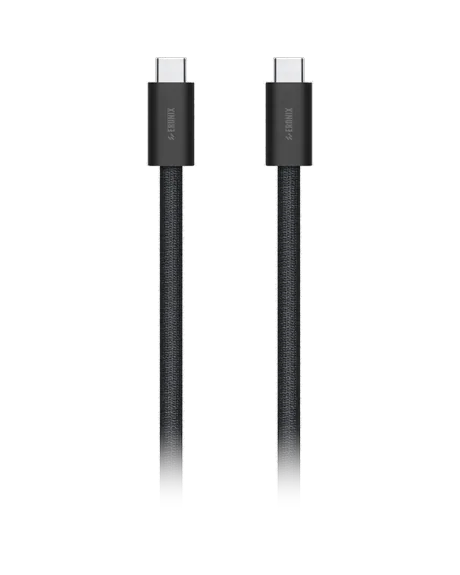
Inside the braid, match the rating to the job. The Everyday Cable is USB-C to USB-C, 60 W over 1 m, the length ChargerLAB suggests for daily use, with aluminium shells, a leather tie and a 10,000-bend test behind it.
For a laptop that needs more, the Power Cable 240 W carries the e-marker and the 240 W rating over 2 m, braided the same way.

Step by step
- Decide the power you need: 60W for most phones, 100W or 240W for laptops.
- Check the packaging for the current rating and, above 60W, an e-marker.
- Choose a data speed marking if you transfer files.
- Pick a length that reaches without strain, usually 1 metre for daily use.
- Inspect the strain relief and braid ends before buying.
Questions people ask
Is a braided cable better than a normal cable?
A braid resists abrasion and tangling, and many people find it lasts longer in a bag. It does not ensure a longer life: in a Consumer Reports bend test reported by BGR, the longest-lasting cable had a plain sleeve. Build quality at the plug joint matters as much as the jacket.
Do I need a 100W cable for my phone?
Most phones charge well below 60W, so a good 3A cable is enough. A 5A, 100W or 240W cable is needed for laptops and the few phones that draw more than 60W. A higher-rated cable is safe to use with any phone; it is simply more capable than needed.
What is an e-marker in a USB-C cable?
An e-marker is a small chip in the plug that reports the cable's current rating and abilities to the charger and device. Under USB-IF rules, cables rated above 3A must contain one. A cable without an e-marker should be treated as limited to 3A, which is 60W at 20V.
How do I make a charging cable last longer?
Avoid sharp bends at the plug, pull by the plug rather than the cable, and do not wrap it tightly around the charger. Use a cable long enough to reach without tension while the phone is in use. Coil it loosely in a bag.
Sources
- ChargerLAB's ultimate cable selection guide for everyone (ChargerLAB) · 28 Jul 2023
- This USB-C cable survived Consumer Reports' stress test (BGR) · 7 Sep 2026
- USB-C (Wikipedia) · Accessed 22 Nov 2026
USB-C Power Delivery
One connector, a negotiated contract.
Read →Buying guide · 5 min readWhich charger does the iPhone 18 Pro need?
Half a battery in 15 minutes, but only if your charger speaks one new word: AVS.
Read →Buying guide · 4 min readDo you need a 100 W cable? When it matters
The difference between a 60 W and a 100 W cable is one small chip. Here is when it counts.
Read →Comparison · 5 min readBraided vs rubber cables: which one should you buy?
The jacket decides how long a cable lasts. One number on the box decides its speed.
Read →Buying guide · 4 min readWhich charger does the iPhone 18 Pro Max need?
The biggest iPhone battery yet, filled to half in the time it takes to drink a chai.
Read →Buying guide · 4 min readWhich charger does the Galaxy S26+ need?
Samsung promises 69 percent in about 30 minutes. One word on the label decides it.
Read →