Journal · Buying guide · 5 min read
Which charger does the iPhone 18 Pro need?
Half a battery in 15 minutes, but only if your charger speaks one new word: AVS.
The iPhone 18 Pro can take half a charge in about 15 minutes. Many buyers will still walk out of the shop with a charger that cannot do it, because the wattage printed on the brick is not the number that matters this year.
Short answerApple quotes up to 50% in about 15 minutes with a 60 W-capable USB-C adapter that supports USB PD 3.1 or later with Adjustable Voltage Supply (AVS), plus a 60 W-rated cable. Popular chargers without AVS take about 20 minutes. A laptop brick without AVS, or a 240 W cable, adds nothing.
iPhone 18 Pro charging speed: Apple's figures and the tests
Apple's specification page lists up to 50% in around 15 minutes on a 60 W-capable adapter with AVS. Its footnote says the test used Apple's 40 W Dynamic Power Adapter with 60 W Max and asks for USB PD 3.1 or better with AVS. Apple's fast-charge support page also accepts a third-party adapter rated 60 W or higher with AVS, but names USB PD 3.2 in its main text. No charger comes in the box, only a 1 m USB-C cable.
9to5Mac reports Apple's claim that a five-minute top-up gives about 6 hours of video playback. Apple's specification page lists up to 23 hours of typical use and up to 34 hours of video playback, while an Apple support page shows 24 and 36 hours. The two Apple pages disagree slightly, so treat both as upper limits.
In ChargerLAB's first look, published on 22 September 2026, the iPhone 18 Pro used an 18 V charging profile and peaked at around 40 W on Apple's adapter. ChargerLAB said a full charging test was still to come. In PhoneArena's review, the phone reached 73% in 30 minutes on a 60 W charger and full in 1 hour 4 minutes.
The battery figures do not agree. ChargerLAB reports 4,056 mAh, and AndroidHeadlines gives the same figure from the EU's EPREL product database. PhoneArena lists 4,288 mAh. Apple does not publish a mAh figure.
Notebookcheck reports that popular chargers above 40 W, such as 45 W models, still work but cap out at iPhone 17 Pro speed, about 20 minutes to 50%. It adds that 96 W and 140 W MacBook chargers do not qualify for the top speed because they lack the adjustable voltage mode.
On MagSafe, Apple quotes up to 50% in 30 minutes with a 35 W or higher adapter. The MagSafe support page says a 25 W peak needs at least 30 W at 15 V and 2 A, and that the phone is limited to 16 W on MagSafe while a USB-C accessory is connected.
| Charger | Time to 50% | Source |
|---|---|---|
| 60 W adapter with AVS, 60 W cable | About 15 min | Apple |
| 45 W charger without AVS | About 20 min | Notebookcheck |
| 96 W or 140 W MacBook charger (no AVS) | Slower than 15 min | Notebookcheck |
| MagSafe, 35 W or more adapter | About 30 min | Apple |
Source: Apple iPhone 18 Pro specifications, accessed 22 Nov 2026; Notebookcheck, 11 Sep 2026
How AVS gets the iPhone 18 Pro to 15 minutes
USB Power Delivery has long offered a few fixed voltages, such as 5 V, 9 V, 15 V and 20 V. The USB-IF describes the adjustable voltage supply mode as a way for the device to request in-between voltages from 15 V up to the charger's highest fixed voltage. The iPhone 18 Pro uses this to ask for about 18 V. In a ChargerLAB compatibility test on the larger Pro Max, an AVS charger delivered the 18 V, 3 A profile and up to 51 W.
Why does 18 V matter? Power is volts times amps. Raising the voltage lets more power travel at the same current, and less current means less heat in the cable and connector. A charger without AVS falls back to a fixed step, and the phone takes less power.
Fixed voltage steps work like a car with only a few gears. You reach the speed you want, but often in the wrong gear, with the engine straining or loafing. AVS is closer to a continuously variable gearbox: the phone picks the exact ratio it wants, moment by moment.
What you can skip
A 100 W or 140 W laptop brick is safe to use, but if it has no AVS it adds nothing here. A 240 W cable also works, but iClarified notes that a 60 W rating is all Apple's stated time requires. Pay for the AVS feature, not for headline watts.
What to check before you buy
Look for AVS by name. The box, spec sheet or listing should say Adjustable Voltage Supply or AVS. A high wattage alone, or PPS support alone, does not prove the charger has AVS.
Check the USB PD version. Apple's specification footnote asks for USB PD 3.1 or later, and its fast-charge support page names PD 3.2. An adapter that lists only PD 3.0 is unlikely to offer AVS.
Check the per-port output. On a multi-port charger, the 60 W must be available on the port you use, with your other devices plugged in as you plan to charge. Read the port table on the box.
Check the cable rating. You need a USB-C cable rated for at least 60 W. The cable in the iPhone box is fine, and a cable rated 100 W or 240 W also works. Look for the wattage marking on the cable or its box, not its thickness.
For MagSafe, check the adapter, not only the puck. Use 35 W or more for Apple's 30-minute figure, and unplug other USB-C accessories while you charge.
Myth corner
The belief: the old 20 W iPhone charger will damage the new phone or will not work. It will work. The phone simply asks for less power and charges more slowly. Apple's speed claims are written as minimums, such as 60 W or higher, not as limits.
The right one for you
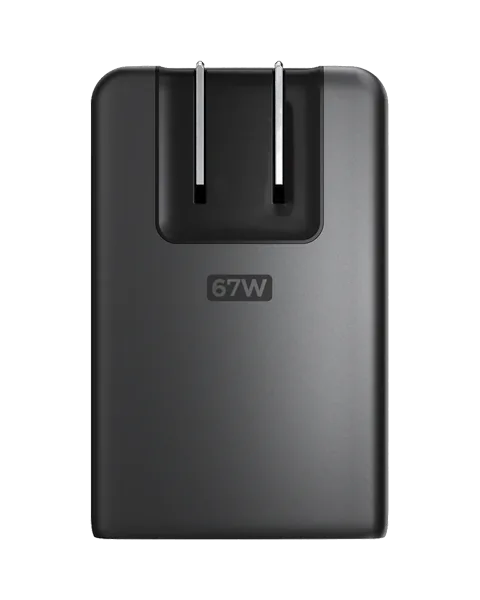
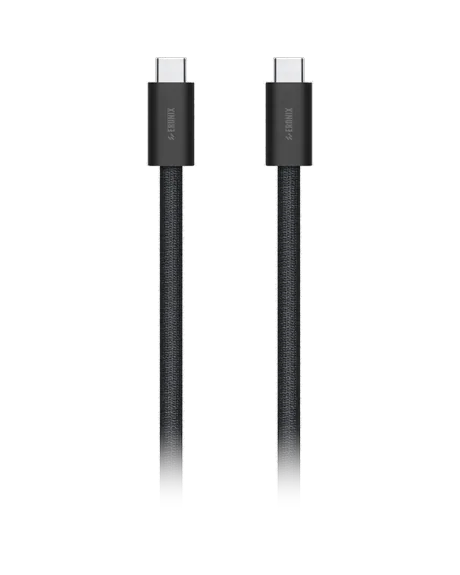
The iPhone 18 Pro's fastest charge needs AVS and 60 W on the port you use. The Entropy67 lists PPS and AVS from 5 to 20 V at up to 3.35 A, and 67 W from a single port, in a body 14 mm thin that also charges a MacBook Air. Pair it with the Everyday Cable: USB-C to USB-C, rated 60 W, braided, with aluminium shells and a leather tie.
Step by step
- Find Adjustable Voltage Supply or AVS on the adapter's box or spec sheet.
- Confirm USB PD 3.1 or later and at least 60 W on the port you will use.
- Use the USB-C cable from the iPhone box or another cable rated for 60 W or more.
- For MagSafe, pair the puck with an adapter of 35 W or more.
- Charge in a cool place, since Apple says fast charging may not work when the phone is too hot or too cold.
Questions people ask
Does the iPhone 18 Pro come with a charger in the box?
No. Apple's specification page lists only a 1 m USB-C Charge Cable in the box. The power adapter and the MagSafe Charger are sold separately. Any compatible USB-C power adapter will charge the phone, but Apple's 15-minute 50% figure needs a 60 W-capable adapter with Adjustable Voltage Supply and USB PD 3.1 or later.
Will my iPhone 17 charger fast charge the iPhone 18 Pro?
Yes, at iPhone 17 Pro speed. Notebookcheck reports that popular 45 W-class chargers without the adjustable voltage mode reach about 20 minutes to 50%. To reach Apple's 15-minute figure, the charger must offer AVS and deliver 60 W. Apple's own 40 W Dynamic Power Adapter with 60 W Max meets that requirement and was used in Apple's test.
Is a 140 W MacBook charger safe for the iPhone 18 Pro?
Yes. Apple says a Mac USB-C power adapter can charge an iPhone, and the USB-IF says USB Power Delivery lets each device draw only the power it requires. Notebookcheck notes that 96 W and 140 W MacBook chargers lack adjustable voltage, so they do not reach the iPhone 18 Pro's fastest wired speed.
How fast does the iPhone 18 Pro charge on MagSafe?
Apple quotes up to 50% in 30 minutes with a MagSafe Charger and a 35 W or higher adapter. MagSafe and Qi2 both peak at 25 W. Apple's MagSafe page says 25 W needs at least 30 W at 15 V and 2 A, and that power is limited to 16 W while a USB-C accessory is connected.
What is the battery capacity of the iPhone 18 Pro?
Apple does not publish it. ChargerLAB and AndroidHeadlines, the latter citing the EU's EPREL database, report 4,056 mAh, while PhoneArena lists 4,288 mAh. Apple instead rates battery life at up to 23 hours of typical use and up to 34 hours of video playback on its specification page.
Sources
- iPhone 18 Pro Technical Specifications (Apple) · accessed 22 Nov 2026
- iPhone 18 Pro technical specifications (Apple Support) · accessed 22 Nov 2026
- Fast charge your iPhone (Apple Support) · accessed 22 Nov 2026
- How to use your MagSafe Charger with iPhone (Apple Support) · accessed 22 Nov 2026
- About Apple USB power adapters (Apple Support) · accessed 22 Nov 2026
- USB Charger (USB Power Delivery) (USB-IF) · accessed 22 Nov 2026
- Unboxing of the iPhone 18 Pro (ChargerLAB) · 22 Sep 2026
- iPhone 18 Pro Max AVS compatibility test (ChargerLAB) · 20 Oct 2026
- iPhone 18 Pro Review (PhoneArena) · accessed 22 Nov 2026
- iPhone 18 Pro Max hits 52W peak charging speeds (AndroidHeadlines, citing EU EPREL listings) · 17 Sep 2026
- iPhone 18 Pro and iPhone Duo: faster charging comes with an adapter catch (Notebookcheck) · 11 Sep 2026
- How to fast charge iPhone 18 Pro (9to5Mac) · 10 Sep 2026
- iPhone 18 Pro fast charging: what charger and cable do you need (iClarified) · 15 Sep 2026
AVS — Adjustable Voltage Supply
The Power Delivery mode iPhone uses for its fastest charge.
Read →Buying guide · 4 min readWhich charger does the Galaxy S26 Ultra need?
Sixty watts on the box. Here is what it takes to get it.
Read →Buying guide · 1 min readHow much power does your laptop actually need?
Reading watts like a spec sheet, not a horoscope.
Read →Buying guide · 1 min readChoosing a USB-C charger: a short, honest checklist
Five checks that outlast any marketing cycle.
Read →Comparison · 1 min readGaN vs conventional chargers: what actually changed
Less mythology, more physics.
Read →Compatibility · 1 min readMagnetic power banks and cases: what fits what
The ring, the case, and the physics between them.
Read →