Journal · Explainer · 4 min read
Can a fake cable damage a phone?
The danger is rarely the copper you can see. It is one tiny part you cannot.
Inside the plug of a USB-C to USB-A cable sits a resistor smaller than a grain of rice. Its value, 56 kilohms, is fixed by the USB Type-C specification. Fit the wrong value to save a few paise and the cable tells your charger it can safely supply 3 A, even when the charger cannot. That one part is the difference between a cable that is merely cheap and one that is wrong. So can a bad cable really damage a phone?
Short answerYes, though it is uncommon with a well-made phone and charger. A miswired cable can tell a charger to deliver more current than it was built for, and thin copper heats up at high current. The usual results are overheating, slow or failed charging and damaged ports. Buy cables with a stated rating from a seller you can trace.
What the standard says, in numbers
Google's ChromiumOS hardware notes summarise the USB Type-C rules that cable makers must follow. A cable with USB-C on one end and an older USB-A plug on the other must carry a 56 kΩ pull-up resistor. The notes say plainly that using the 3 A resistor value instead is not safe, because if the power adapter cannot supply 3 A it could overheat.
The same notes set guard rails for chargers. Before a device is detected, the power line must stay at 0 V. The default maximum is 5.5 V, and proprietary methods of changing voltage are forbidden. All USB-C cables must be able to carry 3 A.
ChargerLAB's cable guide adds the next step. Cables rated above 3 A must contain an e-marker chip that tells the charger what the cable can carry. A 3 A cable is good for up to 60 W, and a 5 A cable with an e-marker up to 100 W. A fake e-marker, or a 5 A claim on thin wire, removes the safety margin the charger relies on.
| Cable | Signalling part | Power |
|---|---|---|
| USB-A to USB-C | 56 kΩ pull-up resistor | Must not signal 3 A |
| USB-C, 3 A | None required | Up to 60 W |
| USB-C, 5 A | E-marker chip | Up to 100 W |
Source: ChromiumOS hardware notes; ChargerLAB cable guide
Milliohms per metre
Source: American wire gauge copper table
How a bad cable causes harm
A USB-C charger trusts the cable to describe itself. Resistors and, for higher power, the e-marker chip are how it does that. If the cable lies, the charger acts on false information. The phone usually protects itself, but the charger, the cable and the ports take the strain.
Copper is the second risk. Standard wire tables show 28 AWG copper with about 213 milliohms of resistance per metre, against about 33 milliohms for 20 AWG. Push 3 A through thin wire and more of the energy turns into heat along the cable and at the plug.
A quick sum shows the scale. Power travels out and back, so a 1 m cable has 2 m of conductor in the loop. In thin 28 AWG copper that is about 0.43 ohms. At 3 A, the cable alone would drop about 1.3 V and turn nearly 4 W into heat along a wire you hold in your hand. In 20 AWG copper, the same sum gives under 0.6 W.
Think of a lorry crossing a bridge. The driver reads the weight limit on the sign and loads up to it. If someone has painted the wrong number on the sign, the lorry is not at fault, but the bridge may fail. The resistor and e-marker are that sign.
Signs a cable is the problem
The cable or its plug gets hot to the touch while charging, not just warm.
Charging is much slower than with another cable on the same charger, or the phone shows a message that the accessory is not supported.
The plug feels loose, the connection drops when you move it, or there is discolouration around the metal shell.
The charger behaves well with one cable and stops or restarts with another. Apple's support advice for its own multi-port adapter is to try a different cable when a device charges slowly, which is a fair first step on any charger.
What to check before you buy
Look for a stated current rating: 3 A for phones, 5 A with an e-marker for devices above 60 W. A cable that names neither is a guess.
Buy from a seller who gives a tax invoice and a warranty. Traceability is the main protection against fakes.
Check the plug. It should fit snugly, with a solid metal shell and a strain relief that bends smoothly.
For USB-A to USB-C cables in particular, buy from established makers. These are the cables where the wrong resistor value has been a known problem.
Retire any cable that is frayed, kinked at the plug, or gets hot.
Myth corner
Myth: a cable is just wire, so any cable is fine. Fact: a USB-C cable carries signalling parts. ChromiumOS's notes on the Type-C specification require a 56 kΩ resistor in USB-A to USB-C cables and warn that the wrong value can overheat a charger.
The right one for you
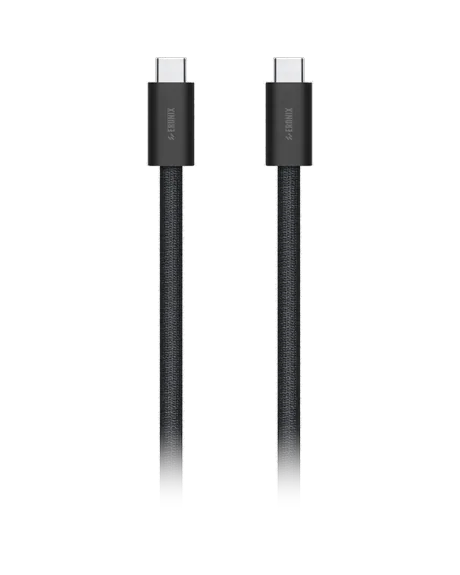
For a phone, the rating to look for is 60 W, and the Everyday Cable states it: USB-C to USB-C, 60 W, 1 m, braided, with aluminium shells and a 10,000-bend test.
For a laptop above 60 W, the Power Cable 240 W carries an e-marker, so the charger is told what the cable can take. It runs 2 m, braided, for a MacBook Pro on the far side of the desk.

Step by step
- Read the cable's current rating before buying: 3 A or 5 A.
- Buy from a seller who provides a tax invoice and a warranty.
- Check the plug fits snugly and the strain relief bends smoothly.
- Feel the plug after ten minutes of charging; it should not be hot.
- Retire damaged, frayed or overheating cables at once.
Questions people ask
Can a cheap cable damage my phone battery?
Rarely the battery itself. Phones control their own charging and usually stop or slow down if something is wrong. The more common damage is to the cable, charger or port from heat, or slow charging. A cable with the wrong resistor value can cause a charger to overheat, per the Type-C rules.
Why does my charging cable get hot?
Some warmth is normal at high current. Excess heat points to thin copper, a damaged conductor or a poor plug contact. Standard wire tables show thin 28 AWG copper has more than six times the resistance of 20 AWG. Replace any cable that becomes too hot to hold.
What is an e-marker chip in a cable?
It is a small chip inside USB-C cables rated above 3 A. ChargerLAB explains that it stores the cable's current rating and capabilities, which the charger and device read before using more than 3 A. Without one, a charger will treat the cable as a 3 A, 60 W cable.
Are USB-A to USB-C cables safe?
Compliant ones are. The USB Type-C rules, as summarised by ChromiumOS, require a 56 kΩ resistor in these cables so a USB-C phone does not draw more than an older charger can supply. Buy them from established makers, because miswired versions of this cable type have been a known problem.
Sources
- ChromiumOS: Cable and adapter tips and tricks · accessed 22 Nov 2026
- ChargerLAB: Ultimate cable selection guide for everyone · accessed 22 Nov 2026
- Wikipedia: American wire gauge (copper resistance table) · accessed 22 Nov 2026
- Apple Support: How to use the 35W Dual USB-C Port Power Adapter · accessed 22 Nov 2026
- Apple Support: About Apple USB power adapters · accessed 22 Nov 2026
USB-C Power Delivery
One connector, a negotiated contract.
Read →Explainer · 4 min readHotel room charging: making one socket work
One socket behind the bed, three devices, a 7 am meeting. Here is the plan.
Read →Explainer · 4 min readHow to charge a phone fast before a flight
Thirty minutes at the gate can be worth half a battery. Five steps to get it.
Read →Comparison · 5 min readBraided vs rubber cables: which one should you buy?
The jacket decides how long a cable lasts. One number on the box decides its speed.
Read →Explainer · 5 min readCan a 100 W charger damage your phone?
The watts on the brick are a ceiling, not a push. Heat is what your battery remembers.
Read →Explainer · 5 min readGaN chargers: what changed and what did not
A new material shrank the charger. Your phone's charging speed stayed where it was.
Read →