Journal · Explainer · 4 min read
How to charge a phone fast before a flight
Thirty minutes at the gate can be worth half a battery. Five steps to get it.
Boarding in 30 minutes, battery at 18 per cent, and many airlines now bar using power banks during the flight. How much charge can you add before the door closes?
Short answerAbout half a battery. Plug a USB-C Power Delivery charger of 20 to 30 W, or your phone's rated fast charger, into a wall socket, use a USB-C to USB-C cable, remove a thick case and keep the phone cool. Recent iPhones reach about 50 per cent in 15 to 30 minutes on Apple's figures.
How much a 30-minute top-up gives you
Apple's fast-charge page lists about 50 per cent in around 15 minutes for the iPhone 18 Pro models with a 60 W-class AVS charger, about 20 minutes for iPhone 17 Pro models with 40 W or more, and about 30 minutes for iPhone Air with 20 W. Apple India's page for its 20 W USB-C adapter gives a more general figure for iPhone 8 and later: up to 50 per cent in around 35 minutes.
Lab results agree. ChargerLAB measured an iPhone 15 Pro Max at 50 per cent in 25 minutes, and an iPhone 16 Pro at 50 per cent in about 27 minutes, both on Apple's 35 W charger. Android Authority measured a Galaxy S26 Ultra at 37 per cent after 10 minutes and about 85 per cent after 30 minutes on a 60 W PPS charger, so a recent Galaxy Ultra can come close to full in a single gate wait.
The fast part happens first. Every one of these phones slows sharply after about half to three quarters, so the first 20 to 30 minutes are the most valuable minutes you can spend at a socket. Arriving at the gate with 40 minutes in hand is worth more than any upgrade to the charger.
| Phone | Charger | To 50% |
|---|---|---|
| iPhone 18 Pro | 60 W-class AVS | about 15 min (Apple) |
| iPhone 17 Pro | 40 W or higher | about 20 min (Apple) |
| iPhone 15 Pro Max | Apple 35 W | 25 min (ChargerLAB) |
| iPhone 16 Pro | Apple 35 W | about 27 min (ChargerLAB) |
| iPhone Air | 20 W | about 30 min (Apple) |
Source: Apple Support; ChargerLAB; accessed 2026
Minutes
Source: Apple Support (iPhone 18 Pro, 17 Pro, Air); ChargerLAB (15 Pro Max, 16 Pro)
Why a low, cool battery charges fastest
A lithium-ion battery accepts high current when it is low and cool. As it fills, the phone reduces current to protect the cell; as it warms, it reduces again. Battery University explains that stress rises in the second half of a charge and advises against fast charging when the battery is hot.
Think of it like boarding the aircraft itself. When the cabin is empty, passengers stream in quickly. As the aisle fills and the bins close, boarding slows to a shuffle. Plugging in at 18 per cent is boarding first; topping up from 80 per cent is boarding last.
That is why starting early matters more than charger size. Ten minutes at 20 per cent adds more than ten minutes at 80.
Five steps at the gate
Step 1: find a wall socket or a USB-C PD outlet and use your own charger. Older airport USB-A ports may supply far less power.
Step 2: use a USB-C to USB-C cable with a USB-C PD charger of at least 20 W for an iPhone, or your phone's rated fast charger, such as a 45 to 60 W PPS charger for recent Galaxy Ultra models.
Step 3: remove a thick case and keep the phone off a sunny window ledge. Apple notes fast charging may not work when the phone is too hot.
Step 4: reduce the load. Lower the brightness, close games and video, and avoid heavy use while it charges.
Step 5: unplug at boarding and switch the power bank off for the flight, since DGCA's advisory and many airline rules bar using it on board.
Plan it the night before
The fastest charge at the gate is the one you do not need. Charge the phone and power bank fully at home or the hotel the night before. If you normally use a charge limit or optimised charging to protect the battery, check whether it will stop the phone short of full on a travel morning, and switch it off for that night if you need every per cent.
Pack the charger and cable at the top of your cabin bag, not in checked luggage, so you can reach them at the gate without unpacking. A compact charger also fits the crowded sockets near gate seating, where a bulky brick can block the next socket.
What to check before you buy
A compact USB-C PD charger of 20 to 30 W covers most iPhones' fastest speeds, according to ChargerLAB's tests.
For the newest Pro iPhones and Galaxy Ultra phones, check for AVS or PPS on the label if you want their top speed.
Carry a short USB-C to USB-C cable; long cables tangle at crowded gate sockets.
If you rely on a power bank, choose one with fast USB-C PD output so a gate top-up before boarding is quick.
Myth corner
Myth: wireless charging is just as quick for a pre-flight top-up. It is not. Apple lists the iPhone 18 Pro at about 50 per cent in 15 minutes wired and about 30 minutes on MagSafe. When time is short, use a cable.
The right one for you
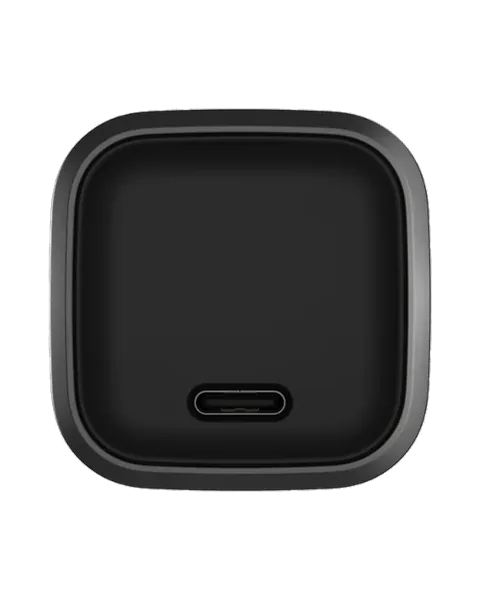
For most iPhones, the Fermi30 is all the gate needs: 30 W over USB-C Power Delivery in a body 49.6 by 32 by 32 mm and 42 g, small enough for a jacket pocket and a crowded socket.
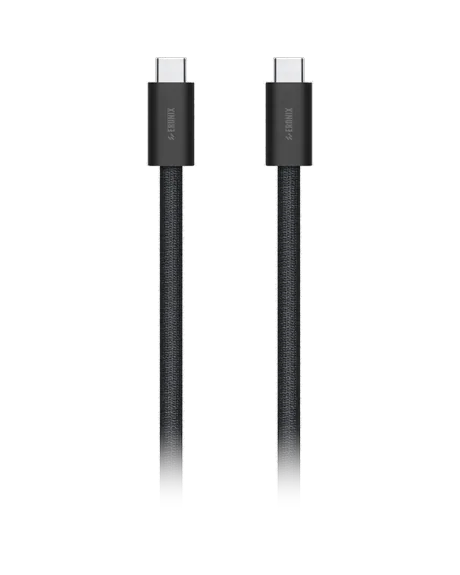
Pair it with the Everyday Cable, 1 m of braided USB-C to USB-C rated for 60 W, with aluminium shells and a leather tie that keeps it coiled at the top of the cabin bag.
Step by step
- Plug your own USB-C PD charger into a wall socket.
- Connect the phone with a USB-C to USB-C cable.
- Remove a thick case and keep the phone out of the sun.
- Lower brightness and close heavy apps while it charges.
- Unplug at boarding and keep the power bank switched off in flight.
Questions people ask
How long does it take to charge a phone to 50 per cent?
About 15 to 35 minutes on a recent phone with the right charger. Apple lists 15 minutes for iPhone 18 Pro models with a 60 W-class AVS charger and 20 minutes for iPhone 17 Pro models with 40 W, while its 20 W adapter page gives around 35 minutes for iPhone 8 and later.
Can I charge my phone during an Indian flight?
You cannot use a power bank. The DGCA's November 2025 advisory bars using power banks to charge devices on board and charging them from seat power. Where an aircraft provides seat USB or power, follow the crew's instructions for charging the phone itself.
Does airplane mode make a phone charge faster?
It can help a little by reducing radio activity and background work, which lowers the load. The bigger gains come from a proper fast charger, a cable instead of wireless, a cool phone and starting at a low battery level.
Is it safe to use airport charging stations?
Using your own charger in a wall socket is the safer habit. With your own charger, only power flows through the outlet, and you control the cable. Some travellers also carry a charge-only cable when they must use public USB ports.
Why does my phone stop fast charging at the airport?
Usually heat or a weak source. Apple says fast charging may not work when the phone is too hot or too cold, and many older USB-A ports supply little power. Move out of the sun, remove the case and use a USB-C PD charger.
Sources
- Apple Support: Fast charge your iPhone · 22 Oct 2026
- Apple India: 20W USB-C Power Adapter · accessed 22 Nov 2026
- ChargerLAB: Charging review of iPhone 15 Pro Max · 29 Sep 2023
- ChargerLAB: Charging review of iPhone 16 Pro · 14 Oct 2024
- Android Authority: Galaxy S26 Ultra 60W charging tested · accessed 22 Nov 2026
- Battery University: Ultra-fast chargers · 25 Oct 2021
- Business Today: Airlines told to tighten fire safety as DGCA bans inflight charging · 4 Jan 2026
Super Fast Charging and Super Fast Charging 2.0
What Galaxy asks of a charger, and how PPS answers it.
Read →Buying guide · 5 min readWhich charger does the iPhone 18 Pro need?
Half a battery in 15 minutes, but only if your charger speaks one new word: AVS.
Read →Explainer · 4 min readDoes fast charging kill the battery?
The watts on the charger matter less than the temperature of the phone
Read →Explainer · 5 min readCan a 100 W charger damage your phone?
The watts on the brick are a ceiling, not a push. Heat is what your battery remembers.
Read →Buying guide · 4 min readWhich charger does the Galaxy S26+ need?
Samsung promises 69 percent in about 30 minutes. One word on the label decides it.
Read →Explainer · 5 min readPPS: why Samsung phones care about it
Three letters on a charger label decide whether a Galaxy charges at full speed or half.
Read →