Journal · Explainer · 5 min read
Do magnets harm phones or cards?
The magnet in your case is strong enough to grip, not strong enough to wipe most cards.
A hotel key card stops opening the door on the second night, and the first suspect is the magnetic case or wallet on your phone. Is the suspicion fair? And if the magnets can do that to a card, what are they doing to the phone they are stuck to?
Short answerThe magnets in a phone, case or charger do not harm the phone, which is designed around them. They can weaken low-strength magnetic stripes, such as hotel key cards. Bank cards with a chip or tap-to-pay are read by the chip, which magnets do not affect. Apple says not to keep cards between a phone and its charger.
How strong a magnet must be to wipe a card
A magnetic stripe stores data as tiny magnetised regions. How hard it is to rewrite them is called coercivity, measured in oersteds (Oe). KJ Magnetics, a magnet supplier that tested cards against its own neodymium magnets, lists high-coercivity stripes, used on most bank cards, at about 4,000 Oe. Low-coercivity stripes, used on hotel key cards and many single-use cards, sit near 300 Oe. That is roughly a thirteen-fold gap.
The distances in that test are the useful part. With a small cylinder magnet of about 5,900 gauss at its surface, a high-coercivity card worked every time at about 2.3 mm, gave intermittent read errors at 1.6 mm and failed at 1.3 mm. A larger block magnet caused intermittent errors at about 3.2 mm. In other words, a bank stripe had to sit within a few millimetres of a strong bare magnet before anything happened.
Low-coercivity cards are a different story. The same source advises keeping them roughly 13 to 15 cm from magnets, against about 2.5 cm for ordinary credit cards. For wallets with magnets built in, it suggests at least 0.8 mm of material between magnet and card, with 1.6 mm as a safer margin.
| Card | Coercivity | Suggested distance from magnets |
|---|---|---|
| Bank card stripe, high coercivity | About 4,000 Oe | About 2.5 cm |
| Hotel key card, low coercivity | About 300 Oe | About 13 to 15 cm |
| Chip or contactless card | Read by the chip | Not affected by magnets |
Source: KJ Magnetics, Credit Cards and Magnetic Stripes, accessed Nov 2026
Distance from magnet (mm)
Source: KJ Magnetics, accessed Nov 2026
What Apple says about MagSafe and cards
Apple's support page for its MagSafe Charger tells users not to place credit cards, security badges, passports or key fobs between the iPhone and the charger, because magnetic strips or RFID chips in those items might be damaged. If a case holds cards, Apple says to take them out before charging or make sure they are not in the path.
MacRumors' guide to MagSafe adds the detail that the iPhone 12, 13 and 14 carry a ring of 18 magnets around the charging coil, and repeats Apple's advice to keep single-use cards such as hotel keys away from the magnets. The warning is about the charger stack, where a card would be squeezed between two magnet arrays and a powered coil, not about a card sitting in your pocket next to the phone.
How it works: why the phone is fine and the stripe is not
A phone has almost nothing inside that stores information magnetically. Storage is flash memory, which holds data as electrical charge. The screen, battery and processor do not care about a static magnetic field. Magnetic accessories are designed to sit at a fixed spot on the back, where the maker has planned for them.
A magnetic stripe is the opposite: it exists to be magnetised. A strong enough field nearby simply writes over it. Think of pencil on paper versus words carved into wood. A low-coercivity hotel card is the pencil line, and a strong magnet held close is the eraser. A chip card keeps its secret in a sealed silicon chip, more like the carving.
Distance does most of the protecting. A magnet's field falls away steeply as you move off its face, which is why the KJ Magnetics results swing from failure to perfect reads across about one millimetre.
Pacemakers and other medical implants
This is the one area where magnets near a phone need real care. MacRumors' MagSafe guide gives the distances to keep iPhones and MagSafe accessories more than 15 cm from an implanted pacemaker or defibrillator, and more than 30 cm while wirelessly charging. Anyone with an implant should follow their doctor's and the device maker's instructions first.
What to check before you buy
Check where the cards sit. In a magnetic wallet or card case, look for a layer of material between the magnet ring and the card slot. A few millimetres of separation is what the lab results point to.
Check what kind of cards you carry. Bank cards with a chip or the contactless symbol are normally read by the chip at the counter. Hotel keys, some metro or parking cards and old membership cards may be magnetic-stripe only, and those are the ones to keep apart.
Check the charging habit. If the wallet or case holds cards, ask whether it is meant to be removed before wireless charging. Apple's own advice is to keep cards out of the charging path.
Check the mount. For a magnetic car mount or stand, confirm it aligns to the phone's charging coil area rather than pressing loose magnets against the camera bump or edges.
Myth corner
Myth: a magnet will wipe your phone's memory. Phones store data in flash memory as electrical charge, not as magnetic patterns, so a case or mount magnet has nothing to erase. The real risks are to magnetic-stripe cards held very close and, for people with implants, to medical devices.
The right one for you
A magnetic wallet should hold firmly to the phone without your cards doing the work.
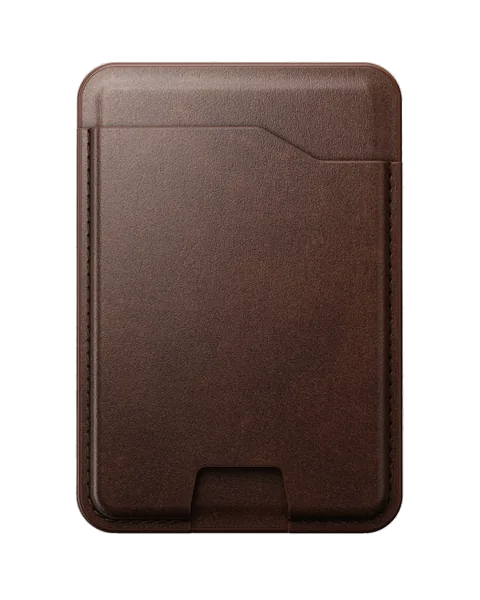
The ERONIX Leather Wallet carries two cards, with a magnet array matched to the ERONIX case and pull-force tested, and is compatible with MagSafe on iPhone 12 and later, in Black or Tan. Keep hotel keys elsewhere, pay with the chip, and take the wallet off before wireless charging, as Apple advises.
Step by step
- Find out whether each card in your wallet uses a chip, tap or only a magnetic stripe.
- Keep stripe-only cards such as hotel keys in a separate pocket from the phone.
- Use a card holder that keeps a layer of material between the magnets and the cards.
- Remove cards from the case path before placing the phone on a wireless charger.
- If you have a medical implant, keep the phone and accessories at the distance your doctor advises.
Questions people ask
Can a MagSafe wallet demagnetise my debit card?
It is unlikely for a modern bank card. Most bank stripes are high coercivity, about 4,000 Oe, and lab tests by KJ Magnetics needed a strong magnet within about 1.6 mm to cause read errors. Chip and tap payments do not use the stripe at all. Keep cards out of the charging path, as Apple advises.
Why did my hotel key card stop working?
Hotel key cards usually use low-coercivity stripes, around 300 Oe, which are far easier to rewrite than bank cards. Keeping one against a magnetic phone case, wallet or bag clasp can corrupt it. Carry it in a different pocket from your phone and ask reception to re-encode it if it fails.
Do magnets affect contactless or chip cards?
A static magnet does not affect the chip. KJ Magnetics notes that RFID chips send a radio signal that permanent magnets do not disturb. Apple still advises not to place cards between an iPhone and a MagSafe charger, because the powered charging coil and magnets together are a different situation from a magnet alone.
Is a magnetic car mount bad for my phone?
A magnetic mount does not damage the phone's memory, battery or screen, which are not magnetic devices. What matters is mechanical: a firm grip, a mount that sits on the charging coil area, and no loose metal plate that blocks wireless charging. For phones with optical image stabilisation, follow the phone maker's own mount guidance.
Sources
- Credit Cards and Magnetic Stripes (KJ Magnetics) · accessed 22 Nov 2026
- How to use your MagSafe Charger (Apple Support) · accessed 22 Nov 2026
- MagSafe: Everything About Apple's iPhone Charging Technology (MacRumors) · accessed 22 Nov 2026
Magnetic Alignment
Position, made physical.
Read →Explainer · 1 min readWhat is Qi2, and why did wireless charging need magnets?
The standard that made wireless charging predictable.
Read →Explainer · 4 min readMagSafe wallets: how many cards, and which ones
Three cards, a ring of magnets and one rule about charging. Here is how to pack it.
Read →Explainer · 4 min readQi2 and Qi2.2: the wireless standards in plain words
Same magnets, same snap. The difference is ten watts and a stricter test.
Read →Explainer · 4 min readMagSafe vs Qi2: same magnets, different rules
They feel identical when they click on. The difference is in who sets the rules.
Read →Explainer · 4 min readWhy wireless charging is slower than wired
Power has to jump a gap of air and glass. Some of it never lands.
Read →