Journal · Explainer · 4 min read
MagSafe wallets: how many cards, and which ones
Three cards, a ring of magnets and one rule about charging. Here is how to pack it.
A wallet that clicks onto the back of your phone sounds like the end of a bulging back pocket. Then the questions start. How many cards will it really hold? Will the magnets wipe my debit card? Can I leave it on overnight on the charger?
Short answerMost MagSafe wallets hold about three cards; Apple's own leather wallet is rated for up to three. Chip and contactless cards are fine. Magnetic-stripe-only cards, such as many hotel keys and gift cards, are at risk. Always remove the wallet before you put the phone on a wireless charger.
The numbers: card capacity and magnet strength
Apple's leather wallet with Find My, launched in 2021, holds up to three cards, according to MacRumors' launch report. MacRumors' hands-on found that it can pop off when the phone goes into a tight pocket, which tells you something useful: the magnets are strong enough to hold, but a fourth card or a snug jeans pocket adds leverage that pulls the wallet away.
The ring itself is precise. MacRumors' MagSafe guide describes a ring of 18 rectangular magnets under the charging coil on iPhone 12, 13 and 14, which centres any MagSafe accessory in the same spot every time.
Card stripes come in two strengths. KJ Magnetics, a magnet supplier, says high-coercivity (HiCo) stripes, used on most bank cards, need a field of about 4,000 gauss to wipe, and low-coercivity (LoCo) stripes, used on many hotel keys and gift cards, about 300 gauss. In plain terms, a LoCo stripe is more than ten times easier to wipe. Its conservative rule for strong magnets is about 2.5 cm of distance for bank cards and 13 to 15 cm for LoCo cards. A phone's MagSafe magnets are far smaller than those test magnets, so the real risk is lower, but the ratio is the part to remember.
| Card type | Typical examples | Field to wipe | Risk |
|---|---|---|---|
| High-coercivity stripe | Most bank cards | About 4,000 gauss | Low |
| Low-coercivity stripe | Hotel keys, gift cards | About 300 gauss | Higher |
| Chip or contactless | EMV cards, metro cards, ID badges | Not affected by permanent magnets | Low, away from chargers |
Source: KJ Magnetics, accessed Nov 2026; Apple guidance via MacRumors
Field (gauss)
Source: KJ Magnetics, accessed Nov 2026
How a MagSafe wallet works
A MagSafe wallet is a pocket with a magnet ring sewn or bonded into its back. That ring lines up with the ring in the phone. Better wallets put a thin layer of material between the magnets and the cards; MacRumors reported that Apple's 2021 wallet kept its shielded design. KJ Magnetics notes that for small disc magnets in wallets, about 1 to 1.5 mm of material between magnet and card is enough, and a steel layer can cut the field further.
Think of it as a fridge magnet holding a postcard. The postcard stays put because the magnet grips the steel door, not the card. Put five postcards under it and it slides down. Card count and card thickness matter more than any other spec.
Chips are a different technology. The chip on an EMV debit card, and the antenna in a contactless card or a metro smart card, store data electronically rather than magnetically. KJ Magnetics states that permanent magnets do not affect RFID chips. Apple's caution is about the charger: its guidance, summarised in MacRumors' MagSafe guide, warns against placing credit cards, security badges, passports or key fobs between an iPhone and a MagSafe Charger, because the stripes or RFID chips could be damaged. A charger adds a changing field and heat, which a wallet alone does not.
Which cards to carry and which to leave at home
Good candidates: one chip-and-contactless debit or credit card, an office ID badge that uses a proximity chip, and a metro or bus smart card. These rely on chips, not stripes.
Keep elsewhere: hotel room keys, older gift cards, parking cards and any card that only works by swiping. These are usually LoCo and the most likely to fail.
Watch thickness: embossed cards, with raised numbers, take more room than flat-printed ones. Two embossed cards can feel like three.
What to check before you buy
Count your cards first. If you carry more than three, a MagSafe wallet is the wrong tool; a stand wallet or a slim separate wallet will hold better.
Pull test it. Attach the wallet with your real cards inside and slide a thumb across it. It should resist a sideways push, not just a straight pull, because pockets push sideways.
Check the case. If you use a case, it needs its own MagSafe ring. Through a thick case without magnets, the grip falls sharply. A wallet whose magnets are matched to your case holds most firmly.
Look for a thumb hole or push slot. A cutout on the back lets you push cards out without removing the wallet, which saves the alert and the fumble at the metro gate.
Ask about Find My. Apple's wallet alerts you when it detaches and shows where it was last separated from the phone, according to MacRumors and Apple. That is a last-seen point, not live tracking, so do not mistake it for a tracker.
Myth corner
Myth: MagSafe wallets wipe every card. Fact: modern bank cards use a high-coercivity stripe plus a chip, and chips are not affected by permanent magnets, according to KJ Magnetics. The cards at real risk are swipe-only hotel keys and similar low-coercivity cards, and any card left between the phone and a charger.
The right one for you
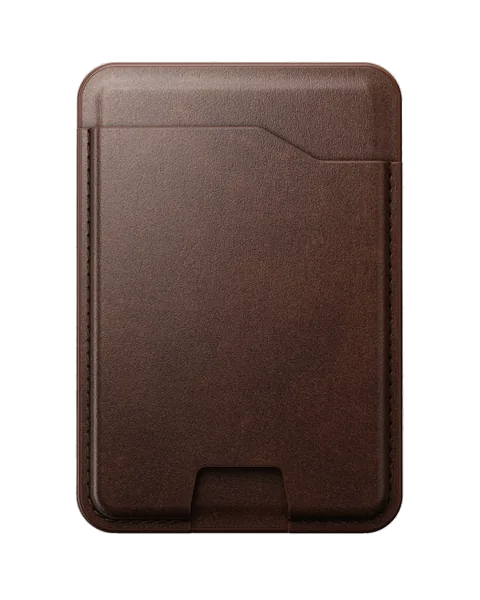
If your day runs on two cards, a chip-and-contactless bank card and a metro card, the Leather Wallet is sized for exactly that. It holds two cards, nothing else, so there is no fourth card levering it off in a tight pocket.
Its magnet array is matched to the ERONIX case and pull-force tested, so it stays where you put it. It is compatible with MagSafe on iPhone 12 and later, in Black or Tan leather.
Step by step
- Pick up to three cards you use every day, chip or contactless only.
- Leave hotel keys and swipe-only cards in a separate holder.
- Fit the wallet on a MagSafe phone or a case with a built-in magnet ring.
- Test the grip with a sideways thumb push.
- Remove the wallet before placing the phone on any wireless charger.
Questions people ask
Can I wirelessly charge my iPhone with a MagSafe wallet attached?
No. Remove the wallet first. The wallet blocks the charger's magnets and coil, and Apple's guidance warns against putting cards between an iPhone and a MagSafe Charger because the stripes or chips could be damaged. A MagSafe case can stay on; the wallet should come off.
Will a MagSafe wallet affect contactless payment from the card inside?
The card still works when you tap it, because the wallet only holds it. Tap the phone-and-wallet side to the terminal and the card can be read, but the phone's own NFC may also respond. Taking the card out avoids confusion at the terminal.
Does a MagSafe wallet work on a phone without MagSafe?
Only with a magnetic case or a stick-on magnet ring. Phones without the built-in ring cannot hold the wallet by themselves. With an add-on ring, the grip depends on that ring's strength, and alignment is less exact than on a phone with built-in magnets.
Why does my MagSafe wallet keep falling off?
Usually too many cards, a thick case without its own magnet ring, or a tight pocket. MacRumors found that even Apple's wallet can pop off in a tight pocket. Cut the card count, use a MagSafe-compatible case, and put the phone in pocket wallet-side in.
Is a leather MagSafe wallet better than silicone or fabric?
Leather stretches a little and moulds to your cards over weeks, so it can start tight and settle. Silicone grips well but gathers lint. Fabric is light but can loosen. Pick on how many cards you carry and how often you remove them.
Sources
- Apple Releases New MagSafe Wallet With Find My Support (MacRumors) · 14 Sep 2021
- Hands-On With Apple's New Find My-Enabled MagSafe Wallet (MacRumors) · 23 Sep 2021
- MagSafe: Everything About Apple's iPhone Charging Technology (MacRumors) · accessed 22 Nov 2026
- Credit Cards and Magnetic Stripes (KJ Magnetics) · accessed 22 Nov 2026
- Add your iPhone Wallet with MagSafe to Find My (Apple Support) · accessed 22 Nov 2026
Magnetic Alignment
Position, made physical.
Read →Compatibility · 1 min readMagnetic power banks and cases: what fits what
The ring, the case, and the physics between them.
Read →Explainer · 1 min readWhat is Qi2, and why did wireless charging need magnets?
The standard that made wireless charging predictable.
Read →Explainer · 5 min readLeather that ages well: caring for a leather case
Less care than you think, and the three things that actually damage leather
Read →Buying guide · 6 min readWhich charger does your 25 W magnetic (Qi2.2) puck need?
The puck can only give what the adapter feeds it, and heat takes its share first.
Read →Buying guide · 5 min readWhich charger does a 15 W MagSafe puck need?
The puck is only as fast as the plug behind it. Here is the adapter that unlocks 15W.
Read →