Journal · Explainer · 4 min read
How to fix 'charging slowly' warnings
The phone is telling you something specific. Five checks find what, in under five minutes.
You plug in at night and a line appears under the battery icon: charging slowly, or check charging accessory, or charging on hold. The phone still charges, just not the way it did yesterday. What is it trying to tell you?
Short answerThe phone is reporting that something is limiting power. Usually it is one of four things: a charger below the phone's needs, a cable that cannot carry enough current, lint or wear in the port, or heat. Swap in a trusted cable, use a charger rated for your phone's fast-charge level, clean the port, and let a hot phone cool.
What each warning means, from the makers
Google's Pixel help page says a Check charging accessory notification means your cable or adapter may be damaged or not supported. It recommends a Google 30 W charger or another PPS charger of 30 W or more for best results, and lists other USB PD adapters rated 15 W or more as the alternative.
Apple's Charging On Hold message, shown on iOS 16 and later on the Lock Screen and in Battery settings, means the iPhone is too hot or too cold to charge, and that charging will resume when it returns to normal temperature. Apple's temperature page gives the iPhone's ambient operating range as 0 °C to 35 °C, and says that when it gets too hot, charging, including wireless charging, slows or stops.
Apple's fast-charge page sets the expected speeds that make a slow charge noticeable. For example, iPhone 17 models reach about 50% in about 20 minutes with a 40 W adapter or higher. A 5 W or 10 W adapter cannot get near that, which is exactly the gap a slow-charging label points to.
| Warning | Meaning | First fix |
|---|---|---|
| Check charging accessory (Pixel) | Cable or adapter damaged or unsupported | Try a 30 W+ PPS charger and another cable |
| Charging On Hold (iPhone, iOS 16+) | Too hot or too cold | Move to 0 °C to 35 °C and wait |
| Charging slowly | Supply below the phone's fast mode | Use a charger at the phone's rating |
Source: Google Pixel Help; Apple Support
How the phone knows the charge is slow
During every charge, the phone's power chip measures the voltage and current actually arriving. It compares that with what it expects from the charger's advertised capabilities. If the charger offers less than the phone's fast mode, or if current falls short because of a thin or worn cable, the phone labels the charge as slow.
Heat works differently. The phone measures battery temperature and reduces current on purpose to protect the cell. That is why the same charger can be fast in an air-conditioned room and slow on a car dashboard.
It is like a car's fuel economy display. It does not know whether you are carrying luggage or driving uphill, only that more fuel is being used than usual. The warning tells you that something is off; the checks below tell you what.
The five-minute fix list
Swap the cable first. It is the cheapest part and the most common cause. Use the cable from the phone's box or one rated for at least 3 A.
Check the charger. Its label should list your phone's fast-charge protocol, such as USB PD or PPS, and a wattage at or above your phone's figure. Test it with another device, as Google suggests.
Look into the port with a torch. Google lists dust or lint among the first checks. A plug that does not seat fully will charge slowly or intermittently.
Cool the phone. Take off a thick case, move it out of the sun, and stop gaming or navigation while it charges.
Restart the phone. A software process stuck in the background can keep the phone hot and the charge slow.
What to check before you buy
Find your phone's recommended charger in its support page and buy to that rating. For a Pixel, that means 30 W PPS; for recent iPhones, 20 W to 40 W or higher depending on model.
Buy a cable with a clear current rating, 3 A or 5 A, rather than a vague fast label.
Choose a charger whose label lists PPS if your phone is a Samsung or Pixel. These phones rely on it for their fastest mode.
Check BIS registration, and avoid unbranded cables with no current rating printed anywhere. A cable you cannot identify is a cable you cannot rule out.
When the warning keeps coming back
If the warning returns with a new cable and the right charger, test each part on its own. Charge a second phone with the same charger and cable. If that phone charges normally, the problem sits with the first phone: its port, its temperature or its software.
If the warning appears only in one place, think about that place. A bedside socket on a long, cheap extension board, or a car charger plugged into a loose socket, can deliver unstable power. Try a wall socket directly.
If the warning appears everywhere and the phone is older, ask an authorised service centre to check the port and battery. By then you will have ruled out the cheap causes and can describe exactly what you tested.
Myth corner
Myth: a charging slowly message means the battery is failing. It usually means the supply, not the battery, is the limit. Swap the charger and cable before suspecting the battery. If the warning disappears with a known-good setup, the battery is fine.
The right one for you
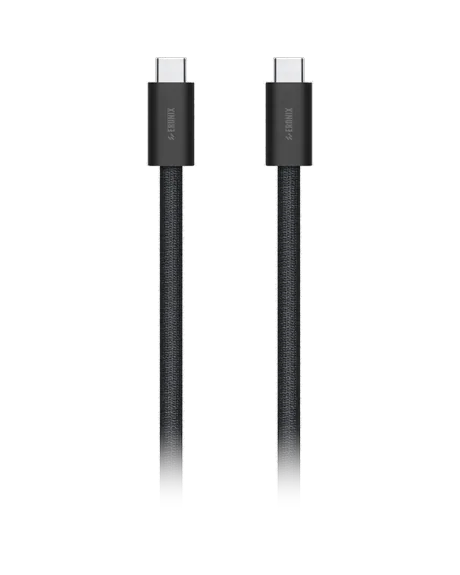
If the checks point to the supply, the Fermi45 meets the ratings above: PPS from 5 to 20 V at 3 A for a Pixel's 30 W, and 45 W for an iPhone 17's 40 W mark or a 45 W Galaxy. Pair it with the Everyday Cable, USB-C to USB-C, rated 60 W over 1 m, braided and bend-tested 10,000 times, and the cable drops off the list of suspects.

Step by step
- Swap in a known-good cable rated for at least 3 A.
- Confirm the charger supports your phone's protocol and wattage.
- Check the port for lint with a torch.
- Remove the case, move the phone somewhere cool and stop heavy use.
- Restart the phone and test again.
Questions people ask
Why does my phone say charging slowly with a fast charger?
The fast charger may not support your phone's fast-charge protocol, the cable may limit current, or the phone may be warm. Pixels need PPS for their best speed, and Samsung super fast charging needs a 45 W charger with a 5 A cable on the Galaxy S24 series.
What does Charging On Hold mean on an iPhone?
Apple says the iPhone is too hot or too cold to charge. Charging resumes automatically when it returns to normal temperature. Move it somewhere cooler and out of the sun, or warmer if it is cold, and lock the screen.
What does Check charging accessory mean on a Pixel?
Google says your cable or adapter may be damaged or not supported. Try a compatible cable and charger. Google recommends a 30 W or higher PPS charger for best results and at least 15 W for other USB PD adapters.
Can a phone case make charging slower?
Yes, by trapping heat. A thick case holds warmth around the battery, and phones reduce charging power when they get warm. Apple says charging slows or stops when an iPhone is too hot. Remove the case during fast charging if the phone feels hot.
Will a software update fix slow charging?
Sometimes. A misbehaving app or background process can keep the phone warm and the charge slow. Restarting the phone and installing updates are worth trying after you have ruled out the cable, charger and port.
Sources
- Google Pixel Help: Fix a Pixel phone that won't charge or turn on · accessed 22 Nov 2026
- Apple Support: If a Charging On Hold notification appears on your iPhone or iPad · accessed 22 Nov 2026
- Apple Support: If your iPhone or iPad gets too hot or too cold · accessed 22 Nov 2026
- Apple Support: Fast charge your iPhone · accessed 22 Nov 2026
- Samsung UK Support: How to use super fast charging on Galaxy S24 series · accessed 22 Nov 2026
PPS — Programmable Power Supply
Power Delivery, with a fine-adjustment dial.
Read →Explainer · 5 min readUSB Power Delivery explained in one page
How a charger and a phone agree on power before it flows, and how to read the label.
Read →Buying guide · 4 min readWhich charger does the Galaxy S26+ need?
Samsung promises 69 percent in about 30 minutes. One word on the label decides it.
Read →Explainer · 5 min readPPS: why Samsung phones care about it
Three letters on a charger label decide whether a Galaxy charges at full speed or half.
Read →Explainer · 4 min readCan you use a Samsung charger on an iPhone?
Different logos, same plug, shared standard. What decides the speed is two letters: PD.
Read →Explainer · 4 min readHow to charge a phone fast before a flight
Thirty minutes at the gate can be worth half a battery. Five steps to get it.
Read →