Journal · Explainer · 5 min read
How Bluetooth audio actually travels
From the music file to your ear in about a sixth of a second: every step, in order.
Tap a song and it plays in your earbuds almost at once. In that pause, your phone has squeezed the music into a fraction of its size, cut it into hundreds of small packets every second, sent them through a radio band shared with your Wi-Fi router and your microwave oven, and had two separate earbuds play the result in step. How does it all fit?
Short answerYour phone compresses the audio with a codec such as SBC, AAC or LC3, packs it into short radio packets, and transmits them in the 2.4 GHz band while hopping between channels to avoid interference. The earbuds buffer the packets, decode them and play them. The buffer is why Bluetooth audio runs a fraction of a second late.
The numbers behind a Bluetooth audio link
The radio lane is narrow. The Bluetooth SIG's technology overview puts both Bluetooth Classic and Bluetooth Low Energy in the 2.4 GHz band, from 2.402 to 2.480 GHz. Classic, which most earbuds still use for music, splits this into 79 channels 1 MHz apart, with raw rates of 1, 2 or 3 Mb/s. Low Energy uses 40 channels 2 MHz apart and runs at up to 2 Mb/s.
Raw rate is not usable rate. An engineering analysis of A2DP by ValdikSS on Habr estimates the realistic audio payload of the common 2 Mb/s packet type at about 1.4 Mb/s, and of the 3 Mb/s type at about 2.1 Mb/s, before radio conditions reduce it further.
Music has to fit well inside that. A CD-quality stereo stream is about 1.4 Mb/s uncompressed, so it must be squeezed. SoundGuys lists the default SBC codec at roughly 192 to 320 kb/s, AAC at about 250 kb/s (its table lists 264 kb/s), aptX at 352 kb/s, aptX HD at 576 kb/s, and LDAC at up to 990 kb/s, though SoundGuys notes many phones default LDAC to 330 kb/s.
Time is the other number. Developer Stephen Coyle, in measurements reported by MacRumors, found average delays of 274 ms on first-generation AirPods, 178 ms on the second generation and 144 ms on AirPods Pro. Other headphones he tested sat around 225 to 250 ms.
| Codec | Typical bit rate | Where you meet it |
|---|---|---|
| SBC | 192 to 320 kb/s | Every Bluetooth headphone |
| AAC | About 250 to 264 kb/s | iPhone, many Android phones |
| aptX | 352 kb/s | Many Android phones |
| aptX HD | 576 kb/s | Many Android phones |
| LDAC | 330 to 990 kb/s | Many Android phones |
| LC3 (LE Audio) | 160 kb/s beat SBC at 345 kb/s | Phones with LE Audio |
Source: SoundGuys; Bluetooth SIG LC3 overview; accessed Nov 2026
Data rate (Mb/s)
Source: ValdikSS on Habr; Bluetooth SIG
Step 1: the codec shrinks the music
A codec is a set of rules for throwing away what you are least likely to hear. SBC, the codec every Bluetooth headphone must support, splits the sound into frequency bands and spends its bits from the low end upward. The Habr analysis shows that when the bit budget runs short, SBC cuts quiet sounds at the very top first, in one test above 17.5 kHz.
Newer codecs spend bits more cleverly. The Bluetooth SIG's overview of LC3, the codec of LE Audio, reports that in formal listening tests LC3 at 160 kb/s scored better than SBC at 345 kb/s, which is less than half the bit rate for higher quality. LC3 works in short frames of 10 or 7.5 ms and supports sample rates up to 48 kHz.
The codec has to be supported at both ends. If your phone offers LDAC and your earbuds only accept SBC and AAC, the link settles on one of those.
Step 2: the radio hops to stay clear
The 2.4 GHz band is crowded. Wi-Fi, other Bluetooth devices and even microwave ovens share it. Bluetooth deals with this by frequency hopping: the phone and earbuds jump between channels many times a second in a pattern both sides know. Classic Bluetooth divides time into slots of 625 microseconds, per the Habr analysis, with the phone and earbuds taking turns.
Picture a conversation in a crowded food court where both of you agree to step to a new table every few seconds. If one table is noisy, you lose a few words, then the next table is quiet. Modern devices go further and stop visiting the tables that are always noisy.
When packets are lost, the link can resend them, or the codec can lower its bit rate to make room. That is why quality sometimes dips when your phone is in a back pocket and your body sits between the antennas. Water in the human body absorbs 2.4 GHz energy well.
Step 3: two earbuds, one stream
Early true wireless earbuds used relay. Qualcomm's white paper on true wireless technology describes how the phone talked to one primary bud, which forwarded audio to the other. Full relay used double the Bluetooth bandwidth and tied you to the primary bud.
Later designs let the second bud listen in on the phone's link directly. Qualcomm calls its version TrueWireless Mirroring: the secondary bud follows the connection, and the primary resends only the packets the other missed. Roles can swap if one bud goes into the case or runs low.
LE Audio builds this into the standard. The Bluetooth SIG describes independent left and right streams for earbuds, and broadcast audio, called Auracast, that lets one transmitter send a stream that any number of nearby listeners can join.
Step 4: the buffer, and why there is delay
Each earbud stores a short stretch of audio before it plays. The buffer covers lost packets and keeps left and right in sync. Encoding, transmission, buffering and decoding add up, which is how Coyle measured delays between about 144 and 274 ms.
Video apps hide most of this by delaying the picture to match. Games and music apps that respond to touch cannot, which is why a drum app can feel late on earbuds and fine on a wired headphone.
What to check before you buy
Match codecs. Check which codecs your phone supports, then look for the same names on the earbuds' box. iPhones use AAC; many Android phones also offer aptX or LDAC.
Ask about LE Audio. If your phone supports LE Audio and LC3, earbuds that support it can deliver good quality at lower bit rates.
Look for a low-latency or game mode if you play games or make music. It shrinks the buffer at some cost to stability.
Check the Bluetooth version, but do not stop there. A newer version helps with range and efficiency; it does not by itself promise a better codec.
Myth corner
Myth: a higher Bluetooth version means better sound. Fact: sound quality depends mainly on the codec and the bit rate both devices agree on. Two Bluetooth 5.3 devices that settle on SBC sound like SBC.
The right one for you
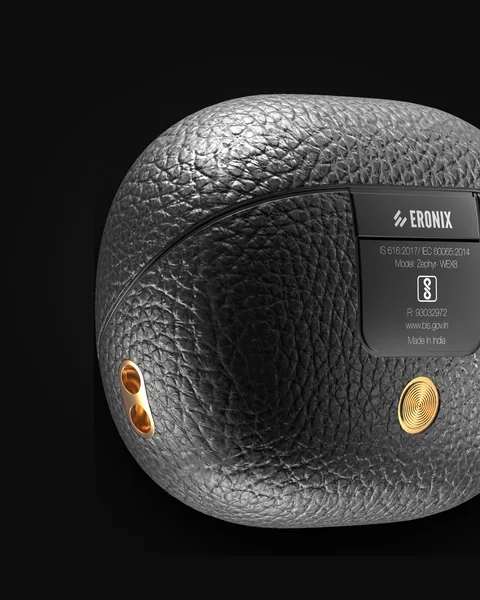
The codec your phone and earbuds agree on matters more than anything else on the box. Zephyr lists SBC, AAC and aptX HD over Bluetooth 5.4, so an iPhone settles on AAC and an Android phone with aptX HD can use that, with no fallback to plain SBC.
It suits iPhone and Galaxy alike, with four microphones and up to 35 dB of noise reduction for calls. The 13 mm bio-cellulose driver sits in a NeoLeatherette case.
Questions people ask
Why do my earbuds cut out when the phone is in my back pocket?
Bluetooth uses the 2.4 GHz band, and the human body absorbs much of that energy. With the phone behind you, the signal to the earbud on the far side has to pass through or around your body. Moving the phone to a front pocket or to the same side usually fixes it.
Is Bluetooth audio lossless?
Usually not. Common codecs such as SBC, AAC, aptX and LDAC compress audio by discarding detail judged least audible. CD-quality stereo needs about 1.4 Mb/s, while typical codecs run between roughly 250 and 990 kb/s according to SoundGuys. Some newer systems offer lossless modes under ideal conditions.
Does Wi-Fi interfere with Bluetooth earbuds?
It can, because both share the 2.4 GHz band. Bluetooth hops between channels to avoid busy ones, so interference usually shows as short dropouts in crowded places. Using 5 GHz Wi-Fi at home leaves the 2.4 GHz band clearer for your earbuds.
What is Auracast?
Auracast is the Bluetooth SIG's broadcast audio feature, part of LE Audio. One transmitter, such as a TV, a phone or a public venue system, sends an audio stream that any number of compatible earbuds or hearing aids nearby can join, rather than pairing one to one.
Why does video stay in sync but games feel late on Bluetooth?
Video players know the audio delay and hold back the picture to match it. Games and music apps react to your touch in real time, so they cannot delay the response. The delay of roughly 144 to 274 ms measured on common earbuds then becomes noticeable.
Sources
- Bluetooth Technology Overview (Bluetooth SIG) · accessed 22 Nov 2026
- A Technical Overview of LC3 (Bluetooth SIG) · accessed 22 Nov 2026
- Audio over Bluetooth: most detailed information about profiles, codecs, and devices (ValdikSS, Habr) · 17 Jun 2019
- Bluetooth codecs explained (SoundGuys) · 30 May 2025
- The Evolution of True Wireless Technology (Qualcomm white paper) · 2020
- AirPods Pro Offer Close to Seamless Audio Experience Thanks to Improved Bluetooth Latency (MacRumors) · 23 Dec 2019
Wireless Audio
Bluetooth, codecs, and the milliseconds that matter.
Read →Explainer · 1 min readHow active noise cancellation actually works
A race measured in fractions of a millisecond.
Read →Explainer · 5 min readLDAC, aptX, AAC: which codec your phone really uses
The logo on the earbud box is a promise. Your phone decides whether it is kept.
Read →Explainer · 4 min readWhy earbuds sound different on iPhone and Android
Same earbuds, same song, two phones. The difference starts before the sound reaches you.
Read →Explainer · 5 min readWhat ANC can and cannot block
Why the bus engine fades but the conductor's voice does not, and what to check.
Read →Explainer · 4 min readTransparency mode: how earbuds let the world back in
Your earbuds can hear the platform announcement for you. Here is how, and where it stops.
Read →