Journal · Explainer · 5 min read
How chargers stay cool: thermal design basics
Every charger is also a small heater. The good ones are designed around that fact.
You unplug your charger after an hour of laptop charging and it feels hot, almost too hot to hold for long. Is that a sign it is failing, or is it doing exactly what it was designed to do?
Short answerSome heat is normal. Even a good charger is about 90% efficient, so one delivering 60 W turns roughly 6 to 7 W into heat inside a small box. Good design spreads that heat across the case and lowers output before parts overheat. Smell, buzzing, discolouration or painful heat mean unplug it.
How much heat a charger makes, in watts and degrees
Efficiency sets the heat. In Tom's Hardware's test of 20 wall chargers from 15 W to 140 W, most measured between 89 and 93% efficient, with two outliers at about 85 and 86%. At 90%, every 100 W delivered to a device costs about 11 W extra from the wall, and that difference is heat.
That heat shows up as temperature. The same test measured case temperatures with an infrared thermometer after 30 minutes of full load. Chargers from 45 to 68 W ran from about 55 to 58 °C at the coolest to above 70 °C at the hottest, without throttling. Every 140 W charger throttled, peaking around 67 to 76 °C and cutting output to between about 88 and 118 W.
Material choice changes the numbers. The IEA 4E technology programme measured GaN and silicon chargers under controlled conditions. At 30 W the two were effectively equal at about 90%. At 60 W, GaN averaged 92% against 90% for silicon, a loss difference of about 1.4 W at full output. GaN chargers also achieved up to about twice the power density on average.
| Charger class | Case temperature | Behaviour |
|---|---|---|
| 45 to 68 W | About 55 to 58 °C at coolest, above 70 °C at hottest | No throttling |
| 140 W | About 67 to 76 °C peak | All throttled, to about 88 to 118 W |
Source: Tom's Hardware test of 20 wall chargers
Efficiency %
GaN Silicon
Source: IEA 4E technology programme
How a charger moves heat out
Inside a charger, heat comes from a few places: the switching transistors that chop mains power at high speed, the small transformer, the rectifier and the control chips. The IEA report measured peak switching frequencies of about 55 to 65 kHz at full load in the 60 W chargers it could measure. Each switch event loses a little energy, and GaN transistors lose less per switch than silicon, which is why they help most at higher wattage.
Getting heat out of a sealed box is the hard part. Designers spread it from hot components to the case with thermal pads, metal shields or a filling compound, so no single spot gets too hot. The case then passes heat to the air. A bigger case has more surface, so it runs cooler at the same output. That is why Tom's Hardware notes that pushing 140 W through a compact plastic shell is difficult even for modern designs.
Think of a kadhai of hot oil. Put it on a small burner and the centre scorches while the edges stay cool; spread the flame and the whole pan heats evenly and gently. A well-built charger spreads its heat the same way, so the whole case is warm rather than one spot being dangerously hot.
The last defence is software. A charger's controller watches its own temperature and lowers output when it gets too hot. In the Tom's Hardware test, this is exactly what the 140 W units did. Throttling is not a fault; it is the design protecting itself.
Why Indian rooms make it harder
A charger can only shed heat into the air around it. Tom's Hardware tested at room temperature, and the IEA test conditions call for an ambient of 23 °C, plus or minus 3 °C. A bedroom in May in much of India is far warmer than that, which leaves less margin. The same charger will reach its throttle point sooner, and output will drop. Give it open air, not a gap behind a bed or a pillow.
Where to feel for trouble
A well-designed charger warms evenly across its case. A charger that is noticeably hotter at one spot, often near the pins or the USB port, may have a poor contact, a damaged socket or a failing component. Feel the pins after unplugging too: hot pins usually point to a loose or worn wall socket rather than the charger, and that socket deserves attention from an electrician.
What to check before you buy
Read the efficiency or energy mark if one is printed. Higher efficiency means less heat at the same output.
Match size to wattage. A very small charger claiming very high sustained output has less surface to shed heat. Expect it to throttle under long loads.
Ask whether it uses GaN for higher wattages. The IEA data shows the efficiency gain is real above about 30 W, and small below it.
Check the plastic. A dense, smooth case with even seams spreads heat better and resists softening.
At home, plug it where air can move. A charger in a socket behind a sofa runs hotter than one on an open wall.
Myth corner
Myth: a warm charger is a faulty charger. Fact: in Tom's Hardware's test, chargers at full load reached about 52 to 76 °C on the case, warm to hot to the touch, while working normally. The warning signs are different: a smell of hot plastic, buzzing, discolouration, a loose or melted pin, or heat that is painful to touch.
The right one for you
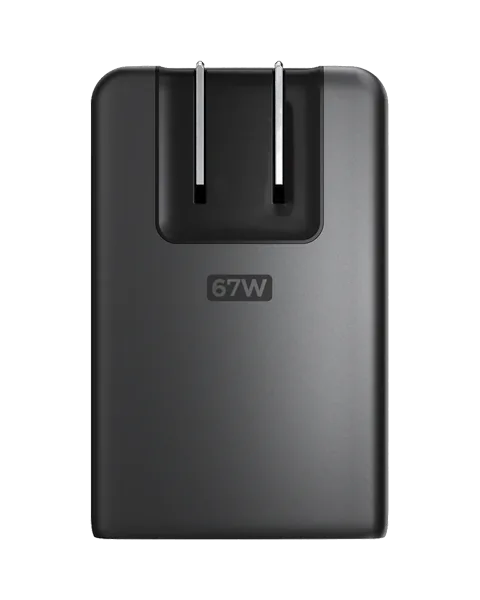
Heat is the cost of conversion, so the parts that decide it are the power stage and the protection around it. The Entropy67 is built on a GaN3 power stage, the material the IEA data favours above 30 W, and it lists over-temperature, over-voltage, over-current and short-circuit protection. It gives 67 W from one USB-C port for a MacBook Air, or shares it across two ports with a phone, and draws under 0.05 W when idle.
Step by step
- Plug the charger into an open socket with air around it.
- Feel the case after 30 minutes of heavy charging: warm or hot is normal.
- Unplug it if it smells, buzzes, discolours or is painful to touch.
- For high wattage, choose a design with enough size and efficiency to shed heat.
Questions people ask
How hot is too hot for a phone charger?
In Tom's Hardware's tests, healthy chargers reached about 52 to 76 °C on the case after 30 minutes at full load, depending on wattage. Warm to hot is normal. Unplug it if it is painful to hold, smells of hot plastic, buzzes, discolours or its pins feel loose or soft.
Do GaN chargers run cooler?
At higher wattages, usually a little. The IEA 4E programme found 60 W GaN chargers averaged about 92% efficiency against 90% for silicon, about 1.4 W less heat at full output. At 30 W the difference was within measurement error. GaN's main benefit is packing more power into a smaller case.
Why does my charger slow down when it gets hot?
Chargers monitor their own temperature and reduce output to stay within safe limits. Tom's Hardware saw every 140 W charger it tested throttle under sustained full load, dropping to between about 88 and 118 W. Better airflow around the charger, or a lower room temperature, reduces throttling.
Is it safe to leave a charger plugged in all the time?
A good charger draws very little with nothing connected; Tom's Hardware measured idle draw around 0.3 W for chargers without displays. It is generally safe, but unplug it if it gets warm with nothing attached, and avoid leaving it in a hot, enclosed spot like a drawer or under bedding.
Sources
- We tested 20 wall chargers from 15 W to 140 W (Tom's Hardware) · accessed 22 Nov 2026
- PECTA: Energy efficiency measurement of wide bandgap-based power supplies (IEA 4E) · Mar 2024
- What is a GaN charger (Android Authority) · accessed 22 Nov 2026
Thermal Management
The quiet discipline inside every serious power product.
Read →Explainer · 5 min readGaN chargers: what changed and what did not
A new material shrank the charger. Your phone's charging speed stayed where it was.
Read →Comparison · 4 min readGaN vs silicon chargers in daily use
Side by side on a desk, in a bag and on the electricity bill. One number decides it.
Read →Explainer · 4 min readUsing chargers with inverters and generators
Your charger turns the wave into DC at once. The spikes matter more than the shape.
Read →Explainer · 4 min readDo chargers wear out?
Heat is the clock inside every charger. Every 10 °C cooler, the clock runs at half speed.
Read →Explainer · 4 min readHotel room charging: making one socket work
One socket behind the bed, three devices, a 7 am meeting. Here is the plan.
Read →