Journal · Explainer · 5 min read
Do you need a new charger for Qi2.2?
Your current pad still charges. The question is whether 10 extra watts change your day.
Your new phone supports Qi2 25W, and the box of your old magnetic wireless pad says Qi2 15W. The shop is suggesting an upgrade. Will the old one even work, and does the new one make a real difference?
Short answerThe old Qi2 pad will still charge, at up to its own 15 W. You need a new charger only if you want the faster 25 W wireless speed, and only if your phone supports it. Then you need a pad listed as Qi2 25W, often called Qi2.2, plus a strong enough USB-C adapter behind it.
What Qi2.2 changes, in numbers
The Wireless Power Consortium announced Qi2 25W on 23 July 2025. It describes it as delivering nearly 70% more power than the original 15 W Qi2, branded from specification version 2.2.1. The original Qi2 products had arrived in November 2023, and the WPC says 14 devices completed certification in the first limited launch, with several hundred more queued.
Macworld's guide to iPhone wireless charging sets out what that means in minutes to 50%. On a 15 W Qi2 or MagSafe charger, an iPhone 12 to 15 takes about 45 minutes. iPhones that accept 25 W take about 30 minutes, and Macworld's own average on an iPhone 16 Pro was 32 to 34 minutes. Wired charging, for comparison, reached 50% in about 25 minutes.
Not every phone takes the full 25 W. Macworld lists the iPhone 16 and 16 Pro at 22 W, the iPhone Air at 20 W, the iPhone 17e at 15 W, and several others, including the iPhone 17 and 18 Pro models, at 25 W with iOS 26 or later. MacRumors reported that iOS 26 is what lifted iPhone 16 models above 15 W on third-party Qi2 25W chargers.
The adapter matters too. Apple's fast-charge page says iPhone 16, 17 and Air fast-charge wirelessly with a MagSafe Charger and a 30 W or higher adapter.
Even at full speed, the gain shrinks as the battery fills. Macworld puts a full wireless charge at 15 W at about 115 minutes, and the faster standard mainly shortens the first half. That is the same taper every lithium-ion battery shows on a cable.
| Wireless level | Example iPhones | To 50% |
|---|---|---|
| 15 W Qi2 or MagSafe | iPhone 12 to 15 | about 45 min |
| 22 W | iPhone 16, 16 Pro | about 35 min |
| 25 W Qi2 25W | iPhone 17 models | about 30 min |
Source: Macworld, 2026
Minutes to 50%
Source: Macworld, accessed 22 Nov 2026
How a magnetic wireless charger delivers more power
Wireless charging passes energy between two coils through a magnetic field. The Wireless Power Consortium explains that how well the coils couple depends on distance, alignment and size. Qi2 uses a ring of magnets, based on Apple's MagSafe, to snap the phone into exactly the right spot every time. That consistent alignment is what lets the standard safely push more power.
Higher power means more heat in the same small space. Battery University puts inductive charging efficiency at about 75 to 80% for small systems, with the losses becoming heat. A 25 W pad needs better coil design and heat control than a 15 W one to avoid throttling, which is why it is a new class of product rather than a firmware update for your old pad.
Think of it like upgrading a water pipe. A wider pipe carries more water, but only if the taps at both ends are sized for it and the joint between them is tight. The phone, the pad and the adapter are the taps; the magnets keep the joint tight.
When an upgrade is worth it
Worth it if you top up wirelessly during the day, at a desk or in a car, where 15 minutes saved matters. Worth it if your phone supports 25 W and you rarely plug in a cable.
Not worth it if you charge wirelessly mainly overnight. Your 15 W pad already fills the phone long before morning, and lower power means less heat.
Check Android phones carefully. 9to5Google notes that Qi2 Ready phones lack built-in magnets and rely on a magnetic case for Qi2 alignment, so full speed may depend on the case.
Think about where the pad sits, too. A car mount or a desk stand that you use in short bursts is where 25 W pays off. A bedside pad can stay at 15 W for years without you noticing any difference at 7 am.
What to check before you buy
Look up your phone's maximum Qi2 wireless watts. If it is 15 W, a 25 W pad adds nothing.
Check the pad is listed as Qi2 25W in the WPC's product database, not just described as compatible.
Check the adapter the pad needs. Apple asks for 30 W or more for its own fast wireless charging on recent iPhones.
For Android phones without built-in magnets, check which magnetic case is required.
Check heat handling: a pad with good ventilation or a fan sustains speed better in a warm room.
Myth corner
Myth: a Qi2 25W phone will not charge on an older Qi2 or Qi pad. It will, at the older pad's lower speed. Qi is designed so devices negotiate a power level both support, so your current pad keeps working while the new standard spreads.
The right one for you
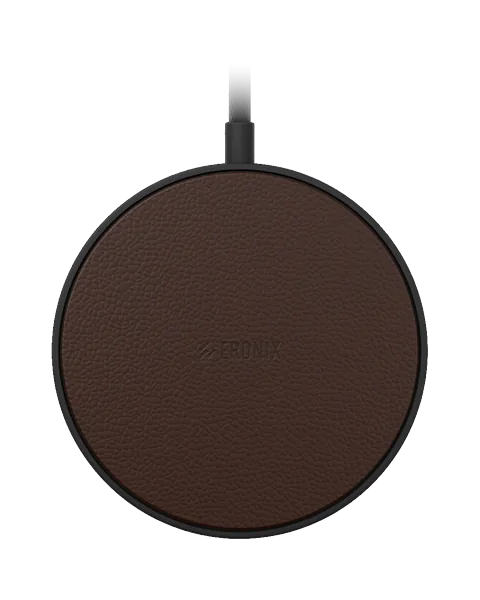
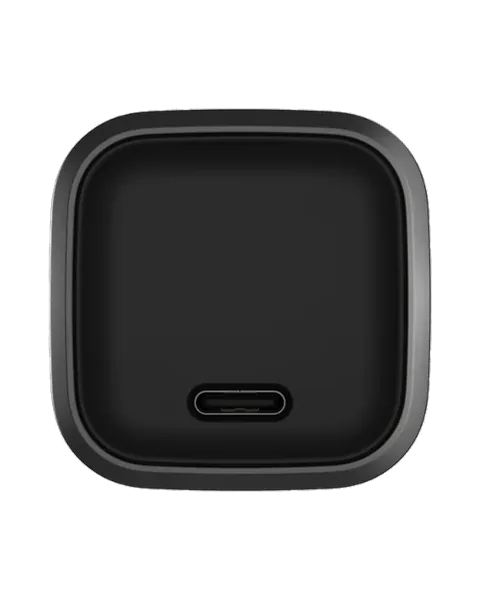
Full Qi2.2 speed needs three things to agree: a phone that takes 25 W, a 25 W magnetic pad, and an adapter of 30 W or more behind it. The ERONIX Magnetic Charger brings Qi2.2 25 W to iPhone 17 and later, and fits iPhone 12 and later, on an aluminium ring with a 1.5 m braided cable. The adapter is not included, so pair it with the Fermi30, a 30 W GaN3 adapter that meets the 30 W level Apple asks for, or choose the complete kit with a 30 W adapter.
Step by step
- Find your phone's maximum Qi2 wireless watts on its spec page.
- If it is above 15 W, look for a pad listed as Qi2 25W in the WPC database.
- Pair the pad with the adapter wattage it specifies, typically 30 W or more.
- Use a thin case designed for magnetic charging, or no case.
- Keep the pad somewhere ventilated to avoid heat throttling.
Questions people ask
What is the difference between Qi2 and Qi2.2?
Qi2 is the magnetic wireless charging standard launched in products in 2023 at up to 15 W. Qi2.2, branded Qi2 25W, raises the limit to 25 W. The WPC says that is nearly 70% more power. Both use the same magnetic alignment, based on Apple's MagSafe.
Will my old Qi2 charger work with a new iPhone?
Yes, at up to the charger's own 15 W. Macworld's guide treats Qi2 as working with every iPhone from the 12 onward, apart from the 16e. You only gain speed by moving to a Qi2 25W pad if your iPhone supports more than 15 W wirelessly.
What adapter does a Qi2 25W charger need?
It needs a USB-C adapter strong enough to supply 25 W at the pad after losses, so more than 25 W at the wall. Apple specifies a 30 W or higher adapter with its MagSafe Charger for fast wireless charging on iPhone 16, 17 and Air. Check the pad's own instructions.
Is Qi2 25W as fast as wired charging?
Close, but not quite. Macworld measured about 30 to 34 minutes to 50% on 25 W wireless iPhones, against about 25 minutes wired. Wireless also produces more heat. For the fastest top-up, a cable still wins; for convenience, 25 W wireless narrows the gap.
Sources
- Wireless Power Consortium: Qi2 25W news release · 23 Jul 2025
- Macworld: Qi2 vs MagSafe, which wireless charger is best for your iPhone · accessed 22 Nov 2026
- MacRumors: iOS 26 adds 25W Qi2 wireless charging support to iPhone 16 models · 23 Aug 2025
- Apple Support: Fast charge your iPhone · accessed 22 Nov 2026
- Wireless Power Consortium: Coupling factor · accessed 22 Nov 2026
- Battery University: BU-412 Charging without wires · accessed 22 Nov 2026
- 9to5Google: Qi2 Ready and built-in magnets · 7 Jan 2025
- Wikipedia: Qi (standard) · accessed 22 Nov 2026
Qi2
Wireless charging, aligned by magnets.
Read →Explainer · 4 min readQi2 and Qi2.2: the wireless standards in plain words
Same magnets, same snap. The difference is ten watts and a stricter test.
Read →Explainer · 5 min readThe physics of wireless charging, simply
No wire, no contact, yet your phone fills up. Here is what actually crosses the gap.
Read →Explainer · 4 min readWhy wireless charging is slower than wired
Power has to jump a gap of air and glass. Some of it never lands.
Read →Explainer · 5 min readDoes a case slow down wireless charging?
The case is rarely the problem. What you tuck inside it often is.
Read →Explainer · 4 min readWhy won't my phone charge on a wireless pad?
Wireless charging is two coils that must line up. Most failures are about that gap.
Read →