Journal · Explainer · 4 min read
Why won't my phone charge on a wireless pad?
Wireless charging is two coils that must line up. Most failures are about that gap.
You put the phone on the pad at night, and in the morning it is at the same 22% it was when you went to bed. No error, no warning, just nothing. Is the pad dead, or is something quietly blocking it?
Short answerUsually something is in the way or out of line. Wireless charging works only when the phone's coil sits close to and centred over the pad's coil. A thick, metal or battery case, a card or mount, a phone shifted by vibration, a warm battery or a weak adapter are the usual causes. Check them in that order.
What the official guidance says
Apple's support page on wireless charging gives a clear checklist. It asks you to place the phone display-up and centred on a Qi charger, and to watch for the charging icon within a few seconds. It notes that many Qi chargers work with iPhone at up to 7.5 W, and that MagSafe chargers align the phone magnetically for faster, more efficient charging.
Apple lists the blockers plainly: magnetic mounts, magnetic cases and other objects between phone and charger can reduce performance, and cards with magnetic strips or RFID chips can be damaged. Thick, metal or battery cases can slow or stop charging. A phone that vibrates with notifications can slide off the charging spot.
Two less obvious causes come from the same page. If the battery gets too warm, software may hold charging at 80% until it cools. And an iPhone will not charge wirelessly while it is connected to a USB cable.
The Wireless Power Consortium, which publishes the Qi standard, notes that Qi2 launched in 2023 at 15 W, with a 25 W version following in 2025, and that its magnetic profile keeps the phone and charger closely aligned, which improves efficiency.
| Cause | What you notice | What to do |
|---|---|---|
| Thick, metal or battery case | Slow or no charging | Remove the case and try again, centred |
| Card, mount or metal plate | Pad light blinks or goes dark | Take it off; cards can be damaged |
| Phone slid off centre | Charging stops overnight | Turn off vibration at night |
| Warm battery | Charging holds at 80% | Move away from sun, vents and pillows |
| USB cable connected | No wireless charging | Unplug the cable from the phone |
Source: Apple Support, How to wirelessly charge your iPhone, accessed 22 Nov 2026
How wireless charging works, and why the gap matters
A wireless pad holds a transmitter coil, and the phone holds a receiver coil. Current in the pad's coil creates a changing magnetic field, which induces current in the phone's coil. The Wireless Power Consortium explains that how well the two couple depends on the distance between the coils and their relative size. The phone also sends control signals to the pad throughout, asking for more or less power.
Think of it like two people talking through a wall. Side by side and close, the conversation flows. Move one person a step sideways or put a thick cushion between them and the words stop getting through. A thick case is the cushion; a phone that slid off centre is the step sideways.
Metal is worse than distance. It absorbs the magnetic field and heats up, so pads are designed to cut power when they detect a foreign object. That is often what a blinking or dark pad light is telling you.
The fix, step by step
Take the phone out of its case and remove any card, ring holder or metal plate. Try again, centred. If it charges now, the case or accessory was the problem.
Check the pad's adapter. Many pads need a USB PD or fast-charging adapter of a specific wattage to deliver their rated power. A low-power USB-A brick may run the pad very slowly or not at all. Use the adapter the pad maker recommends.
Turn off vibration or use Do Not Disturb at night, so notifications do not walk the phone off the coil.
Move the setup away from sunlight, a laptop vent or a pillow. If the phone is warm, it will pause or slow charging by design.
Unplug any USB cable from the phone. Some phones ignore wireless charging when a cable is connected. If none of this works, try the phone on another pad and another phone on your pad to isolate the faulty part.
When the pad itself is the problem
If no phone charges on the pad, even after a centred test with the case removed with the recommended adapter, the pad, its cable or its adapter has failed. Swap the cable and adapter first, because those fail more often than the coil inside.
If only your phone refuses, while another phone charges, check your phone's settings and software, then test it on a second pad. A phone that has been dropped or repaired may have a damaged receiver coil, which needs a service centre to diagnose.
What to check before you buy
Look for a Qi or Qi2 logo, and check the product in the Wireless Power Consortium's public product database.
Choose a magnetic Qi2 or MagSafe-compatible pad if you want alignment to be automatic.
Read which adapter the pad needs, including wattage and USB PD, and make sure you have one.
If you use a case, pick one marked as compatible with wireless or magnetic charging.
Myth corner
Myth: if the pad lights up, the phone must be charging. The light only shows the pad has power. The phone's own charging icon is the real signal, and Apple says it should appear within a few seconds of correct placement.
The right one for you
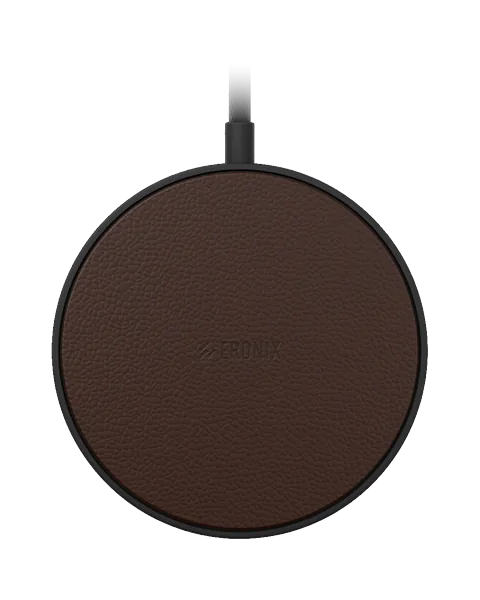
Most of these faults come down to alignment, and a magnetic charger takes that out of your hands. The ERONIX Magnetic Charger snaps onto iPhone 12 and later and charges at up to 25 W on iPhone 17 and later under Qi2.2, through an aluminium ring and a 1.5 m braided cable. It needs a USB-C adapter, which is not in the box; the complete kit pairs it with a 30 W adapter.
Step by step
- Remove the case, cards and any metal accessory, then centre the phone on the pad.
- Connect the pad to the adapter its maker recommends.
- Turn on Do Not Disturb so vibration does not move the phone.
- Move the setup to a cool spot away from sunlight and bedding.
- Unplug any USB cable from the phone and try again.
Questions people ask
Why does my phone charge wirelessly only up to 80%?
Usually because the battery is warm. Apple says that if the battery gets too warm during wireless charging, software may limit charging above 80% until it cools. Move the phone and pad somewhere cooler, away from sunlight or bedding, and charging should resume.
Does a phone case stop wireless charging?
A thin case usually does not. Apple advises removing thick, metal or battery cases if charging is slow or does not start, and warns that magnetic mounts and cards placed between the phone and charger can reduce performance or be damaged.
Why is my wireless charger light blinking?
Many pads blink when they detect a foreign object, poor alignment or an adapter that cannot supply enough power. The exact meaning differs by maker, so check the pad's manual. Remove metal objects, re-centre the phone and try the recommended adapter.
What adapter does a wireless charger need?
It depends on the pad. Many need a USB PD adapter of a stated wattage to reach their rated wireless output, and run slowly or not at all on a weak USB-A brick. Check the pad's label or manual and use the adapter it names.
Will a wireless charger work with any phone?
It works with phones that support the Qi standard, which most current flagships and many mid-range phones do. Apple lists iPhone 8 and later. Magnetic alignment needs a phone or case with a Qi2 or MagSafe-compatible magnet ring.
Sources
- How to wirelessly charge your iPhone, Apple Support · accessed 22 Nov 2026
- Knowledge base, Wireless Power Consortium · accessed 22 Nov 2026
- Magnetic induction, Wireless Power Consortium knowledge base · accessed 22 Nov 2026
Qi2
Wireless charging, aligned by magnets.
Read →Explainer · 4 min readQi2 and Qi2.2: the wireless standards in plain words
Same magnets, same snap. The difference is ten watts and a stricter test.
Read →Explainer · 4 min readWhy wireless charging is slower than wired
Power has to jump a gap of air and glass. Some of it never lands.
Read →Explainer · 5 min readDoes a case slow down wireless charging?
The case is rarely the problem. What you tuck inside it often is.
Read →Comparison · 5 min readDesk stand vs pad vs puck: which wireless charger?
Three shapes, one physics problem: getting two coils to line up and stay there.
Read →Buying guide · 5 min readWhich charger for a phone with a thick case on a wireless pad?
Wireless charging is a short-distance handshake. A chunky case makes the reach longer.
Read →