Journal · Explainer · 5 min read
Why does one earbud sound quieter?
Left loud, right faint. The cause is usually small, and so is the fix.
Halfway through a song you notice it: the left earbud is clearly softer than the right. You turn the volume up, and the imbalance stays. Is one earbud dying?
Short answerRarely. The usual causes are earwax or dirt on that earbud's speaker mesh, a poor seal from the wrong tip size or a loose fit, or a balance or hearing setting on your phone. Clean the mesh gently, refit or resize the tip, check the balance slider, and reset the earbuds. Only then suspect a fault.
What the sources say about fit and seal
Seal changes loudness more than most people expect. SoundGuys charted the same earphones with a good and a poor seal. With a poor seal, bass falls away sharply, and the site describes the higher notes sounding roughly twice as loud as everything else. It gives no decibel figure in the text, only the chart. A bud that seals in one ear and leaks in the other will sound thinner and quieter on the leaky side.
Ears also differ from each other. Apple's ear tip guide for AirPods Pro offers sizes from XXS to L, depending on the model, and says plainly that you might need different sizes for your left and right ears. Its Ear Tip Fit Test, or the Acoustic Seal Test on AirPods Pro 3, checks each side separately.
Blockage is the other everyday cause. Apple's AirPods Pro cleaning guide describes brushing each speaker mesh with a soft-bristled toothbrush dipped in micellar water for about 15 seconds, blotting, and repeating twice more, then doing the same with distilled water and letting the earbuds dry for at least two hours.
| Symptom | Likely cause | First fix |
|---|---|---|
| Softer and muffled | Wax or dirt on the mesh | Clean the mesh with a soft brush |
| Thin, little bass | Poor seal | Refit or change tip size |
| Same on every earbud | Balance setting | Centre the Balance slider |
| Started suddenly | Software glitch | Reset and re-pair |
| Quiet side follows the bud | Faulty earbud | Warranty claim |
Source: Apple Support; SoundGuys
How a small blockage makes a big difference
An earbud's driver is tiny, and its sound leaves through a fine mesh a few millimetres across. That mesh keeps out dust and earwax, but over weeks it slowly gets coated. Each layer narrows the path for sound, and the highs are affected first, so the bud sounds muffled as well as softer.
Seal works in the opposite direction. A sealed ear canal is a small closed space, and the driver can build pressure in it easily, especially in the bass. If air leaks around the tip, much of that pressure escapes, so the bud has to work harder for the same loudness.
Think of it like speaking into a paper cone. Cup it tightly around your mouth and the sound carries; leave a gap at the side, or stuff a handkerchief in the end, and the same voice sounds weak at the other end. A blocked mesh is the handkerchief; a loose tip is the gap.
Fix it in this order
Clean the mesh. Remove the tip, then brush the mesh gently with a dry, soft brush, or follow your maker's method. Apple warns against sharp objects, abrasives and running AirPods under water, apart from its specific AirPods Pro 3 rinse, and says not to use soap or household cleaners on ear tips. Rinse silicone tips with water if your maker allows it, and let everything dry fully.
Refit and resize the tips. Push each bud in with a gentle twist so the tip seals. Try one size up or down on the quieter side; it is normal for each ear to need a different size. Use the fit or seal test in your earbuds' app if there is one.
Check the balance setting. On an iPhone, go to Settings, Accessibility, Audio and Visual, and look at the Balance slider; it should sit in the centre. Apple also notes that AirPods Pro in Transparency mode have a separate Transparency Balance slider. Android phones have a similar balance control in their accessibility settings. Check that hearing features, such as Apple's Headphone Accommodations, are set the way you want.
Reset and re-pair. Forget the earbuds in Bluetooth settings, reset them using the maker's steps, and pair again. This clears a software glitch that can make one side misbehave.
When it is a real fault
If the imbalance remains after cleaning, refitting, a centred balance slider and a reset, swap the buds between ears. If the quiet side follows the bud, the bud is likely faulty. If the quiet side stays with the same ear, the cause may be wax in that ear canal or a hearing difference, which a doctor or audiologist can check.
Note any crackle, rattle or sound that cuts in and out. These point to a driver or connection fault, which is a warranty matter, not a cleaning one.
What to check before you buy
Count the tip sizes in the box. More sizes, ideally from extra small to large, make a good seal on both sides more likely.
Look for a fit or seal test in the companion app. It checks each ear separately and saves guesswork.
Check whether replacement tips are sold. Tips wear and stretch; a supply of the right size keeps the seal consistent.
Ask how the mesh can be cleaned. A maker that publishes cleaning steps saves you from damaging the earbuds with the wrong tool.
Myth corner
Myth: you should clean an earbud mesh with a pin. Apple specifically warns against sharp objects on AirPods, and a pin can puncture the mesh and reach the driver behind it, turning a cleaning job into a repair. A soft brush and patience work better.
The right one for you
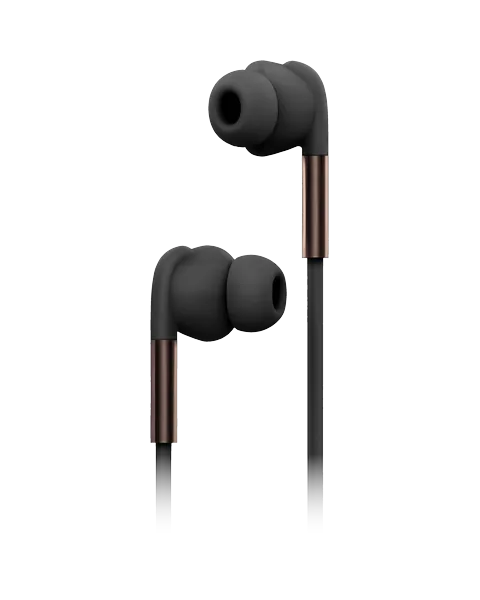
A good seal on both sides starts with having the right tip for each ear. The Xenon comes with ear tips in three sizes, so the left and right can take different ones, as many ears need.
It is wired over USB-C with its own 24-bit/96 kHz DAC, so there is nothing to pair or reset, and it fits every USB-C phone, iPhone 15 and later included. The 14 mm dual titanium drivers sit in a metal housing.
Step by step
- Remove the ear tips and brush the speaker mesh gently with a dry, soft-bristled brush.
- Let the earbuds dry fully before use.
- Refit each bud with a gentle twist and try a different tip size on the quieter side.
- Check the phone's balance slider is centred.
- Forget, reset and re-pair the earbuds.
- Swap the buds between ears to see whether the fault follows the bud.
Questions people ask
Can earwax make one earbud quieter?
Yes. Earwax gradually coats the fine speaker mesh, narrowing the path for sound, so that bud sounds softer and muffled. Apple recommends cleaning AirPods Pro meshes with a soft-bristled brush and micellar water, then drying for at least two hours. Avoid pins or sharp tools, which can damage the mesh.
Should both ear tips be the same size?
Not necessarily. Apple's AirPods Pro guide says you might need different sizes for your left and right ears. Ear canals differ, and a tip that seals in one ear may leak in the other, making that side sound quieter and thinner. Try sizes on each side separately.
How do I check audio balance on my iPhone?
Go to Settings, Accessibility, Audio and Visual, and look at the Balance slider; it should sit in the centre. If you use AirPods Pro in Transparency mode, Apple provides a separate Transparency Balance slider. Android phones offer a similar balance control in their accessibility settings.
Is it the earbud or my ear?
Swap the earbuds between ears after cleaning and refitting. If the quiet side follows the bud, the bud is likely at fault. If it stays with the same ear, wax in that ear or a hearing difference may be the cause, and a doctor or audiologist can check.
Sources
- SoundGuys: How your in-ears fit matters a lot · accessed 22 Nov 2026
- Choose your AirPods Pro ear tips, Apple Support · accessed 22 Nov 2026
- How to clean your AirPods Pro, Apple Support · accessed 22 Nov 2026
- Customise audio levels and Headphone Accommodations, Apple Support · accessed 22 Nov 2026
- How to reset your AirPods and AirPods Pro, Apple Support · accessed 22 Nov 2026
Acoustics
What a driver actually does.
Read →Explainer · 4 min readHi-Res Audio on Bluetooth: what is real
The badge on the box is real. So is the compression that makes it fit.
Read →Explainer · 4 min readCleaning earbuds safely
Most earbud damage during cleaning comes from the toothpick, not the dirt.
Read →Explainer · 5 min readWhat 'drivers' and 'mm' mean on a spec sheet
12 mm sounds bigger than 10 mm. Your ears may not agree, and here is why.
Read →Explainer · 5 min readFrequency response charts, read simply
One wiggly line can tell you whether earbuds will sound boomy, harsh or just right.
Read →Explainer · 5 min readBass: why more is not always better
The low end fills a song. Push it too far and it starts to swallow everything else.
Read →