Journal · Explainer · 5 min read
What 'universal' really means for USB-C
Every port fits every plug. That is where the promise ends, and the labels begin.
Your phone, your laptop, your earbuds and your partner's tablet all have the same oval port now. So any USB-C cable and any USB-C charger should work with anything, at full speed, right?
Short answerThey will usually connect and charge, but not always at full speed. USB-C is a universal connector, not a universal capability. Power, data speed and video depend on what the device, charger and cable each support. Every compliant cable carries 60 W; 100 W needs a 5 A cable, and many charging cables move data only at USB 2.0 speed.
The numbers: what changes from cable to cable
Wikipedia's summary of the USB-C specifications describes a 24-pin reversible plug, identical at both ends. What runs through it varies. USB 2.0 cables have fewer wires and support only USB 2.0 data and Power Delivery. Full-featured cables have all wires and come in speed grades marketed as 5, 10, 20 or 40 Gbps.
Power has its own steps. Every USB-C cable must support 3 A, which at 20 V is 60 W. Cables rated for 5 A support up to 100 W. The Extended Power Range reaches 240 W, at 48 V and 5 A. Every cable except the most basic 60 W, USB 2.0 type must contain an e-marker chip that reports what it can carry.
Length matters for the fastest modes. According to the same summary, passive full-featured cables are limited to about 2 m for 5 Gbps and 1 m for 10 Gbps in some uses, and 40 Gbps Thunderbolt 3 needs active cables beyond about 0.8 m.
| Cable type | Current | Power | E-marker |
|---|---|---|---|
| Basic USB 2.0 type | 3 A | 60 W | Not required |
| 5 A cable | 5 A | 100 W | Required |
| Extended Power Range | 5 A at 48 V | 240 W | Required |
Source: USB-C, Wikipedia
How it works: one shape, many languages
The USB Implementers Forum, which writes the USB standards, says it plainly in its packaging guidelines: USB Type-C is a type of connector. It is not USB 3.2, USB4 or USB Power Delivery, and the terms are not interchangeable. It asks makers to treat Type-C as a descriptive feature and to state separately which data and power standards a product supports.
When you plug in, the two ends talk before anything heavy happens. Charging starts at a safe 5 V. Then the device and charger agree on more power if both support USB Power Delivery and the cable is rated for it. Data links agree on a speed both ends and the cable can handle. Video modes, such as DisplayPort, are switched on only if both devices support them.
Think of it like Indian Railways' broad gauge. Every coach fits every track, from a local passenger train to a Vande Bharat. But the speed you travel depends on the engine, the signalling and the coaches, not on the width of the rails. USB-C is the gauge.
What the EU common charger law actually requires
Much of the universal idea comes from the European Union. Directive 2022/2380 requires a USB-C port on phones, tablets, e-readers, earbuds, cameras, headphones, handheld consoles and portable speakers sold in the EU from 28 December 2024, and on laptops from 28 April 2026, according to the European Parliament's legislative summary. It harmonises fast charging, lets buyers choose a device with or without a charger, and requires a label showing charging capabilities.
It does not make every charger equally fast for every device, and it does not yet cover wireless charging. Apple's switch from Lightning to USB-C began with iPhone 15.
Where universal genuinely helps
The shared shape still solves real problems. One good USB-C Power Delivery charger can now serve a phone, earbuds, a tablet and many laptops, each drawing what it negotiates. The handshake that starts at 5 V means a mismatch normally costs you speed, not safety, on compliant equipment. And the EU's unbundling rule exists precisely because buyers already own a suitable charger.
The practical habit is simple: keep one high-wattage charger, one 100 W or 240 W cable for the laptop, one fast data cable, and let the phone cable be the plain one. Label them, and the universal port becomes genuinely universal in your bag.
What to check before you buy
Read the cable's power rating. For phones, a 60 W cable is enough. For laptops above 60 W, choose 100 W or 240 W.
Read the data rating separately if you move files or connect a display. A cable sold for charging may be USB 2.0 only. Look for USB 10Gbps, 20Gbps or 40Gbps on the packaging, the names the USB-IF recommends.
Check the charger's output against your device's need. A 20 W charger will charge a laptop slowly, if at all. A phone that uses PPS or Apple's AVS needs a charger that supports them for top speed.
Check video support if you want a monitor. Both the device and the cable must support video over USB-C.
Look for the USB-IF logo. The forum allows its logos only on products that have passed its compliance programme.
Myth corner
Myth: a USB-C cable that charges my phone fast will do everything. It may be a USB 2.0 cable, fine for charging up to its rating but slow for files and unable to carry video. Wikipedia's summary of the specifications notes that USB 2.0 Type-C cables support only USB 2.0 data and Power Delivery. Keep one fast data cable labelled for that job.
The right one for you
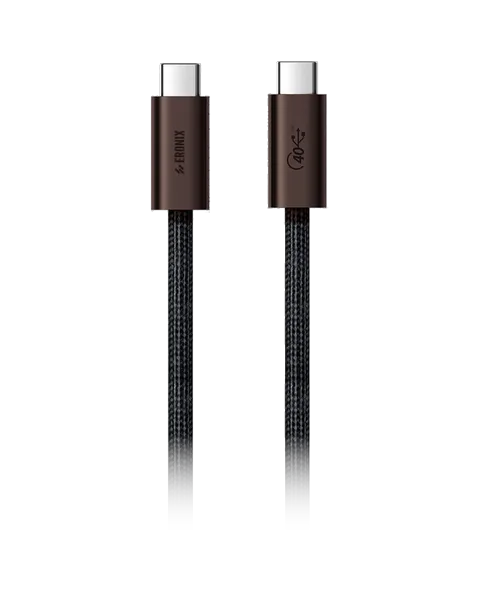
The habit in this guide is one cable per job, each labelled for what it carries. For the Mac, the iPad Pro and a display, the Mac Cable USB4 states both ratings on the label: USB4 at 40 Gbps and 240 W, so the screen, the data and the power share one cable.
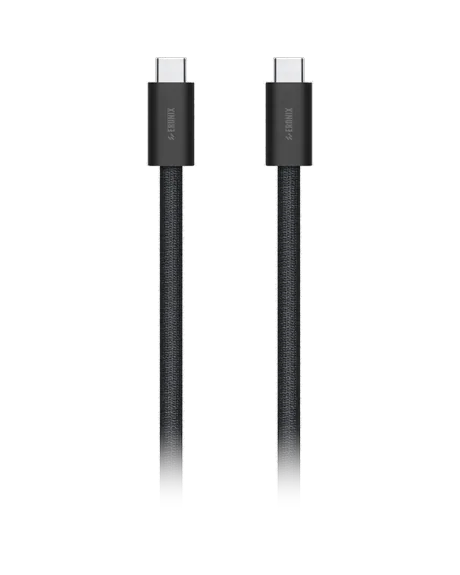
For the phone, the Everyday Cable is the plain one done properly: USB-C at both ends, 60 W, 1 m, braided, with aluminium shells, tested to 10,000 bends.
Step by step
- Check your device's required charging wattage and protocol.
- Choose a charger whose output label meets that need.
- Pick a cable rated 60 W for phones, or 100 W or 240 W for laptops.
- Choose a cable marked 10Gbps or faster if you transfer files or use a display.
- Look for the USB-IF logo on the packaging.
Questions people ask
Can I use any USB-C charger for my phone?
Usually yes, safely. USB-C chargers start at 5 V and only raise voltage when the phone asks. But speed varies: a phone that needs PPS or Apple's AVS for its top speed will charge more slowly on a charger without them. Check your phone maker's recommended wattage and protocol.
Why does my USB-C cable not transfer files fast?
It may be a USB 2.0 cable. Wikipedia's summary of the USB-C specifications explains that USB 2.0 Type-C cables have fewer wires and carry only USB 2.0 data plus power. For fast transfers, use a cable marked USB 10Gbps or faster, and check your device's port supports that speed.
Do all USB-C cables support 100 W?
No. Every compliant USB-C cable must support 3 A, which is 60 W at 20 V. 100 W needs a 5 A cable with an e-marker chip, and 240 W needs an Extended Power Range cable. Using a 60 W cable with a 100 W laptop is safe but slower.
Does the EU USB-C rule apply in India?
The EU directive applies to devices sold in the European Union, from 28 December 2024 for most small devices and 28 April 2026 for laptops. Global brands often use the same port worldwide, so many devices sold in India also use USB-C. Check Indian rules separately for local requirements.
Sources
- USB-C, Wikipedia · accessed 22 Nov 2026
- USB-IF: USB Type-C language, product and packaging guidelines · 20 Mar 2023
- European Parliament Legislative Train: Common chargers for mobile phones and similar devices · accessed 22 Nov 2026
USB-C Power Delivery
One connector, a negotiated contract.
Read →Buying guide · 5 min readWhich charger does the iPhone 18 Pro need?
Half a battery in 15 minutes, but only if your charger speaks one new word: AVS.
Read →Explainer · 5 min readUSB Power Delivery explained in one page
How a charger and a phone agree on power before it flows, and how to read the label.
Read →Comparison · 5 min readFast charging on iPhone vs Galaxy
Two phones, two dialects of USB-C. The charger that speaks both is the one to own.
Read →Explainer · 4 min readHow to fix 'charging slowly' warnings
The phone is telling you something specific. Five checks find what, in under five minutes.
Read →Buying guide · 4 min readWhich charger does the iPhone 18 Pro Max need?
The biggest iPhone battery yet, filled to half in the time it takes to drink a chai.
Read →