Journal · Buying guide · 5 min read
Which charger does the Nothing Phone (3) need?
One open standard, one word on the label, and you are at full speed.
Sixty minutes. That is how long Nothing says the Phone (3) takes to fill with its official charger. Walk up to a counter, though, and you face a wall of bricks that all claim to be fast. Which of them actually gets the Phone (3) close to that hour?
Short answerUse a USB-C charger that supports PPS, the programmable mode of USB Power Delivery. Nothing's support page asks for a PPS charger and quotes about 60 minutes for a full charge on its official charger. Public specifications list a 65 W wired peak, so a 65 W PPS charger reaches full speed. A smaller PPS charger works too, only slower.
Nothing Phone (3) charging figures
Nothing's support article for the Phone (3) lists a 5,150 mAh battery and gives one clear instruction: use a PPS protocol charger. With the official Nothing charger, it says the phone reaches a full charge in about 60 minutes. It also notes that heat or cold can slow charging, suggests about 25 °C, give or take 3 °C, and recommends keeping the screen off.
Nothing's support page does not list the peak wattage. Public specification summaries compiled from Nothing's launch material list 65 W wired charging over the PD 3.0, PPS and QC4 protocols, 15 W wireless charging, 7.5 W reverse wired charging and 5 W reverse wireless charging for accessories. The same summaries list the Indian model with a larger 5,500 mAh battery, so the Indian full-charge time may differ slightly from Nothing's global figure.
We could not find an independent lab charging curve for the Phone (3) that we could verify, so we do not quote one. Nothing's 60-minute figure is the maker's own claim.
| Item | Figure |
|---|---|
| Battery (global / India) | 5,150 mAh / 5,500 mAh |
| Wired peak | 65 W, PD 3.0, PPS, QC4 |
| Wireless | 15 W |
| Reverse wired / wireless | 7.5 W / 5 W |
| Full charge, official charger | About 60 min |
Source: Nothing Support; launch specification summary
Power (W)
Source: Nothing Phone (3) launch specification summary
Why PPS matters for this phone
USB Power Delivery offers fixed voltage steps such as 5 V, 9 V, 15 V and 20 V. PPS adds fine control. Granite River Labs, a USB test lab, describes PPS output adjusting in 20 mV steps. The phone asks for a voltage just above the battery's own and changes its request every few moments as the battery fills.
That fine control moves the conversion work from the phone to the charger. The phone's own circuitry then does less, which means less heat inside the phone and a faster sustained charge. A charger without PPS can still charge the Phone (3) over standard PD, but the phone must convert more power itself and will usually charge more slowly.
Think of a water tap versus a bucket. A fixed-voltage charger hands the phone a full bucket and lets it pour what it needs; some always spills as heat. A PPS charger is a tap the phone can turn to exactly the flow it wants.
What you can skip
You do not need a proprietary charger. The Phone (3) runs on open standards, so a PPS charger from any reputable maker is suitable.
You do not need more than 65 W for this phone alone. A larger charger is useful only if you will share it with a laptop.
You do not need a wireless charger for speed. At 15 W, wireless is a convenience for the bedside, not a fast option.
Sharing one charger with other devices
Because the Phone (3) speaks the same open standard as most modern laptops, tablets and iPhones, it is a good candidate for a single multi-port charger. Watch the per-port figures. Nothing's support site notes, in another article, that a multi-port charger divides its power among the ports in use, and that charging can pause briefly when you plug in a second device.
If you charge a laptop and the phone together, choose a charger whose label shows enough wattage on the phone's port with both ports in use, and confirm that port still offers PPS.
Signs the charger is the bottleneck
If a full charge takes far longer than Nothing's 60-minute figure, start with the charger label. A charger without PPS, or a PPS range that tops out at a low current, will hold the phone back even if the headline wattage looks large.
Next, swap the cable. A worn or basic cable can limit current, and the phone has no way to tell you which part is slow. A known 5 A cable rules it out in a minute.
Finally, check the conditions. A phone in a thick case, on a bed or in a warm car will slow itself down, whatever charger you use.
What to check before you buy
Look for PPS on the charger's label or listing, not just USB PD. It is the one word Nothing asks for.
Read the output table. A PPS line shows a voltage range with a current, rather than one fixed voltage. A charger that only lists fixed voltages lacks PPS.
Use a cable rated for the current. A 5 A, e-marked USB-C cable lets the charger offer its highest current; a 3 A cable can limit it.
Check the BIS registration number printed on the charger before you buy it in India.
Charge in open air. Nothing itself notes that temperature can slow charging.
Myth corner
Myth: the Phone (3) charges fastest only on Nothing's own charger. Nothing's instruction is about the protocol, not the brand: use a PPS charger. Any well-made charger with the right PPS output and a suitable cable can reach the phone's top rate.
The right one for you
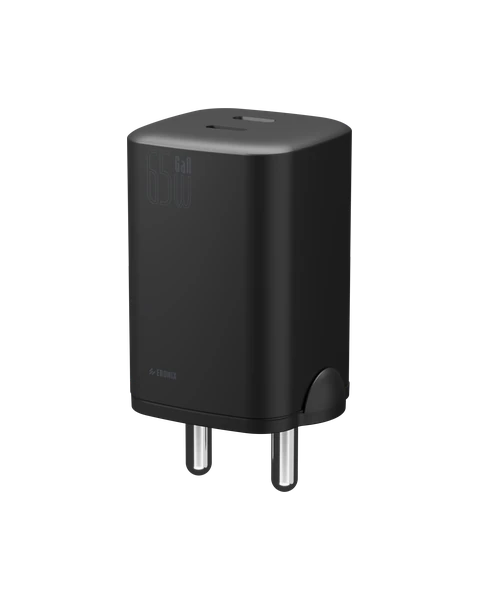
The Phone (3) asks for one thing: PPS. Its listed wired peak is 65 W, and Fermi65 is the ERONIX charger matched to that peak: 65 W, with two USB-C ports.
Give the phone a port of its own when speed matters.
Step by step
- Check that the charger lists PPS, not just USB PD.
- Pick 65 W for full speed or a smaller PPS charger if speed matters less.
- Use a 5 A e-marked USB-C cable for the highest current.
- Check the BIS registration number on the label.
- Charge at room temperature with the screen off for the fastest result.
Questions people ask
How long does the Nothing Phone (3) take to charge?
Nothing's support page says the Phone (3) reaches a full charge in about 60 minutes with the official Nothing charger. It notes that temperature can slow charging and recommends charging at room temperature with the screen off. Results with other chargers depend on their PPS output.
Does the Nothing Phone (3) come with a charger?
Check the box contents for your market before you buy anything. If there is no charger in the box, a USB-C charger with PPS is the right choice, ideally 65 W if you want the phone's full wired speed.
Can I use a Samsung charger with the Nothing Phone (3)?
Yes, if it supports PPS. Samsung's own support pages call for PPS chargers for its fast modes, so many Samsung chargers list PPS on the label. The phone will charge at whatever level both the charger and phone support, up to the phone's wired limit, which public specification summaries list as 65 W.
Does the Nothing Phone (3) support wireless charging?
Yes. Public specification summaries list 15 W wireless charging and 5 W reverse wireless charging for accessories such as earbuds. Wireless is slower than wired and is best for overnight or desk top-ups.
Why does my Nothing phone charge slowly in a car or outdoors?
Heat slows charging. Nothing notes that temperature affects speed and recommends room temperature with the screen off. Car dashboards and direct sun push the phone warm, and it reduces power to protect the battery.
Sources
- Nothing Support: Nothing Phone (3) battery and charging · accessed 22 Nov 2026
- Nothing Phone 3 (Wikipedia summary of launch specifications; secondary source) · accessed 22 Nov 2026
- Nothing Support: Why does the charging port stop working and restart when I start using another port · accessed 22 Nov 2026
- Granite River Labs: USB Power Delivery Specification 3.1 · accessed 22 Nov 2026
- BIS CRS portal: Search by registration number · accessed 22 Nov 2026
PPS — Programmable Power Supply
Power Delivery, with a fine-adjustment dial.
Read →Buying guide · 4 min readWhich charger does the Galaxy S26 Ultra need?
Sixty watts on the box. Here is what it takes to get it.
Read →Buying guide · 4 min readWhich charger works best in a car with a 12 V socket?
The dashboard USB port was built for music, not charging. The 12 V socket can do far more.
Read →Buying guide · 4 min readWhich charger for two phones at once?
Two phones, one socket, both fast. The answer is in the shared-port line of the label.
Read →Buying guide · 4 min readHow many watts does a 4-port desk charger really give each port?
The wattage on the box is a shared budget. Every extra cable takes a slice.
Read →Buying guide · 5 min readWhich charger for students: one brick for everything
One bag, one socket, one brick. Here is how many watts that brick really needs.
Read →