Journal · Buying guide · 4 min read
Which charger does your Steam Deck or handheld gaming PC need?
A gaming handheld is a laptop in your hands. Size the charger like one.
You are two hours into a long game on a Steam Deck, the battery is at 15% and the only spare charger in the room is the 25 W one from your phone. You plug it in and the percentage keeps falling. Is the charger broken, or is it simply too small?
Short answerIt is too small for gaming. Valve rates the Steam Deck's USB Power Delivery charger at 45 W, and ASUS rates the ROG Ally's adapter at 65 W (20 V, 3.25 A). Use a USB PD charger at or above your handheld's own rating, with a USB-C cable rated for 60 W or more.
Battery and charger numbers for popular handhelds
Valve's official tech specs list the Steam Deck OLED with a 50 Wh battery, 3 to 12 hours of gameplay and a 45 W USB PD 3.0 power supply with a 2.5 m cable. The original LCD model lists a 40 Wh battery, 2 to 8 hours of gameplay and the same 45 W PD 3.0 supply with a 1.5 m cable.
ASUS's specification page for the 2023 ROG Ally lists a 40 Wh, four-cell lithium-ion battery and a 65 W USB-C adapter with a 20 V, 3.25 A output. ASUS also notes that whether a charger is in the box varies by country and model, so check before you rely on one.
For comparison, Nintendo lists the Switch 2 battery at 5,220 mAh and a full charge at about 3 hours in Sleep mode. The pattern holds across all three: bigger screens and faster chips mean battery capacities closer to a small laptop's than a phone's.
A quick worked example, using round illustrative figures, shows why the phone charger loses. Suppose a demanding game draws about 20 W. A 25 W charger then leaves almost nothing for the battery. A 45 W charger covers the game and still pushes charge into the cells.
| Handheld | Battery | Charger rating | Gameplay |
|---|---|---|---|
| Steam Deck OLED | 50 Wh | 45 W USB PD 3.0 | 3 to 12 h |
| Steam Deck (LCD) | 40 Wh | 45 W USB PD 3.0 | 2 to 8 h |
| ROG Ally (2023) | 40 Wh | 65 W (20 V, 3.25 A) | not stated |
Source: Valve Steam Deck tech specs; ASUS ROG Ally (2023) specifications, accessed 22 Nov 2026
Charger rating (W)
Source: Valve and ASUS spec pages, accessed 22 Nov 2026
How charging works while you play
The handheld's power circuit has two jobs at once. It runs the processor, screen and fans, and it charges the battery with whatever is left. USB Power Delivery decides how much arrives. The USB Implementers Forum describes PD as a negotiation in which the device asks only for the power it needs, and the charger offers voltages up to its limit. At 20 V and 3 A that is 60 W; at 20 V and 5 A it is 100 W.
Think of it like a household budget. The game is rent, paid first. Only what is left over goes into savings, which is the battery. A small charger is a small salary: rent gets paid, but savings stall or fall.
That is also why a larger charger is safe. A 100 W laptop charger does not force 100 W into a Steam Deck. The Deck asks for what it can use, and the rest of the charger's capacity stays idle.
Docks, power banks and travel
Docks pass power through to the handheld and also run their own ports, display output and network. A dock connected to a 45 W charger can leave less than 45 W for the console. If you use a dock with an external screen, a 65 W charger gives the setup room.
A power bank can keep a handheld going on a train or flight if it offers USB PD output at 20 V. Bank output of 45 W or more will charge during light play. Below that, expect it to slow the drain rather than reverse it.
On flights, carry the power bank in your cabin bag and check its watt-hour rating against your airline's limit. Most handheld batteries and common power banks fall within typical cabin limits, but the rule belongs to the airline.
What to check before you buy
Find your handheld's own charger rating: 45 W for Steam Deck, 65 W for the ROG Ally per its spec page. Choose a USB PD charger with at least that output on a single port.
Read the output label for a 20 V line. Handheld PCs charge fastest at 20 V; a charger that tops out at 9 V or 12 V will be slow.
Use a USB-C cable rated for 60 W or more, and 100 W if your charger and handheld run above 60 W.
On a multi-port charger, check the per-port split. A 100 W charger may give only 45 W to one port when a phone is plugged into another.
For travel, pick a power bank that lists USB PD output and states its watt-hour figure clearly on the case.
Myth corner
Myth: you must only ever use the charger that came in the box. Valve's and ASUS's own spec pages describe standard USB PD supplies, so any reliable USB PD charger with the same or higher rating and a suitable cable will charge the device correctly. What matters is the standard and the rating, not the logo.
The right one for you
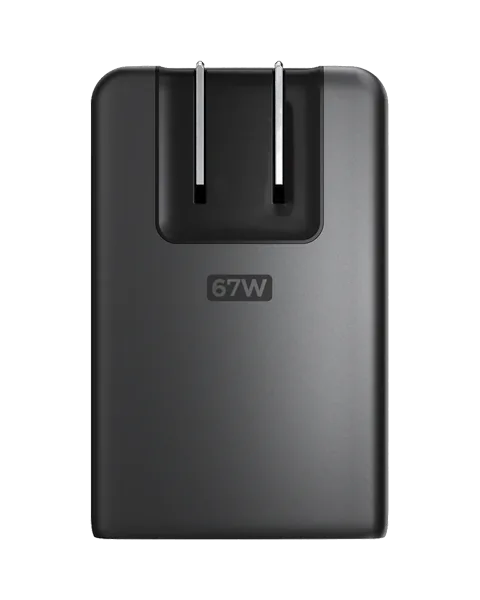
A handheld wants its full rating at 20 V from a single port: 45 W for a Steam Deck, 65 W for a ROG Ally. The Entropy67 gives 67 W from one USB-C port at 20 V and 3.35 A, enough for either console and for a docked setup, in a body 14 mm thin that slips into the same pouch as the console. Pair it with the Power Cable 240 W: braided, e-marked and 2 m long, so the handheld reaches the sofa while it charges.

Step by step
- Look up your handheld's adapter rating on the maker's spec page.
- Choose a USB PD charger that meets that rating on a single port, with a 20 V line.
- Pair it with a USB-C cable rated for 60 W or 100 W as needed.
- If you use a dock, add headroom to the charger rating.
- For travel, pick a USB PD power bank with a clearly printed watt-hour figure.
Questions people ask
Can I charge my Steam Deck with a phone charger?
Yes, if it is a USB-C charger with USB Power Delivery, but slowly. During demanding games a 20 W to 30 W phone charger may only slow the battery drain. Valve supplies a 45 W PD 3.0 charger, so use 45 W or more if you want to charge while playing.
Is a 65 W or 100 W charger safe for the Steam Deck?
Yes. USB Power Delivery lets the device request only the power it needs, so the Steam Deck draws within its own limit and the rest of the charger's capacity stays unused. Use a USB-C cable rated for the charger's output.
What charger does the ASUS ROG Ally need?
ASUS's specification page for the 2023 ROG Ally lists a 65 W USB-C adapter with a 20 V, 3.25 A output. A USB PD charger that can supply 65 W at 20 V on one port, with a cable rated above 60 W, matches it.
How big is the Steam Deck battery?
Valve lists 50 Wh for the Steam Deck OLED and 40 Wh for the original LCD model. It rates gameplay at 3 to 12 hours for the OLED and 2 to 8 hours for the LCD, depending on the game and settings.
Why does my handheld charge slowly on a dock?
A dock uses part of the incoming power for its own ports, display output and network. If the dock's charger is only just big enough for the handheld, less reaches the battery. Check the dock maker's recommended input rating and use a USB PD charger that meets or exceeds it.
Sources
- Steam Deck OLED tech specs, Valve · accessed 22 Nov 2026
- Steam Deck (LCD) tech specs, Valve · accessed 22 Nov 2026
- ROG Ally (2023) specifications, ASUS · accessed 22 Nov 2026
- Nintendo Switch 2 technical specs · accessed 22 Nov 2026
- USB Charger (USB Power Delivery), USB Implementers Forum · accessed 22 Nov 2026
USB-C Power Delivery
One connector, a negotiated contract.
Read →Buying guide · 4 min readHow many watts does a 4-port desk charger really give each port?
The wattage on the box is a shared budget. Every extra cable takes a slice.
Read →Buying guide · 5 min readIs a 140 W charger overkill?
A big number on a small brick. Who actually uses all of it, and who never will.
Read →Buying guide · 5 min readWhich charger for a work-from-home desk?
One socket, one charger, a full working day. The sum is simpler than it looks.
Read →Explainer · 4 min readHotel room charging: making one socket work
One socket behind the bed, three devices, a 7 am meeting. Here is the plan.
Read →Explainer · 5 min readGaN chargers: what changed and what did not
A new material shrank the charger. Your phone's charging speed stayed where it was.
Read →