Journal · Explainer · 4 min read
Audio for content creators: earbuds as monitors
Fine for checking a cut. Risky for hearing yourself live. Here is where the line falls.
You are recording a voice-over for a reel, earbuds in, and something feels off. Your own voice arrives in your ears a beat late, like an echo in a big hall, and you start stumbling over words you know by heart. Are your earbuds the wrong tool for this job?
Short answerFor live monitoring, usually yes. Bluetooth earbuds add a delay that independent tests have measured at well over 100 ms, enough to throw off speech and timing. They are fine for reviewing a finished edit or checking a mix on the kind of earbuds your audience uses. For hearing yourself while recording, use wired headphones or a low-latency setup.
How much delay Bluetooth adds
MacRumors reported tests by developer Stephen Coyle, who timed the gap between triggering a sound on an iPhone and hearing it. He measured about 274 ms on first-generation AirPods, 178 ms on AirPods 2 and 144 ms on the original AirPods Pro, with some other wireless headphones around 225 to 250 ms. These were 2019 models and newer earbuds may do better, but the point stands: the delay is measured in tenths of a second, not milliseconds.
Codecs designed for low delay exist. SoundGuys' codec guide says aptX Low Latency stays under 40 ms, and LHDC's low-latency mode can go as low as 30 ms end to end, but both need matching support on phone and earbuds. Bluetooth LE Audio's LC3 codec, the Bluetooth SIG explains, works in short frames of 10 ms or 7.5 ms, and lists lower latency among its design goals, though the SIG does not publish a single end-to-end figure.
A wired connection, by contrast, adds no meaningful transmission delay. The sound reaches your ears as fast as the phone or interface outputs it.
| Connection | Delay | Source |
|---|---|---|
| AirPods, first generation | About 274 ms | Stephen Coyle, via MacRumors |
| AirPods 2 | About 178 ms | Stephen Coyle, via MacRumors |
| AirPods Pro, original | About 144 ms | Stephen Coyle, via MacRumors |
| Some other wireless headphones | About 225 to 250 ms | Stephen Coyle, via MacRumors |
| aptX Low Latency | Under 40 ms | SoundGuys |
| LHDC low-latency mode | As low as 30 ms | SoundGuys |
| Wired | No meaningful transmission delay | - |
Source: MacRumors, Dec 2019; SoundGuys codec guide, accessed Nov 2026
Delay (ms)
Source: Stephen Coyle's tests, reported by MacRumors, Dec 2019
Why delay matters for your voice
When you speak, you hear yourself twice: through the air and through the bones of your skull. Your brain expects both copies to line up. Feed it a third copy a tenth of a second late and it starts to correct for a mismatch that is not there, which shows up as hesitation, slurring or a slower pace.
It is like trying to clap along to a video call where the other person's audio lags. You can do it, but you have to stop listening to stay in time. For a creator speaking to camera, that is exactly the wrong habit.
Delay matters less once recording is done. Video editors and players compensate for Bluetooth lag during playback on many phones, so lip sync often looks right even when audio is late. Reviewing a cut on earbuds is therefore reasonable.
Where earbuds earn their place
Checking how the audience will hear it. Much of your audience will hear a reel on earbuds or a phone speaker, not studio monitors. Playing your final export on everyday earbuds reveals harsh s sounds, buried dialogue or music that drowns the voice.
Catching noise. Earbuds with a good seal block outside sound, which helps you hear background hum, fan noise or clipping in a recording.
Editing on the move. For rough cuts on a train or in a café, earbuds are practical. Do the final mix check on wired headphones or speakers as well.
A sensible creator setup
Record with wired monitoring where you can. Many phones and USB microphones offer a headphone output or direct monitoring, so you hear the mic without the round trip through Bluetooth.
Turn off processing when judging sound. ANC, spatial audio and equaliser presets change what you hear. For a neutral check, switch them off and use a flat setting.
Check on two devices. Listen once on earbuds and once on speakers or a laptop. A mix that works on both will work for most viewers.
Keep levels moderate. Long editing sessions at high volume tire the ears and skew judgement. The WHO suggests keeping device volume at or below 60% of maximum.
What to check before you buy
Ask about latency, not just sound. If a brand publishes a game or low-latency mode, ask what codec it uses and whether your phone supports it.
Check that ANC and EQ can be switched off. Monitoring needs a plain, unprocessed sound.
Check the seal. A snug fit gives accurate bass and blocks room noise, both important for judging recordings.
Check comfort for long sessions. An editing session can run for hours; light earbuds with several tip sizes help.
Keep a wired option. A USB-C or 3.5 mm wired pair alongside earbuds covers live recording.
Myth corner
Myth: if the video looks in sync on your phone, the earbuds have no lag. Players often delay the video to match Bluetooth audio, so playback looks right. Live input, like your own voice while recording, cannot be delayed to match, which is why the lag shows up only then.
The right one for you
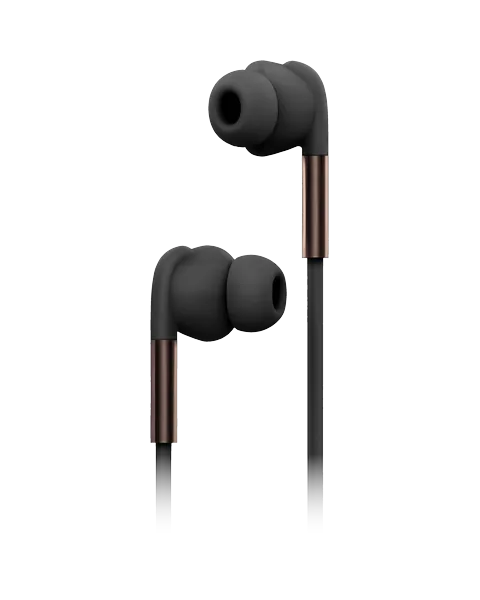
For hearing your own voice while you record, the answer above is a wired pair. The Xenon plugs into USB-C with its own 24-bit/96 kHz DAC in the cable: no Bluetooth link, no pairing and no battery to run down mid-take.
It fits every USB-C phone, iPhone 15 and later, with an in-line mic and remote, three ear-tip sizes for the seal that keeps room noise out, and a metal housing that travels in a camera bag.
Step by step
- Record with wired headphones or a microphone's direct monitoring output.
- Switch off ANC, spatial audio and EQ presets when judging sound.
- Review the export on everyday earbuds to hear it as viewers will.
- Check the same export on a speaker or laptop.
- Keep volume moderate during long editing sessions.
Questions people ask
Can I use AirPods to monitor my voice while recording?
You can, but the delay is noticeable. Tests reported by MacRumors measured about 144 to 274 ms on earlier AirPods models, enough to make many speakers stumble. For live monitoring use wired headphones or the direct monitoring output on a USB microphone. AirPods are fine for reviewing the finished clip.
What latency is acceptable for monitoring?
Lower is better. Low-latency codecs such as aptX Low Latency stay under 40 ms according to SoundGuys, which most people tolerate far better than the 144 to 274 ms measured on earlier AirPods. Wired monitoring adds no meaningful delay, which is why studios still use it.
Should I edit videos with ANC on?
For rough edits in noisy places, ANC helps you hear detail. For final checks, switch ANC, spatial audio and EQ presets off so you hear the recording as it is. Processing changes bass and treble and can hide or exaggerate problems in the mix.
Do Bluetooth earbuds have lag on videos?
The audio does arrive late, but many phones and video apps delay the picture to match, so playback usually looks in sync. The lag shows up in live situations such as recording, games or music apps where you play notes and expect to hear them instantly.
Sources
- MacRumors: AirPods Pro offer close to seamless audio experience thanks to improved latency · 23 Dec 2019
- SoundGuys: Bluetooth codecs explained · accessed 22 Nov 2026
- Bluetooth SIG: A technical overview of LC3 · accessed 22 Nov 2026
- World Health Organization: Deafness and hearing loss, safe listening (Q&A) · accessed 22 Nov 2026
Wireless Audio
Bluetooth, codecs, and the milliseconds that matter.
Read →Explainer · 4 min readHi-Res Audio on Bluetooth: what is real
The badge on the box is real. So is the compression that makes it fit.
Read →Explainer · 4 min readCleaning earbuds safely
Most earbud damage during cleaning comes from the toothpick, not the dirt.
Read →Explainer · 5 min readWhat 'drivers' and 'mm' mean on a spec sheet
12 mm sounds bigger than 10 mm. Your ears may not agree, and here is why.
Read →Explainer · 5 min readFrequency response charts, read simply
One wiggly line can tell you whether earbuds will sound boomy, harsh or just right.
Read →Explainer · 5 min readBass: why more is not always better
The low end fills a song. Push it too far and it starts to swallow everything else.
Read →