Journal · Buying guide · 5 min read
How to charge your Galaxy Buds the right way
A case ten times the size of the buds. How to keep both topped up and healthy.
One bud reads 100%, the other 12%, and both have sat in the case all night. Or the case shows a red light that never turns green. Galaxy Buds are simple to charge until they are not. What is actually happening inside that small case?
Short answerThe case is a battery that refills the buds through two tiny metal contacts. Charge the case over USB-C, or on a Qi wireless pad if your model's case supports it. Most charging problems come from dirty contacts, a bud not seated properly, or a case that has been left in heat. Clean, seat, cool.
The battery numbers for a current Galaxy Buds model
Samsung's announcement for the Galaxy Buds3 FE gives a clear picture of the sizes involved. It lists a typical capacity of 53 mAh for each earbud and 515 mAh for the case, with rated capacities of 50 mAh and 500 mAh. The case holds roughly ten times one bud's battery.
Samsung quotes up to 6 hours of music with ANC on, or 8.5 hours with ANC off, per charge of the earbuds. With the case, that rises to up to 24 hours with ANC on and 30 hours with it off. Talk time is up to 4 hours on the buds and 18 hours with the case, with or without ANC. Samsung notes these come from internal testing of pre-production earbuds with a recent Galaxy phone at default settings, and that capacities were measured by a third-party lab under IEC 61960-3.
The earbuds are rated IP54: dust protected and resistant to splashes from any direction. Samsung does not give a rating for the case, which is worth remembering after a rainy commute.
The original Galaxy Buds case charged wirelessly through magnetic induction to the Wireless Power Consortium's standard. Samsung's Buds3 FE announcement does not say whether that case charges wirelessly, so check your exact model before buying a pad; not every case does.
| Measure | ANC on | ANC off |
|---|---|---|
| Music, earbuds | Up to 6 h | Up to 8.5 h |
| Music, with case | Up to 24 h | Up to 30 h |
| Talk, earbuds | Up to 4 h | Up to 4 h |
| Talk, with case | Up to 18 h | Up to 18 h |
| Battery, rated | 50 mAh per bud | 500 mAh case |
Source: Samsung Newsroom, Galaxy Buds3 FE announcement, accessed 22 Nov 2026
Hours
ANC on ANC off
Source: Samsung Newsroom, accessed 22 Nov 2026
How the case charges the buds
Each bud sits on two spring-loaded pins inside the case. When the lid closes, magnets hold the bud down and current flows from the case battery through those pins. Sweat, skin oil and lint build up on the bud's contacts over months. A thin film is enough to stop one bud charging while the other is fine.
Think of it like a phone in a car holder with a weak clip. The phone looks secure, but every bump lifts it off the connector for a moment. A bud that is slightly lifted by a fat silicone tip or debris behaves the same way.
The case itself charges from a USB-C cable or, on supported models, from a wireless pad. Because the case battery is small, it needs very little power; any reliable USB-C phone charger is enough.
Habits that keep the batteries healthy
Clean contacts monthly. Use a dry cotton bud on the metal points on each earbud and inside the case. Do not use liquids inside the case.
Seat the buds properly. Drop them in and check that the lid closes without resistance and the case light responds.
Avoid heat. Battery University estimates that lithium cells held at full charge for a year at 25 °C keep about 80% of capacity, against about 96% at 40% charge. Car dashboards and sunny window ledges are the worst places to leave a case.
Top up little and often. Battery University's estimates show shallower discharge cycles lasting several times longer than full ones; there is no need to run the case flat.
If your Galaxy Buds will not charge
If one bud will not charge: clean both contacts, remove and reseat the bud, and try removing its ear tip briefly to check the tip is not lifting it.
If the case will not charge: try another USB-C cable and adapter, clean the port gently with a dry, soft brush, and if your case supports it, try a Qi pad to rule out the port.
If the case is warm or was in the sun, let it cool to room temperature before charging.
If nothing works, reset the buds from the companion app and check for a firmware update, then contact service.
Travelling with Galaxy Buds
On a long trip, charge the case fully the night before and keep the buds in it between uses. Samsung's Buds3 FE figures, up to 24 hours of music with ANC on including the case, cover most long-haul flights with room to spare.
Carry a short USB-C cable rather than relying on the seat's USB socket, which may offer very little power. A small power bank or a multi-port travel charger can then refill the case alongside your phone at the hotel.
In hot destinations, keep the case in your bag rather than a jacket pocket in the sun, and do not leave it in a parked car.
What to check before you buy
Confirm whether your Galaxy Buds model's case supports wireless charging before buying a pad.
Any reliable USB-C charger works; the case's needs are small, so a charger with a second USB-C port can refill it alongside your phone.
Pick a pad or stand with a flat earbud area if you plan to charge wirelessly.
Carry a short USB-C cable rather than a long one in the earbud pouch.
Myth corner
Myth: leaving the buds in the case all day overcharges them. The case stops charging the buds when they are full; the charging circuit, not you, controls it. What wears the cells is heat and long periods at full charge, not the case itself.
The right one for you
The case needs little power, so the smart move is to charge it beside your phone. If yours is one of the Galaxy S phones that take 45 W, the Fermi45 does both from one plug: Samsung Super Fast Charging 2.0 for the phone, with its 45 W shared across two USB-C ports as 25 + 20 W or 30 + 15 W when the case joins in.
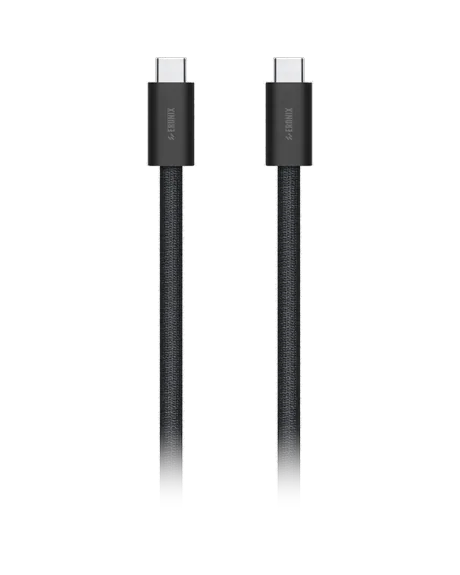
For the pouch, the Everyday Cable is USB-C to USB-C at 1 m, braided, with aluminium shells and a leather tie that keeps it neatly coiled beside the buds.

Step by step
- Wipe the bud and case contacts with a dry cotton bud.
- Seat each bud firmly and close the lid.
- Charge the case over USB-C, or on a Qi pad if supported.
- Keep the case away from heat while charging.
- Reset through the app if a bud still will not charge.
Questions people ask
Why is only one of my Galaxy Buds charging?
Usually dirty contacts or a bud not seated fully. Wipe the metal points on the bud and inside the case with a dry cotton bud, check the ear tip is not lifting the bud, and close the lid firmly. If it still fails, reset the buds through the app.
Can Galaxy Buds charge wirelessly?
Some do. The original Galaxy Buds case charged wirelessly by magnetic induction, but not every later model supports it, and Samsung's Buds3 FE announcement does not list wireless charging. Check your exact model's specification before buying a pad; a USB-C cable is the dependable route.
How long do Galaxy Buds3 FE last on a charge?
Samsung quotes up to 6 hours of music with ANC on and 8.5 hours with ANC off per charge, and up to 24 or 30 hours respectively with the case. Talk time is up to 4 hours on the buds. Figures come from Samsung's internal testing.
What charger should I use for Galaxy Buds?
Any reliable USB-C charger and cable. The case has a small battery, about 515 mAh typical on the Buds3 FE, so it needs very little power. Avoid unbranded adapters with vague labels.
Can I charge Galaxy Buds from my phone?
Some Samsung Galaxy phones offer reverse wireless charging, and a wireless-capable Buds case placed on the phone's back can top up from it. It is slower and drains the phone, so treat it as a backup, not your daily method.
Sources
- Samsung introduces Galaxy Buds3 FE, Samsung Newsroom US · accessed 22 Nov 2026
- Samsung Galaxy Buds, Wikipedia · accessed 22 Nov 2026
- BU-808: How to prolong lithium-based batteries, Battery University · accessed 22 Nov 2026
- IP code, Wikipedia (IEC 60529 levels) · accessed 22 Nov 2026
Battery Management
Capacity is chemistry; longevity is software.
Read →Explainer · 4 min readHow to charge earbuds that won't charge
Before you book a repair, try these steps in this order. Most cases come back to life
Read →Buying guide · 5 min readWhich charger does your USB-C mirrorless or DSLR camera need?
The camera box may hold a 7.5 W brick. The camera itself can often take much more.
Read →Buying guide · 4 min readWhich charger does the iPhone 18 Pro Max need?
The biggest iPhone battery yet, filled to half in the time it takes to drink a chai.
Read →Explainer · 4 min readHow long should earbud batteries last?
Two numbers matter: hours per charge today, and how many charges before they shrink.
Read →Explainer · 4 min readCaring for earbud batteries
You cannot swap an earbud battery. You can change how quickly it wears.
Read →