Journal · Explainer · 5 min read
Why phones get warm while charging
A little warmth is physics. Knowing where it comes from tells you when to worry
A test reported by TechSpot found that charging a Pixel 4 on a flat wireless pad used about 47 per cent more energy than charging it with a cable. That extra energy did not vanish. Most of it left the phone as heat. So where does the warmth you feel through the glass really come from?
Short answerNo charging process is perfectly efficient. Some energy turns into heat inside the battery, in the phone's power management chip and, on a wireless pad, in the coils. Fast charging and wireless charging make more of it. Mild warmth is normal. A phone too hot to hold comfortably is a signal to stop and cool it.
Where the heat comes from, measured
Wireless loses the most. Battery University puts inductive transfer at about 75 to 80 per cent efficient for small systems. In the test TechSpot reported, originally run by Eric Ravenscraft for OneZero, a dead Pixel 4 took about 14.26 Wh to fill by cable, against 21.01 Wh on a flat pad and 19.8 Wh on Google's stand. Misalignment made it worse.
The adapter also runs warm, but that heat stays outside the phone. Battery University notes that wired adapters must reach at least 85 per cent efficiency under the California Energy Commission's Level V rule, and 87 per cent under the Energy Star equivalent.
The battery has limits. Battery University gives the accepted charging range for lithium-ion as 0 to 45 °C, advises fast charging only between 5 and 45 °C, and says 10 to 30 °C gives the best results. It adds that many chargers will not charge at all above 50 °C.
Apple's guidance sets the room, not the battery: iPhones are designed for ambient temperatures of 0 to 35 °C. Above that, Apple says, charging slows or stops, including wireless charging, and the display may dim. Apple also lists times when warmth is expected: during setup, restoring from a backup, major software updates, wireless charging, gaming and camera use.
| Limit | Range | Source |
|---|---|---|
| Accepted charging range, lithium-ion | 0 to 45 °C | Battery University |
| Fast charging | 5 to 45 °C | Battery University |
| Best results | 10 to 30 °C | Battery University |
| iPhone ambient operating range | 0 to 35 °C | Apple |
| Ideal comfort zone, Apple devices | 16 to 22 °C | Apple |
Source: Battery University BU-410; Apple Support and Apple Batteries page, accessed 22 Nov 2026
Energy (Wh)
Source: TechSpot, reporting Eric Ravenscraft's test for OneZero, accessed 22 Nov 2026
How charging turns into heat
Every battery has a small internal resistance. Push current through it and some energy becomes heat, just as a wire gets warm when it carries a load. The heat rises with the square of the current, so doubling the current roughly quadruples this loss. That is why the first, fastest minutes of a fast charge feel the warmest.
Think of filling a water bottle through a narrow funnel. Pour gently and it flows cleanly. Pour hard and water splashes over the edges. The splash is the lost energy, and in a phone it lands as heat.
The phone's power chip adds a second source. It converts the incoming voltage down to what the battery needs, and that conversion is never perfect. Modern fast-charging systems move part of this work into the adapter by asking for exactly the voltage the battery wants, which keeps the phone cooler.
Wireless adds a third. Energy must jump an air gap between two coils. A slight offset, a thick case or a coin in the way weakens the link and turns more of it into heat in both the pad and the phone.
Warm or too hot: how to tell
Normal: the back feels warm, like a cup of tea that has cooled for a few minutes, and the warmth fades within minutes of the charge slowing or ending.
Too hot: the phone is uncomfortable to hold, the screen dims, or iPhone shows Charging On Hold. Unplug, remove the case, and move it somewhere cooler.
Stop and seek service: the phone swells, smells, hisses, or gets hot while switched off. Do not keep charging it.
An Indian summer adds one more check
Room temperature matters as much as the charger. Apple gives 16 to 22 °C as the ideal comfort zone for its devices and warns that ambient temperatures above 35 °C can permanently reduce battery capacity. It adds that software may limit charging above 80 per cent when the battery is too warm.
On a hot afternoon, charge away from windows and car dashboards, off the bed, and preferably in a room with a fan or air conditioning. If the phone stops at 80 per cent on hot days only, heat is the likely reason.
What to check before you buy
Choose an adapter that supports your phone's own fast-charging standard, such as USB PD or PPS. A matched adapter lets the phone draw what it needs without wasting energy as heat inside the phone.
For wireless, prefer magnetic alignment. A pad that snaps the coil into place avoids the misalignment losses the TechSpot test describes.
Ask whether the charger lowers power when warm. Good chargers and phones both throttle with temperature; that is a feature, not a fault.
Check the case. Thick or leather cases trap heat on a wireless pad. A case made for magnetic charging keeps the coil spacing correct.
Myth corner
Myth: a warm phone means the charger is fake or faulty. Not on its own. Apple lists wireless charging, updates and heavy apps as normal causes of warmth. A fault looks different: excessive heat, a burning smell, sparks or damage to the cable or plug.
The right one for you
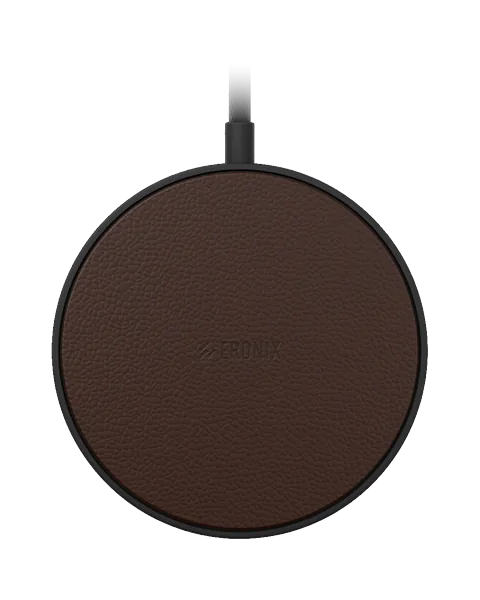
Misalignment is where wireless charging loses the most, and magnetic alignment keeps the coils in line. The Magnetic Charger snaps onto iPhone 12 and later and charges at up to 25 W on iPhone 17 and later, through an aluminium ring on a 1.5 m braided cable.
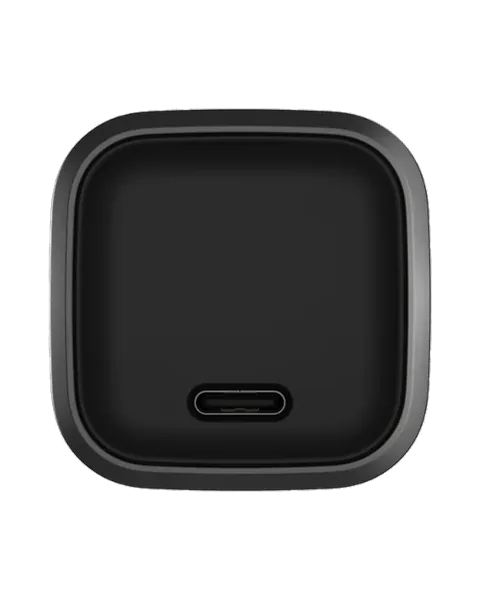
It comes without an adapter, and the Fermi30 is the match: 30 W from one USB-C port, with 15 V at 2 A and over-temperature protection built in.
Step by step
- Take the phone out of a thick case before charging.
- Charge away from direct sun, pillows and car dashboards.
- Use an adapter that supports your phone's fast-charging standard.
- On a wireless pad, centre the phone or use magnetic alignment.
- If the phone is too hot to hold, unplug it and let it cool.
Questions people ask
Is it normal for my phone to get warm while fast charging?
Yes. Fast charging pushes more current, and battery resistance turns some of it into heat. Battery University advises fast charging only between 5 and 45 °C, and phones slow down automatically as they warm. If the phone becomes too hot to hold, unplug it and let it cool.
Why does my phone get hotter on a wireless charger?
Wireless charging is less efficient than a cable. Battery University puts small inductive systems at about 75 to 80 per cent efficient, and a test reported by TechSpot found a flat pad used about 47 per cent more energy than a cable. Misalignment and thick cases add further losses.
Should I remove the case while charging?
If the phone runs hot, yes. Cases slow heat loss, and thick ones also increase the gap on a wireless pad. Apple notes that iPhone slows or stops charging, wireless included, when it gets too hot. On a hot summer day, taking the case off is one of the quickest ways to keep charging speed up.
Does using the phone while charging make it hotter?
Yes. The phone generates heat from the processor and screen as well as from charging. Games, navigation and video calls add the most. Apple lists games and camera use among normal causes of warmth. If you must use the phone, a lower brightness and pausing heavy apps help.
Sources
- Apple Support: If your iPhone or iPad gets too hot or too cold · accessed 22 Nov 2026
- Battery University: BU-410 Charging at high and low temperatures · accessed 22 Nov 2026
- Battery University: BU-412 Charging without wires · accessed 22 Nov 2026
- TechSpot: Wireless charging has an efficiency issue · accessed 22 Nov 2026
- Google Pixel Help: Charge your Pixel phone · accessed 22 Nov 2026
- Apple: Batteries, maximising performance · accessed 22 Nov 2026
Thermal Management
The quiet discipline inside every serious power product.
Read →Explainer · 4 min readIs it bad to use the phone while charging?
Scrolling on charge is fine. Gaming on charge in a hot car is the habit to break.
Read →Explainer · 4 min readQi2 and Qi2.2: the wireless standards in plain words
Same magnets, same snap. The difference is ten watts and a stricter test.
Read →Explainer · 4 min readWhy wireless charging is slower than wired
Power has to jump a gap of air and glass. Some of it never lands.
Read →Explainer · 5 min readDoes a case slow down wireless charging?
The case is rarely the problem. What you tuck inside it often is.
Read →Explainer · 4 min readCan you charge a phone with a wet port?
Monsoon, a splash, a liquid warning on screen. Here is why waiting beats the override.
Read →